
Before a number can send its first text, some countries ask for a one-time registration. Which one depends on where your number is, and Allo files the paperwork either way. You answer a few questions.
What your number needs
| Your number | Registration | Fee | Approval |
|---|---|---|---|
| United States | 10DLC | $24 once, whole company | 3 to 7 business days |
| Canada | 10DLC, only to text US numbers | $24 once, whole company | 3 to 7 business days |
| France | Sender name, known as a Sender ID, only for automated messages | None | 1 to 5 business days |
| United Kingdom | Nothing | None | None |
| Belgium | Nothing | None | None |
Register
Carriers require a 10DLC registration before you can text a US number. Without it, every outbound message is blocked at the network, so start early.
Texting only Canadian numbers? No registration is needed. 10DLC applies the moment you text a US number.
Go to Settings > Register for SMS (10DLC)
Open Settings > Register for SMS (10DLC) in your Allo dashboard.
Verify your business
Your legal details, contact and address. A one-time $24 for your entire company, covering every seat and every number.
Explain your messaging use case
What you send, and how people agreed to hear from you. You submit it together with your business details, and one registration covers up to 50 phone numbers.
Allo asks how people agree to get your texts. When in doubt, select Verbal Opt-In: it only needs your phone number published on your website. Before you submit, go through the SMS registration checklist.
Approval takes 3 to 7 business days. Once it lands, the SMS composer appears in your inbox and automatic replies are unlocked. Allo emails you when texting is on, and if anything is rejected.
I'm not based in the US. Do I still need to register?
Yes. 10DLC is required for any US number, wherever your business is.
I'm porting a number that already has 10DLC. Do I re-register?
Yes. 10DLC registrations don't transfer between providers, so you verify your business again with Allo and describe your messaging use case again.
My registration was rejected. What now?
The rejection email says which step failed. A failed business verification usually means your details do not match your official records. A rejected use case usually comes from an opt-in method you cannot show. The SMS registration checklist covers both. Fix what it points to, then submit again from Settings > Register for SMS (10DLC).
Only one of my numbers can text
You registered as a Sole Proprietor, and that carrier tier allows one number per registration. Contact support to re-submit as a Private Company, which supports several numbers.
Texts you type yourself work straight away, with nothing to register. Anything Allo sends on your behalf needs a registered sender name, what French operators call an alphanumeric Sender ID. It is the name your customer sees at the top of the thread, instead of a number they do not recognise.
The walkthrough is narrated in French, with English subtitles.
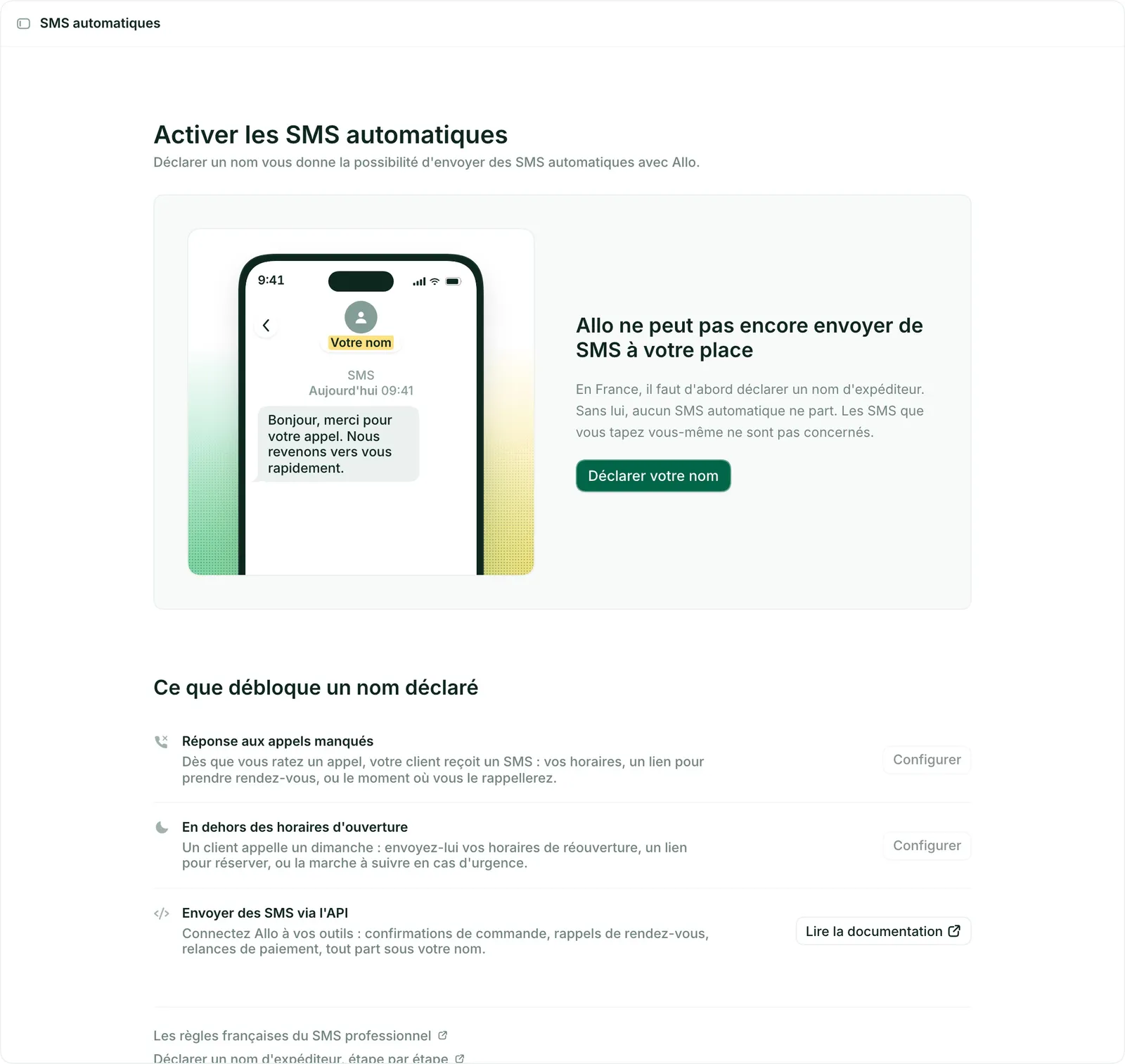
Select your French line
The line selector is at the bottom left of the app. It is what decides which settings you are shown.
Go to Settings > Automatic texts
Open Settings > Automatic texts in your Allo dashboard, on desktop or on the web. The entry sits in the Calls and texts group.
Register your name
Letters and digits, no spaces or accents, 11 characters maximum. Add a sample message: we check that the name and the message match your business. For example "MOBILEFIRST", with "Hi, thanks for your call. We'll get back to you shortly."
The screen shows the result on a phone as you type.
Wait for approval
It takes 1 to 5 business days. You get an email as soon as the name is live.
There is no setup fee.
What the name unlocks. Three things, set up afterwards number by number:
- The missed-call reply. The moment you miss a call, your customer gets a text: your opening hours, a booking link, or when you will call back.
- The out-of-hours message. A customer calls on a Sunday: send them your reopening hours, a booking link, or what to do in an emergency.
- Texts sent through the API. Order confirmations, appointment reminders, payment follow-ups, all going out under your name. See Send an SMS in France.
The first two are Send SMS steps in each line's call flow. From the Automatic texts page, the button beside each row takes you straight there.
What names are not allowed?
Generic terms like "Alert", "Bank" or "Delivery", and names impersonating public institutions or major brands, are blocked by AF2M. Your name has to represent your actual business.
Can recipients reply?
No. A sender name is one-way. For a two-way conversation, write from the inbox, or get a short code, covered in SMS in France.
Do I need it to text by hand?
No. Typing a text yourself works without any registration, and goes out from your number. The sender name covers what Allo sends for you: automatic replies, call flows, the API.
Nothing to register. Texting works as soon as your number is live, at the same rate whether you type the message or Allo sends it.
MMS is not available on these numbers.
Next
What a text costs, and how segments are counted
Texts that won't send, arrive, or deliver
What carriers check before they approve your number
ARCEP, CNIL and AF2M rules, and short codes
What texting does on Allo