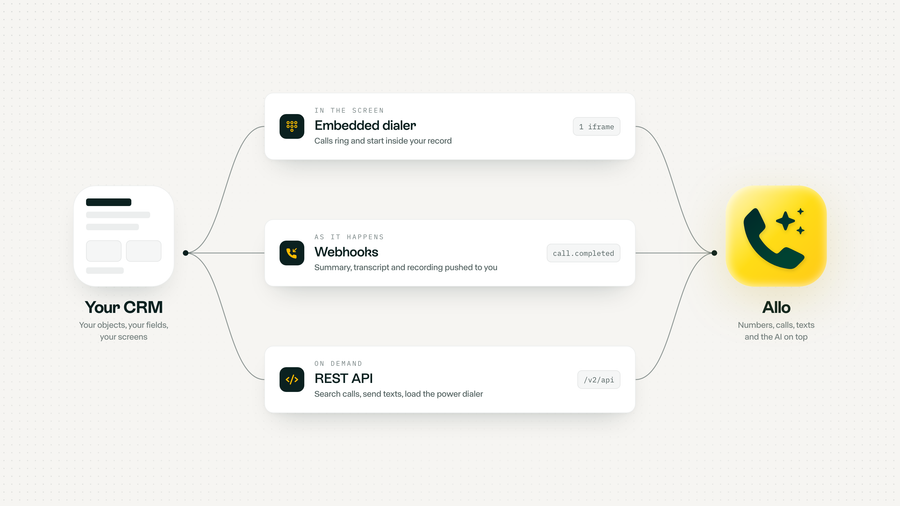
Every few days a partner asks us the same question with a different CRM in it. A property manager running tenants out of a home-grown back office. A recruiting agency on a niche ATS. An insurance broker whose "CRM" is an Airtable base with 40 fields nobody else would understand. None of them want to leave that tool. They just want to make phone calls.
That used to mean one of two bad options: keep the phone system in another tab and copy notes across by hand, or build telephony yourself, tough, ah?. But don't worry, this article is about a third option, and about exactly how it works.
Why custom CRMs are the hardest place to put a phone
Native integrations are built for the mass market. They know what a HubSpot contact or a Salesforce lead looks like, and they write calls to it. Your CRM does not have leads. It has tenants, job sites, loan files, candidates, policies. The call belongs on one of those, next to the fields that make your business yours.
So the choice has always been between a phone system that does not know your data, and a phone system you have to build. Building one is a bigger project than it looks from the outside.
| What a phone needs | Build it yourself | Allo API + embedded dialer |
|---|---|---|
| Business numbers | Pick a carrier, buy numbers country by country | Local numbers in 120+ countries, ported for free |
| Texting compliance | 10DLC and Sender ID registrations on you | Guided registration, with the Allo team |
| Calling from the browser | WebRTC, microphones, audio quality | One iframe |
| Recording and transcripts | Storage, speech to text, consent rules | Every call, with recording compliance settings |
| AI on the call | Your own models, prompts and pipelines | Summaries, tags and an AI receptionist, built in |
| Getting data into the CRM | Your code | Your code, fed by signed webhooks |
Three ways in: the dialer, webhooks and the API
Every Allo integration with a custom CRM is built from the same three pieces. Each one answers a different question.
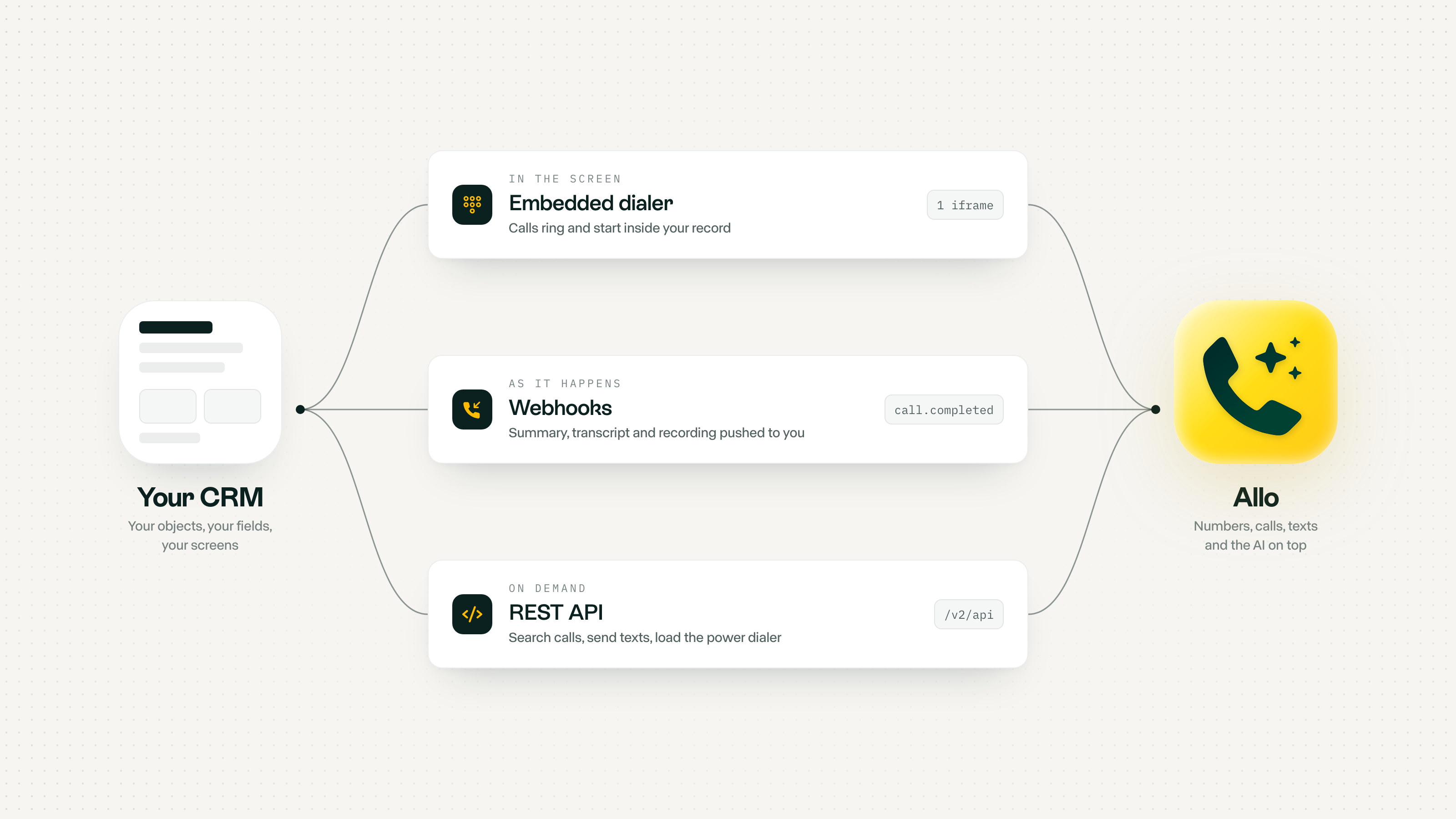
| Layer | Answers | Lives | Typical use |
|---|---|---|---|
| Embedded dialer | How does my team call from here? | In your page, as an iframe | Click to call, ringing inside the record, screen pop |
| Webhooks | What just happened? | On your server | Write the call, summary and recording to the right record |
| REST API | Can my CRM make Allo do something? | On your server | Send a text, load a calling list, search past calls |
The embedded dialer, our newest piece
The embedded dialer puts the full Allo dialer inside your app with a single iframe. Your team signs in to Allo inside it once, and from then on calls start and ring right where they work. It talks to your page in both directions through postMessage.
| Event | Direction | What your CRM can do with it |
|---|---|---|
| dial | Your app → dialer | Open the dialer with a number ready to call |
| ready | Dialer → your app | Enable call buttons only once the dialer is loaded |
| login | Dialer → your app | Know which teammate is signed in |
| incoming_call | Dialer → your app | Screen pop: open the caller's record before anyone says hello |
| outgoing_call | Dialer → your app | Mark the record as "on a call" for the rest of the team |
| call_answered | Dialer → your app | Start a talk track, a timer or a checklist |
| call_ended | Dialer → your app | Ask the rep for an outcome while it is fresh |

Tip
One step before it works
Embedding is switched on per domain. Email [email protected] with the domains your CRM runs on, then drop in the iframe.
Webhooks: the part that makes it AI native
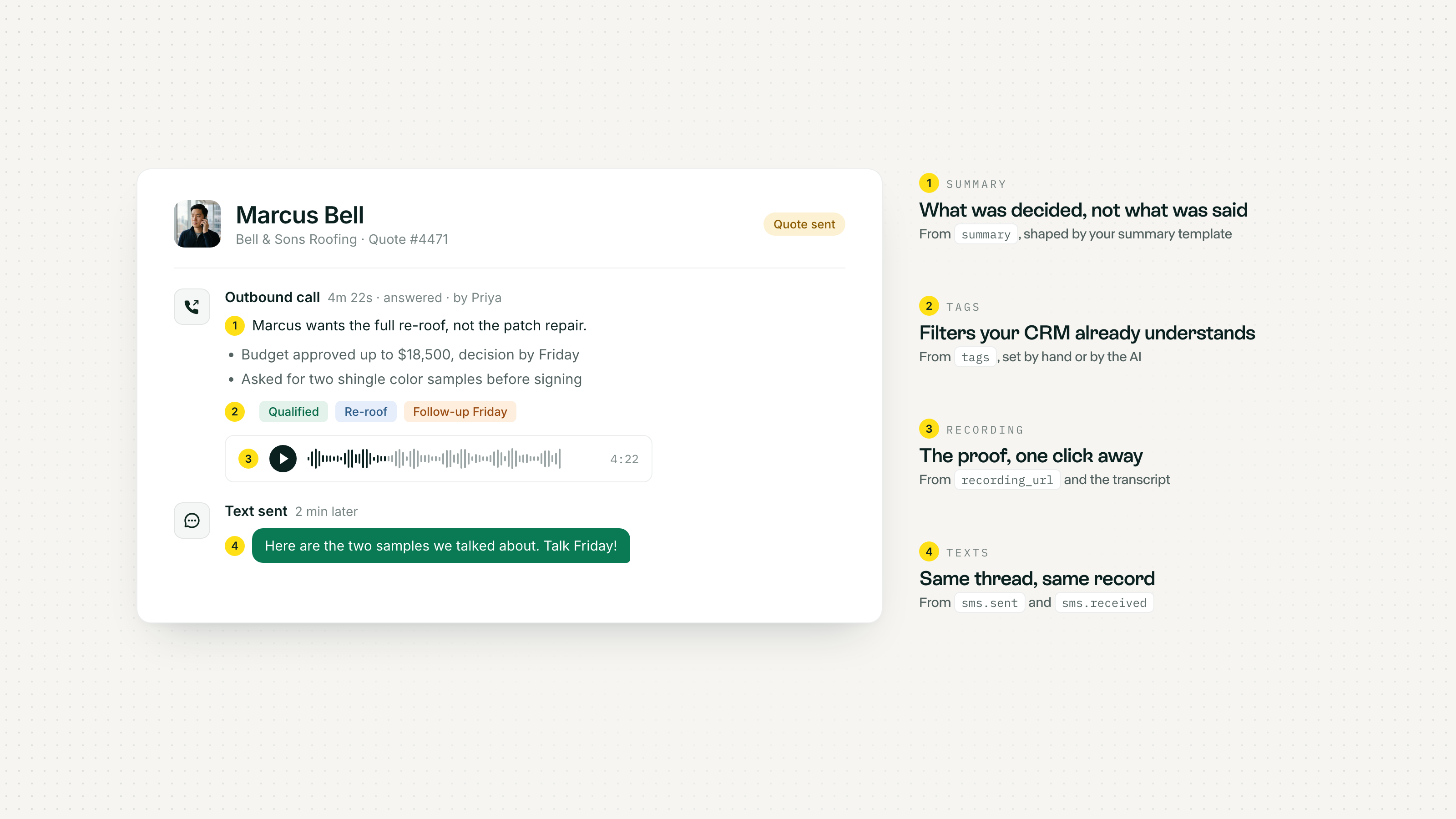
The dialer tells your page what is happening. Webhooks tell your server what happened, with everything the AI produced. The one that matters most is call.completed, sent about 30 seconds after the call hangs up, with the summary, the full transcript, the recording URL, the tags, the result and any fields the AI receptionist collected.
There are 22 event types in total, from call.received (which already carries the matching person, company and deals) to sms.received, tag.added and thread comments. Every delivery is signed, retried up to 8 times over about 27.5 hours, and can be replayed after an outage.
The API: when your CRM gives the orders
The REST API is how your CRM makes Allo do things. The endpoints custom CRMs use the most:
- Load the power dialer from any list in your CRM, for yourself or for a teammate, with names and companies attached.
- Send a text from the team's Allo number, so it lands in the same thread as the calls.
- Search every call and text by keyword across transcripts, summaries and messages.
- Read and add tags so your CRM filters and Allo filters stay the same.
- Write summary templates so the AI summary follows your fields, not a generic format.
- Configure the AI receptionist per line: prompt, knowledge, business hours, transfer rules.
One call, end to end
Here is what a single outbound call looks like when both channels are wired. The browser events drive the screen while the call is live. The webhooks carry the result to your database once it is over.
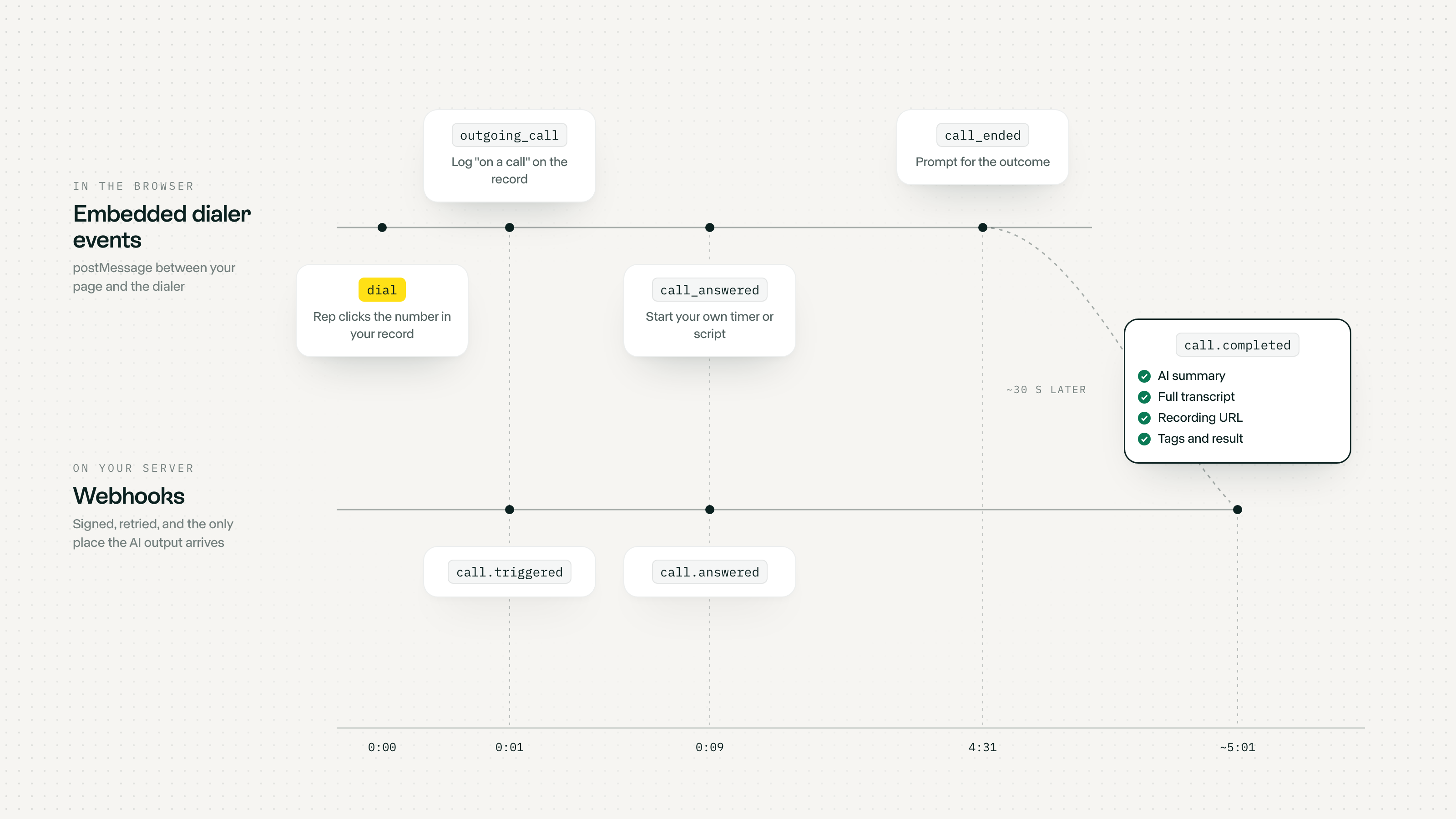
- The rep clicks a number in your CRM Your page sends dial with the number. The embedded dialer opens with the call ready, on the rep's own Allo line.
- The call starts The dialer fires outgoing_call to your page and Allo fires call.triggered to your server. Use whichever is closer to the thing you want to update.
- The prospect picks up call_answered in the browser. Show the talk track for this deal stage, or start your own timer.
- The rep hangs up call_ended in the browser. Ask for the outcome now, while the rep still remembers it.
- About 30 seconds later call.completed reaches your server with the summary, transcript, recording and tags. Your handler writes them to the record, in your schema.
The code: the embed
<iframe id="allo" src="https://web.withallo.com?variant=dialer" allow="microphone; autoplay" style="width: 376px; height: 640px; border: 0;" ></iframe> <script> const ALLO = "https://web.withallo.com"; const dialer = document.getElementById("allo").contentWindow; // 1. Every phone number in your CRM becomes a call button document.querySelectorAll("[data-phone]").forEach((el) => { el.addEventListener("click", () => { dialer.postMessage( { source: "allo-host", type: "dial", payload: { phone_number: el.dataset.phone } }, ALLO ); }); }); // 2. Your CRM reacts to what happens on the call window.addEventListener("message", ({ origin, data }) => { if (origin !== ALLO || data?.source !== "allo-dialer") return; switch (data.type) { case "incoming_call": openCallerRecord(data.payload); break; // screen pop case "outgoing_call": markRecord("on a call"); break; case "call_ended": askForOutcome(); break; } }); </script>
The code: writing the call into your CRM
// POST /webhooks/allo (subscribed to call.completed and sms.received) app.post("/webhooks/allo", express.raw({ type: "application/json" }), async (req, res) => { // 1. Verify the webhook-signature header first (see the Allo docs) // 2. Deduplicate on the webhook-id header: delivery is at least once res.sendStatus(200); // answer within 20 seconds, work in the background const { topic, data } = JSON.parse(req.body); if (topic !== "call.completed") return; const number = data.type === "INBOUND" ? data.from_number : data.to; const record = await crm.findByPhone(number); // your lookup, your schema await crm.addActivity(record.id, { kind: "call", direction: data.type, // INBOUND or OUTBOUND outcome: data.result, // ANSWERED, VOICEMAIL, TRANSFERRED_AI... duration: data.length, // "4m 22s" summary: data.summary, // the AI summary tags: data.tags, recording: data.recording_url, transcript: data.concatenated_transcript, rep: data.user_email, collected: data.data_collected, // fields the AI receptionist gathered }); });
The code: a "call this list" button
Any filtered view in your CRM can become a calling session. One request to append numbers to a rep's power dialer queue, and they dial back to back from the embedded dialer. curl -X POST https://api.withallo.com/v2/api/dialing-queues/current/numbers \ -H "Authorization: Api-Key YOUR_API_KEY" \ -H "Content-Type: application/json" \ -d '{ "email": "[email protected]", "numbers": [ { "number": "+14155550142", "name": "Dana", "last_name": "Whitfield", "company": "Harborline" }, { "number": "+14155550187", "name": "Marcus", "last_name": "Bell", "company": "Bell & Sons Roofing" } ] }'
What lands on the record
This is the part your team will actually feel. The rep does not type notes. The record fills itself, and it fills itself with what your business needs, because you decide where each field goes.
1iframe to embed the dialer
~30s from hang-up to summary on your server
22webhook event types
8automatic retries per delivery
The top 10 CRMs, and where the custom part starts
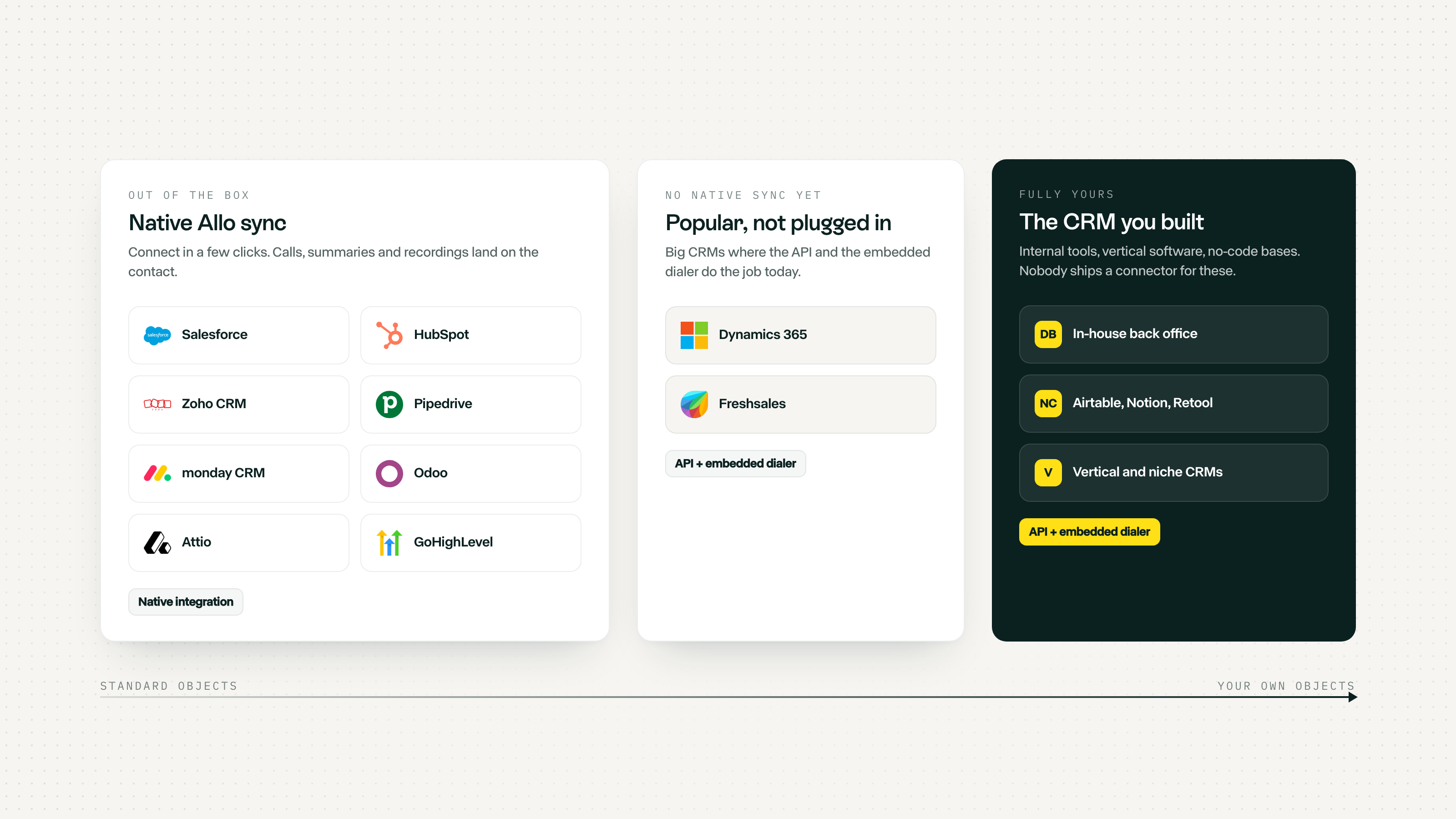
Most teams are not on a fully custom CRM. They are on a big one they bent into shape with custom objects, extra apps and an internal tool or two on the side. Here is how Allo meets the ten most used CRMs, and when to reach past the native sync.
| CRM | Native Allo sync | Reach for the API + embedded dialer when... |
|---|---|---|
| Salesforce | Yes | Calls should land on a custom object, or reps live in a Lightning app you built |
| HubSpot | Yes | You run a custom object or an internal tool beside the CRM |
| Microsoft Dynamics 365 | Not yet | Always: embed the dialer on the form, write calls with webhooks |
| Zoho CRM | Yes | Your team works in a custom Zoho module or a Creator app |
| Pipedrive | Yes (Business plan) | You want calling lists built from filters Pipedrive does not have |
| monday CRM | Yes | The call belongs on a board that is not your contacts board |
| Freshsales | Not yet | Always: the API and the embedded dialer cover it today |
| Odoo | Yes | You extended Odoo with your own module and views |
| Attio | Yes | Calls should drive custom lists or workflows beyond the synced record |
| GoHighLevel | Yes | You are an agency and each sub-account runs its own setup |
Less common CRMs Allo already syncs with natively
Before you write a line of code, check this list. Plenty of the niche CRMs partners ask about are already native: connect them in a few clicks and calls log themselves, with the AI summary and the recording. See the full list in the integrations overview.
| CRM | Built for | What Allo syncs natively |
|---|---|---|
| folk | Relationship-driven teams, agencies, founders | Call recordings and AI summaries on the contact |
| Streak | Teams running their pipeline inside Gmail | Call recordings and AI summaries |
| Apollo | Outbound prospecting teams | Calls, texts and voicemails, with contacts, companies and deals kept aligned (Business plan) |
| Sellsy | European SMBs selling and invoicing in one tool | Contacts, plus calls logged with summaries |
| Brevo | Marketing-led teams on email and SMS campaigns | Call recordings and AI summaries |
| noCRM.io | Lead-focused sales teams | Call recordings and summaries on the lead |
| Pipeline CRM | Small sales teams managing deals | Call recordings and AI summaries |
| Follow Up Boss | Real estate agents and teams | Call recordings and summaries on the person |
| JobNimbus | Roofers and exterior contractors | Call recordings and summaries on the contact |
| Jobber | Home service businesses | Call recordings and summaries on the client |
| eWay-CRM | Teams running their CRM inside Outlook | Contacts into Allo, every call and SMS logged as a journal on the contact and its company |
The CRMs teams build themselves
Then there is the long tail, and it is where most of the partner questions come from. Four recipes we see again and again:
| Your CRM | Dialer goes in | Webhooks write to | The API adds |
|---|---|---|---|
| An in-house back office (Rails, Django, Laravel, Node) | The record page, as a side panel | Your own database, via one endpoint | Texts and calling lists from any admin view |
| Airtable or Notion | An interface page or a small web app on top | The base, through an automation or a tiny server | A "call these rows" button |
| Retool or another internal tool builder | An iframe component next to the table | Your database, like the rest of the tool | Buttons that queue, text or tag |
| Vertical software (property, recruiting, insurance, clinics) | A custom tab or panel, where the vendor allows it | The vendor's API or your warehouse | The workflows the vendor never built |

Note
Native sync is right when
Your CRM is on the integrations list Calls belong on standard contacts and deals You want it running today with no code
Note
API + embedded dialer is right when
Your CRM is home-grown, vertical or not listed Calls belong on your own objects You want the phone inside your screen, not next to it
Tip
Building a CRM for other people?
If you sell vertical software or a CRM, the Allo reseller program is built for you: embed Allo in your product, bundle it with your offer and bill it at your own price.
Where to start this week
- Email [email protected] with the domains your CRM runs on, to switch on the embedded dialer.
- Paste the iframe on your record page and wire the dial event to your phone fields.
- Create an API key in Allo settings and subscribe a webhook to call.completed.
- Map the summary, tags and recording to your own fields. That mapping is the whole integration.
- Add one button that loads a filtered list into the power dialer. Your reps will ask for more.
FAQ
Can I use Allo with a CRM that has no native integration?
Yes. The embedded dialer works in any web app you control, and webhooks plus the REST API let you write calls, summaries and recordings into any database. That is the whole point of this setup.
What is the Allo embedded dialer?
The full Allo dialer inside your own app, loaded with one iframe. Your app can send it a number to call and receives events for ready, login, outgoing_call, incoming_call, call_answered and call_ended. See the embedded dialer docs.
Do my users need an Allo account?
Yes. Each teammate signs in to Allo inside the dialer the first time, and calls go out on their own Allo line, with recording, transcripts and AI summaries.
How do call summaries get into my CRM?
Through the call.completed webhook, sent about 30 seconds after the call ends. It carries the AI summary, full transcript, recording URL, tags, result and the fields the AI receptionist collected.
Can my CRM start a calling session?
Yes. The API can append numbers, with names and companies, to your own power dialer queue or a teammate's. The rep then dials the list back to back.
Is the AI receptionist available with a custom CRM?
Yes. It answers on your Allo line whatever CRM you use, and what it collects comes through the same webhooks, so a missed call can still end up as a qualified record in your system.
Which CRM are you using?
Seriously, tell us. Every niche CRM we hear about makes the next integration easier, and the most requested ones become native. Send the name to [email protected], or book a demo and we will sketch your setup with you, on a call, obviously.