This Reddit comment sums it all:
“I use virtual phone numbers quite often for both personal and professional reasons. Personally, they’re great for keeping my main number private and avoiding spam. Professionally, they help me manage calls from different regions and keep work separate from personal life. I prefer them over traditional landlines or mobiles because of their flexibility, ease of management, and cost-effectiveness.”
Yes, virtual numbers are great, both for personal and professional usage.
In this article, we'll explain how to get one, which provider to choose, and key elements to keep in mind when using a virtual phone number.
How Does a Virtual Phone Number Work?
Before sharing how to set up your virtual phone number, let’s look at how they work.
A virtual phone number looks and acts exactly like a regular phone number to anyone who calls it, but with one major difference: it isn't tied to a physical SIM card, copper phone line, or a specific device. Instead, it lives entirely in the cloud.
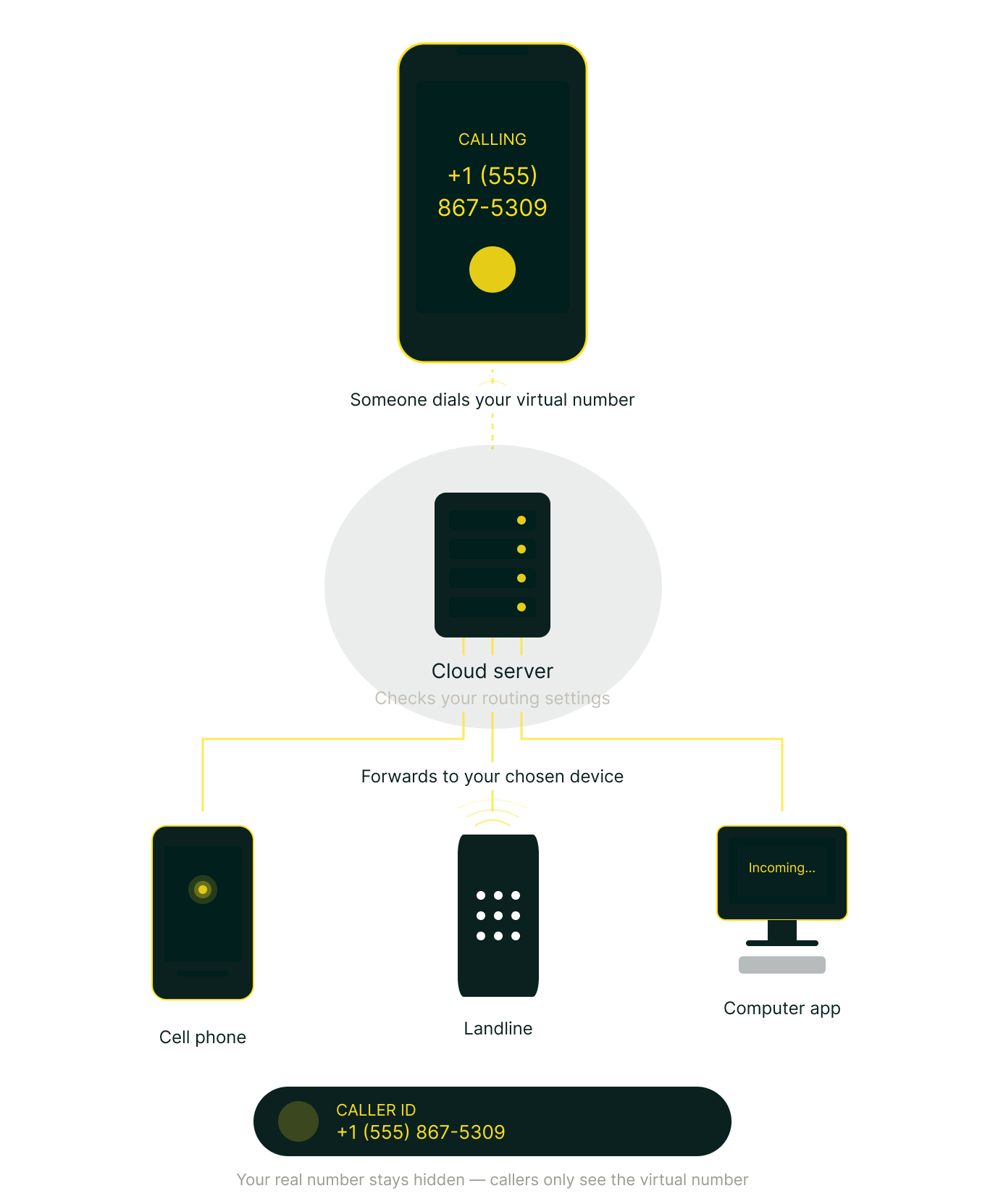
When someone dials your virtual phone number, the call goes to your virtual phone service provider’s servers rather than a traditional cell tower or local telephone exchange.
The server instantly checks your settings to see where you want the call to go. It then forwards the call to the destination you've chosen. This could be your personal cell phone, a landline, or an app on your computer.
You can answer the call on whatever device it was routed to. If you want to make an outgoing call, you use an app or web interface provided by the service. The person receiving your call will see your virtual number on their caller ID, keeping your actual device number hidden.
How to Get a Virtual Phone Number
Getting an Internet phone number is actually quite simple.
Here are the main steps:
- Choose a provider. Recommended options include Allo, Google Voice, Quo, Nextiva, RingCentral among others. Pick one based on your needs.
- Sign up. Create an account on the provider's website or app.
- Select your number. Most services let you pick a number with a specific area code, or even a toll-free or international number.
- Choose a plan. Free options exist (like Google Voice for personal usage), but paid plans typically start at a few dollars per month and offer more features like call recording, voicemail transcription, or multiple lines.
- Start using it. Once set up, you can make and receive calls and texts through the provider's app or web interface, and often forward calls to your real phone.
What Are The Best Virtual Number Providers In The US?
Getting a virtual phone number shouldn't feel like signing a mortgage. Yet with dozens of providers, confusing add-ons, and contracts designed to keep you locked in, picking the right one can eat up an entire afternoon.
We compared five of the most popular virtual phone number providers in the US — from budget picks to enterprise solutions — so you don't have to. Here's what we found.
Quick Comparison
| Provider | Best for | G2 Rating | Base price for a virtual number |
|---|---|---|---|
| Allo | Small teams that want AI built in | 4.7/5 | $18/user/month (billed yearly) |
| Google Voice | Solopreneurs on a tight budget | 4.1/5 | $10/user/month (+ Google Workspace subscription) |
| Nextiva | Large teams and support centers | 4.5/5 | $15/user/month (billed yearly) |
| Quo | Small teams that need shared inboxes | 4.7/5 | $15/user/month (billed yearly) |
| RingCentral | Enterprises with complex needs | 4.2/5 | $20/user/month (billed yearly) |
Allo, best for small sales teams
What is Allo?
Allo launched in 2024 with a clear mission: build an AI phone system from scratch, specifically for small sales teams. Instead of bolting AI onto a legacy system, Allo was designed AI-first and mobile-first from day one. It's quickly gained traction, earning the #1 spot in G2's Best New Software 2026 ranking.
Why Allo is a good choice?
Where it shines:
Allo stands out for teams that live on the phone and need their CRM updated without the busywork. Every call is automatically recorded, transcribed, and synced to your CRM (HubSpot, Salesforce, Pipedrive, Attio, and more). The AI receptionist handles calls when you can't, the live voicemail feature lets you listen in real time, and the AI assistant lets you search across your call history using natural language.
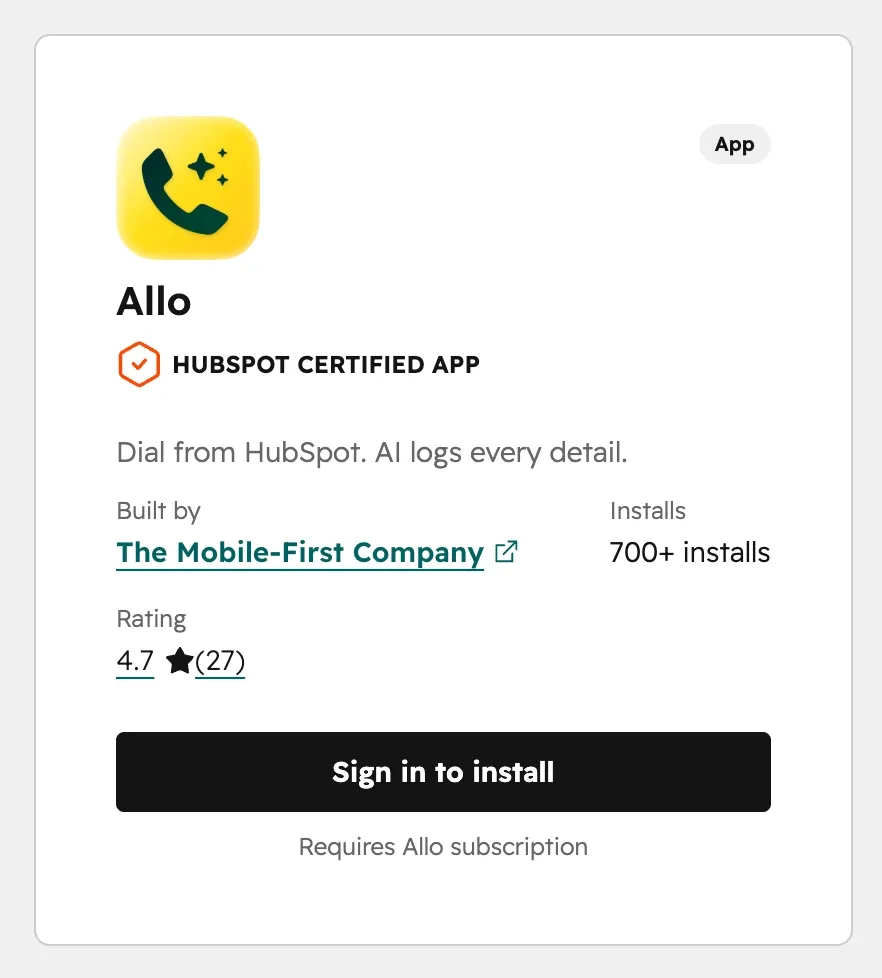
The integrations are worth highlighting: 18 native integrations plus Zapier and an API. The HubSpot integration alone has 200+ installs and a 4.7/5 rating on the HubSpot Marketplace.
On the billing side, there's no surprise here. One price, everything included. No add-ons, no seat minimums. You can cancel anytime from the app: no phone call, no questions asked.
Where it could improve:
Allo not the best fit for large enterprises who have complex multi-department workflows or need distinct user roles.. And if you need video conferencing or WhatsApp support built in, you'll need to look elsewhere for now.
Allo pricing
A virtual phone number is included in every Allo plan — no extra fees.
- Solo: $18/month for 1 user. Includes unlimited calls, an unlimited AI receptionist, AI summaries, IVR, integrations, and a local or toll-free number.
- Business: $45/month per user ($32 annually). Adds more integrations (Apollo.io, Claap, Shopify), MCP, a power dialer, and international calling.
Need an extra number? That's $5/month. There's a 7-day free trial to test everything before you commit.
Estimated monthly cost for a virtual number: $18/month (all-in, AI included).
Video demo of Allo
Google Voice, best for solopreneurs on a budget
What is Google Voice?
Google Voice has been around since 2009, making it one of the longest-running virtual number services in the US. It's incredibly popular among consumers because the personal version is free. For businesses, it's part of the Google Workspace ecosystem. Think of it as a no-frills phone system that does the basics well, but doesn't do much beyond that.
Why Google Voice is a good choice?
Where it shines:
If budget is your number one concern, Google Voice is hard to beat. Plans start at $10/month per user, and if you're already paying for Google Workspace, it slots in seamlessly. You get unlimited domestic calls in the US and Canada, unlimited texting, and voicemail transcription. The interface is clean and familiar if you already use Google products.
It's also dead simple: there's almost nothing to configure. For a solo founder who just needs a business number that isn't their personal cell, it works.
Where it could improve:
Google Voice has almost no AI features beyond spam blocking and voicemail transcription. There are zero CRM integrations — none. If you need your calls logged anywhere other than Google Workspace, you're out of luck. Customer support is essentially non-existent for the free tier, and even business users rely heavily on community forums. You also can't get numbers outside the US and Canada, and some US regions aren't covered either. Number porting has known limitations as well.
Google Voice pricing
A local phone number is included with every plan.
- Standalone Starter: $10/user/month (1 user max, US only).
- Workspace Starter: $10/user/month (up to 10 users).
- Standard: $20/user/month. Adds on-demand recording and call routing.
- Premier: $30/user/month. Adds automatic recording and advanced reporting via BigQuery.
Note: business plans require a Google Workspace subscription, which starts at $8.40/user/month.
Estimated monthly cost for a virtual number: $10/month (but with no AI, and no CRM integrations). Factor in the Google Workspace subscription ($8.40/month) if you don’t have one yet.
Video demo of Google Voice
Nextiva, best for large teams and support centers
What is Nextiva?
Founded in 2008 in Scottsdale, Arizona, Nextiva has grown into a full unified communications platform (UCaaS). Their pitch has always been about giving businesses of any size the communication tools of a Fortune 500 company. They handle voice, video, team chat, SMS, and even WhatsApp and Instagram messaging. They've also been building out AI features over the last couple of years, including an AI receptionist called XBert.
Why Nextiva is a good choice?
Where it shines:
Nextiva is a strong pick if you need more than just phone calls. The platform bundles voice, video meetings, team chat, and SMS into one interface, which means fewer tools to manage. Their customer support has a solid reputation — they even trademarked "Amazing Service" — and setup is generally straightforward.
For larger teams, the analytics and reporting capabilities are a real advantage. The AI features on higher-tier plans include real-time transcription, call summaries, and emotion scoring. If you run a contact center or a big support operation, Nextiva has tools built specifically for that.
Where it could improve:
The base plan is fairly stripped-down. You won't get CRM integrations, AI transcription, or advanced routing unless you upgrade to the $50/month Engage plan or higher. The HubSpot integration requires a Windows computer, which is a surprising limitation in 2026. SMS registration can take several weeks to complete. And Nextiva is US-focused — if you need international numbers, your options are limited to parts of Canada.
On the billing side, canceling requires a phone call or email before your service term ends. Some reviewers report friction during the process.
Nextiva pricing
One local or toll-free number is included.
- Core: $23/user/month. Phone calls, SMS, video meetings, call routing, team chat.
- Engage: $50/user/month. Advanced reporting, web chat, toll-free number.
- Power Suite CX: $75/user/month. AI transcription & summarization, intelligent routing, up to 100 agents.
Many features that competitors include by default, like CRM integrations and AI call summaries, are locked behind add-ons or higher-tier plans.
Estimated monthly cost for a virtual number: $23/month (base), but expect $50+/month if you need AI features and integrations.
Video demo of Nextiva
Quo, best for small teams that need collaboration tools
What is Quo?
Originally launched as OpenPhone in 2018 by Mahyar Raissi and Daryna Kulya, this YC-backed startup rebranded to Quo in 2025. The founders built it to solve a problem they experienced firsthand: business owners using personal numbers to run their companies. Quo focuses on voice and text, with a clean UI and built-in collaboration features like shared inboxes, threaded conversations, and internal team chat.
Why Quo is a good choice?
Where it shines:
Quo's interface is one of the cleanest in the space. The shared inbox is a standout — your whole team can see incoming calls and texts, leave internal notes, and tag each other. It feels more like a team messaging app than a traditional phone system.
Their support team gets consistently positive reviews, and setup is quick. On the AI side, Quo offers an AI answering service called Sona, plus call transcriptions and summaries. Pricing starts at $19/month, making it one of the more affordable options.
Where it could improve:
AI features come with caveats. Call summaries and transcripts are only available on the $33/month Business plan, and Sona (the AI answering service) includes just 10 free calls per month — after that, it's $0.75 per call, which adds up fast for busy teams.
There are also some restrictions that could catch you off guard: Quo doesn't allow cold calling and can suspend accounts if they suspect you're breaking this rule. And the spam filtering could use improvement — multiple users have flagged this as a gap.
CRM integrations (HubSpot, Salesforce) are locked behind the Business plan at $33/month. The HubSpot Marketplace rating sits at 3.3/5, which is noticeably lower than some competitors.
Quo pricing
A local number is included on all plans.
- Starter: $19/user/month. Local number, unlimited US/Canada calling and messaging, voicemail transcripts, 10 Sona AI calls.
- Business: $33/user/month. Adds AI summaries, group calling, transfers, analytics, CRM integrations.
- Scale: $47/user/month. Dedicated onboarding, priority support, inbound phone support.
Additional numbers and international calling are billed separately.
Estimated monthly cost for a virtual number: $19/month (base), but $33/month if you need AI and CRM integrations. AI receptionist costs can spike depending on volume.
Demo video of Quo
RingCentral, best for enterprises with complex needs
What is RingCentral?
RingCentral has been in the game since 1999 — making it one of the oldest players on this list. It's a massive platform with over 500 integrations, support for voice, video, SMS, WhatsApp, and Instagram. They've added AI features in recent years, including an AI assistant called AVA. If you're a large company with offices in multiple countries, RingCentral probably handles your use case. If you're a 5-person sales team, it might be overkill.
Why RingCentral is a good choice?
Where it shines:
The integration ecosystem is unmatched: 500+ native integrations, including Salesforce, HubSpot, Microsoft Teams, Pipedrive, and more. RingCentral offers phone numbers in 100+ countries, which is by far the widest international coverage on this list.
The platform is reliable and feature-rich: fax, video conferencing, webinars, physical phone support, and advanced AI capabilities like call recording with summaries, SMS translation, and an AI email draft generator. For enterprises that need everything under one roof, it checks a lot of boxes.
Where it could improve:
RingCentral's biggest weakness is the experience for small teams. The Trustpilot rating sits at 2.1/5 — and the reviews paint a consistent picture: billing surprises, difficulty reaching support, and contracts designed to lock you in.
Canceling is notoriously painful. You have to call or chat with support, provide your account phone number, answer a security question, and give the last 4 digits of your credit card. One Reddit user reported it took a full hour. You also need to give 30 days' notice before your service term ends.

The AI receptionist isn't included in any base plan — it starts at $59/month for 100 minutes as an add-on. Conversation Intelligence is another $60/user/month. These costs stack up quickly for small teams.
RingCentral also prohibits lead generation and affiliate marketing activities, which could be an issue for certain sales teams.
RingCentral pricing
One local or toll-free number is included.
- Core: $30/user/month. Unlimited domestic calling, call recordings, meetings.
- Advanced: $35/user/month. Adds CRM integrations and reporting.
- Ultra: $45/user/month. Unlimited storage, webinars, device analytics.
- AI Receptionist add-on: Starts at $59/month for 100 minutes.
- Conversation Intelligence: $60/user/month.
Additional toll-free numbers, SMS packs, and analytics are all billed separately.
Estimated monthly cost for a virtual number: $30/month (base), but $90+/month if you want AI features.
Demo video of RingCentral
The bottom line
Your choice depends on what your team actually needs day-to-day:
- If budget is everything and you just need a basic number, Google Voice at $10/month does the job, but don't expect integrations or AI.
- If you're a small team that wants AI built into every call without paying extra, Allo gives you the most value from $18/month, CRM sync, call summaries, and an AI receptionist, all included.
- If you're running a large support center and need a full UCaaS platform, Nextiva has the depth, starting at $23/month for basics.
- If your team thrives on collaboration and shared inboxes, Quo at $19/month is a solid starting point. Just watch the AI add-on costs.
- And if you're an enterprise with complex, global needs, RingCentral has the integrations and coverage. Just be ready for the price tag and the cancellation process.
Key Elements for Choosing a Virtual Phone Number Provider
Ready to buy your phone number?
We suggest you follow this checklist before you make your final call (pun intended):
- Call quality: If your calls break up, your number becomes useless. Make sure to run a few tests before picking your provider.
- Features: There’s a world between providers equipping you with just a phone number and providers that will help you be more productive. Do you need an IVR? An AI receptionist? Or just a number to receive calls?
- Integrations: If you’re using your phone to sell, make sure your virtual number provider integrates with your CRM.
- Global coverage: If you’re selling internationally, make sure you can call foreign countries without breaking the bank.
- Billing practices: Some providers require a yearly commitment, and some others make it difficult to cancel your subscription. A quick investigation is strongly recommended.
- Kind of virtual number you need: Do you need a local phone number? A toll-free number? A vanity number? Not all providers offer them all.
What Are The Benefits Of Virtual Phone Numbers?
Still hesitating?
Here’s why and when virtual numbers make sense:
- Privacy: Virtual phone numbers keep your personal number separate from business or online interactions, reducing unwanted calls and exposure.
- Flexibility: You can get numbers with local area codes in different cities or countries, making it easier (and cheaper) for contacts in those regions to reach you.
- Cost savings: They're typically much cheaper than traditional phone lines, especially for international communication.
- Portability: They work over the internet, so you can use them from anywhere on any device without being tied to a physical SIM or location.
- Scalability: You can easily add or remove lines as needed without installing new hardware.
- Higher conversions: if you’re part of a sales team, buying a local virtual phone number can also boost your pickup rates.
Is There a Downside to Using a Virtual Number?
Let’s paint a clear picture.
In some cases, virtual phone numbers can be limited:
- Internet dependence: Since they run over the internet, call quality suffers with a weak or unstable connection. No internet means no service.
- Verification issues: Some banks, apps, and online services won't accept virtual numbers for two-factor authentication or account verification, as they're flagged as non-traditional numbers.
- Feature limitations: Free or low-cost plans may lack features like MMS support, call recording, or international calling. You often get what you pay for.
- Regulatory restrictions: In some countries, virtual numbers face legal limitations or require identity verification to obtain, which can complicate things.
What Will People See When I Call Them?
Let's clarify one last important point: the people you call will not get access to your actual phone number.
They will only see your virtual phone number.
Frequently Asked Questions About Virtual Phone Numbers
How can I get a virtual phone number for free?
You can get a free US phone number through Google Voice, provided it is for personal use. Other providers like Allo, Nextiva or Quo offer free trials of their service.
How do I set up a virtual business phone number?
Identify your needs: do you only need a phone number, or do you need extra features (like call forwarding, call recording, an AI receptionist, etc.)? Pick a provider accordingly. Sign up and select a virtual phone number that matches your requirements (local phone number, toll-free number, vanity number, etc.). Customize your setup (opening hours, call forwarding rules, etc.)
How to get a US virtual phone number?
You can buy a US number from providers like Allo, Google Voice, Nextiva, Quo or RingCentral. It's usually a quick process.
How to forward a virtual phone number?
The call forwarding options vary depending on your virtual phone number provider. It's usually something you can configure in your admin settings and takes only a few clicks. Keep in mind that some advanced call forwarding rules (find me/follow me, hunt groups, etc.) are not available with all providers.