
Article overview
- There are three types of cold-calling software: phone systems, number databases, and recording and analysis tools.
- The three best cold calling software options are Allo, Aircall, and Kixie.
- The best contact center databases for calling are Zoominfo and Apollo.
- The best recording and analysis platforms are Gong and Avoma.
It’s 4:55 PM on a Friday — but you’re nowhere near completing all that after-call work from your cold calling campaign. Meanwhile, your CRM needs updating, and next week’s call list isn’t built yet. You know your to-dos will still be there when you get back to the office Monday.
Cold calling software takes this work off your plate by automating outreach and follow-up tasks. It can also help you remain compliant (aka, avoid TCPA violations) without slowing down your pace for outbound calls.
You’re short on time, so we’ve collected seven of the best cold-calling tools on the market — including phone systems, contact center databases, and recording and analysis platforms — to help you whittle down the perfect options.
What are the different types of cold-calling software?
There are technically three different types of cold calling software:
- Phone systems with cold calling features such as Allo, Aircall, Kixie. These allow you to place more calls, increase call volumes, and keep sales reps busy.
- Phone number databases. Benefits: find the best people to call.
- Cold calling recording and analysis platforms. You can use these tools to turn sales calls into insights, then collect call information that can help close more deals in the future. For example, automatically determine whether a caller needs a follow-up, or coach new sales reps on how to close deals more efficiently.
This article breaks down all three categories so you can mix-and-match platforms for your growing team.
Best Phone Systems for Cold Calling
Phone systems for cold calling let you make and receive calls
Best practices for cold calling with VoIP phone software include*:
- Follow time-of-day restrictions in your country or area
- Avoid any contacts on do-not-call lists (DNCs), both inside and outside your business
- Review calls and provide feedback to team members on compliance laws
- Train new team members on all best practices and internal processes
*Note: We’re not lawyers, and we don’t play ones on TV. So before you conduct cold calls with your team, make sure you consult legal counsel to follow all best practices and protect your business.
Now, we’ll start with one of the highest-rated cold calling systems for SMBs:
Allo: Best for Fast-Growing Sales Teams
Pros
- Sales-first features like cascade ringing and click-to-call
- AI-driven tools on every plan
- On-demand and automatic call recording
Cons
- No power dialing tool
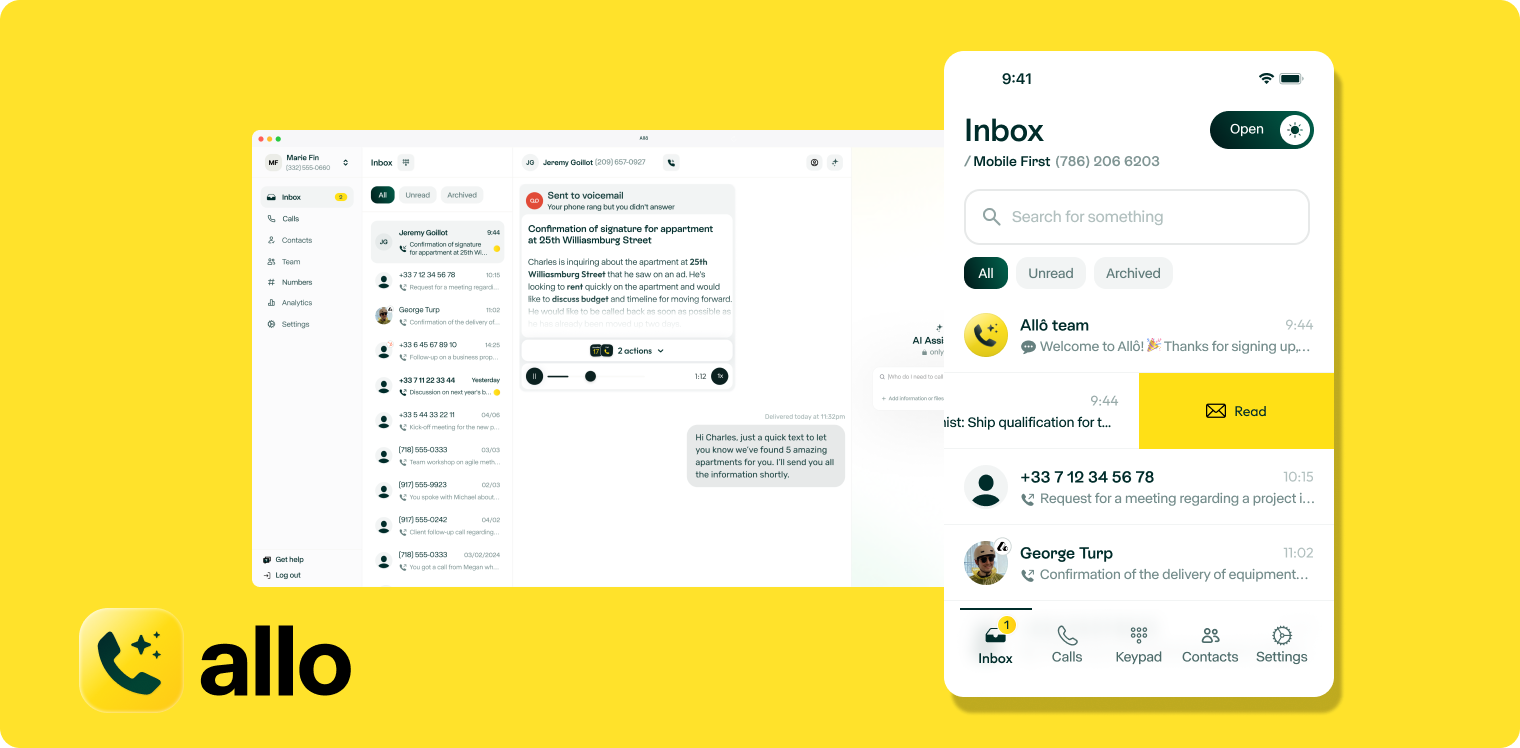
Allo is modern sales call software designed to help you make and receive calls together as a team. First, sign up for a free trial to test our platform with your sales reps. Then, once you confirm we’re a fit, port over existing numbers to begin handling calls as a team.
The Business plan comes with everything you need to make cold calling a team effort, including a power dialer that works through your call list one contact at a time. With shared phone numbers, everyone on your team can see who called when, along with all context stored under the same contact info. Leave internal notes to mark out details or assign calls. You can push these details to your CRM to keep everyone on your team (including the marketing department) in the loop.
Allo also makes it easy to put after-call work on autopilot. With workflow automations, you can:
- Record calls automatically
- Route callers to the right person or department
- Tag recordings based on their keywords or content
- Set ring orders based on agent availability
- Skim summaries and transcripts of past interactions
What about tasks you can’t automate completely? You’ll have access to AI tools that speed up your workflows. AI call insights, for example, can help you extract key details or points from conversations. Our AI writing tool makes it easier to write follow-up texts to callers. Worried you can’t reach the phone in time for follow-ups? Set up an AI voice agent to greet callers, route emergency calls, and take messages until you find time to follow up.
See why Allo is the best cold calling phone system for fast-growing sales teams.
Try us today with a seven-day free trial.
Allo Pricing
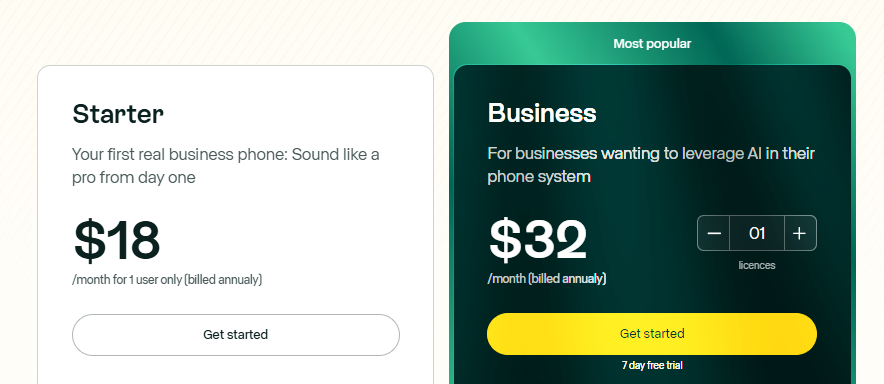
There are two Allo pricing plans, both of which are designed to grow alongside your team.
- Starter: $18/user/month for a local business number, unlimited calls and texts in the US and Canada, smart call routing, call recording, AI search for context and keywords, personalized greetings, call transfers, third-party integrations, AI call tags, and access to the AI receptionist
- Business: $32/user/month for access to the CRM integrations (HubSpot, Salesforce, etc.), ask AI, call whispering, Intelligent call distribution, shared phone numbers, internal notes, call statistics and insights, personalized onboarding, and user roles/permissions
Key Features of Allo
- Cascade ringing
- Click to call
- AI summaries
- On-demand and automatic call recording
- Call analytics
- Integrations with CRMs
- Spam call blockers
Demo of Allo
Aircall.io: Best for Predictive Dialer
Pros
- Predictive dialing calls multiple sales reps at the same time
- Voicemail drop to save time
- Sales call analytics on the base plan
Cons
- Expensive add-ons required for best cold calling features
- Pricey user minimums
- Limited call recording storage
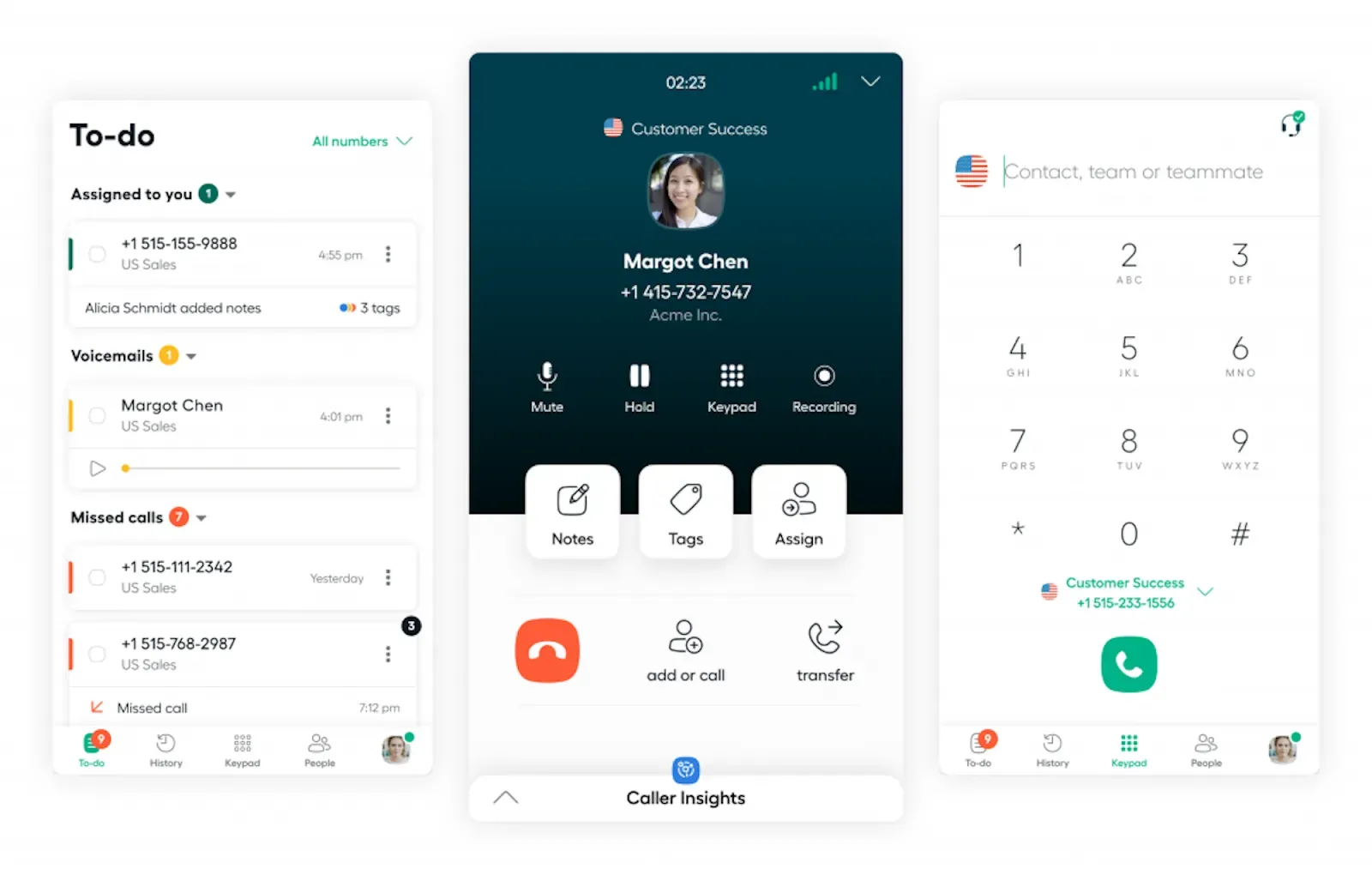
Aircall is a flexible cloud phone system designed for enterprise teams and contact centers. You get unlimited calls in the US and Canada, plus softphone support, SMS and MMS, and shared phone numbers on every plan. Aircall’s platform also lets you assign follow up calls to other coworkers, or leave comments via call notes for other sales reps involved in a deal. You also have the option to record calls on demand or automatically so everyone on your sales team can collect context in minutes.
Just keep in mind that Aircall’s call recording storage is limited. You only get up to one year of storage on the base plan. For unlimited storage, you’ll need to upgrade to the Professional plan. But this is only available upon request — Aircall only offers six months by default.
Plus, most of Aircalls’ best cold calling features require expensive upgrades on top of your plan. It’s $30/license to connect with Salesforce’s CRM, for example. And AI tools like playbooks, live prompts, call scoring, and sentiment analysis require $9/license/month and $49/license/month, respectively.
It doesn’t help that Aircall is already expensive, considering its user minimums. Since there’s a three-user minimum on the base plan alone, you’ll pay $90/month just to access basic features. If you want to upgrade for more, prepare to pay $150/month.
Aircall.io Pricing
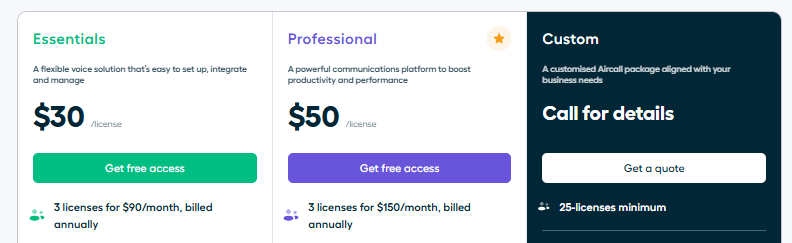
There are three Aircall pricing plans to choose from:
- Essentials: $30/user/month for three users minimum, plus unlimited calls in the US and Canada, IVR phone menus, call recording, click-to-dial, SMS and MMS support, and access to an AI Voice Agent
- Professional: $50/user/month for three users minimum, plus mandatory call tagging, integration with Salesforce CTI, smart routing, queue callback for support teams, and access to the Power Dialer and Voicemail Drop
- Enterprise: Custom pricing for 25 users minimum, plus custom onboarding, unlimited international calls, SLAs, SSOs, and access to API developer support
Keep in mind this doesn’t include its pricey add-ons. These range anywhere from $9/user/month to $49/user/month, and $0.49 per minute for the AI voice agent.
Key Features of Aircall.io
- AI voice agent
- 100+ integrations
- Phone menus, or IVR
- Predictive sales dialer
- On-demand or automatic call recording, with limited storage
Demo of Aircall
Kixie: Best for Power Dialing
Pros
- Unlimited minutes in the US and Canada
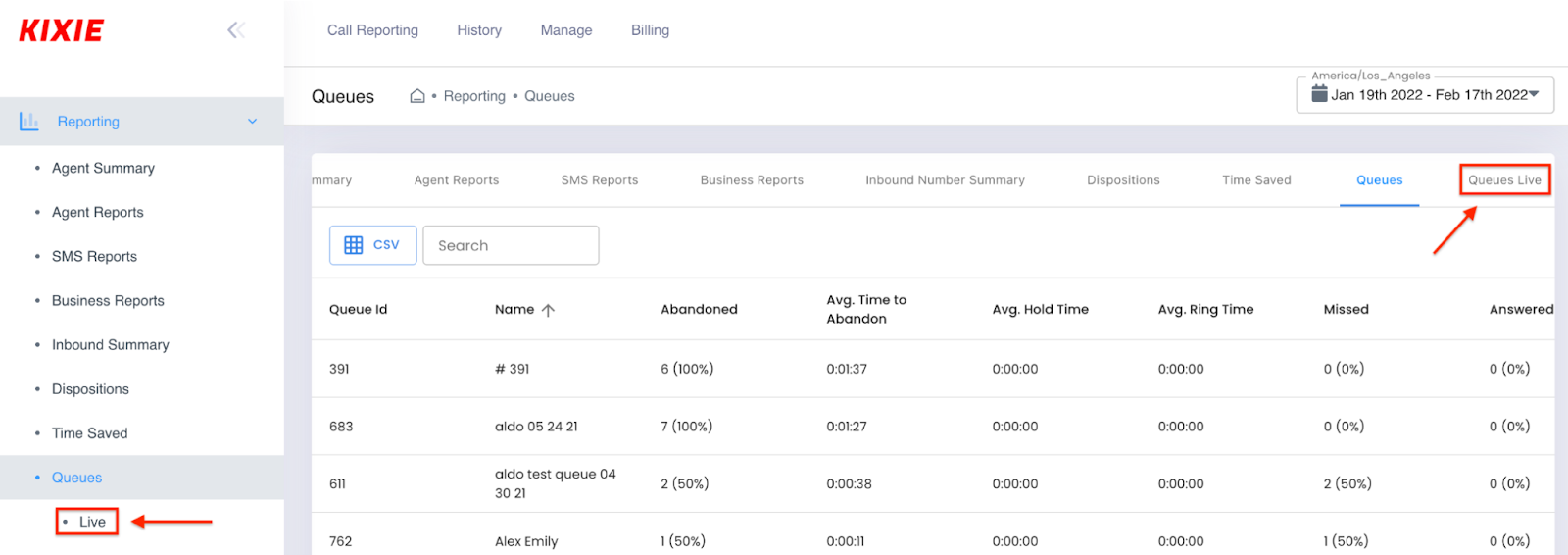
- Single and multi-line power dialer
- DNC list management, with add-on
Cons
- No public pricing
- Better connection quality requires add-on
- Third-party integrations may cost extra
Kixie is a type of AI call center software designed for enterprise call centers and large support teams. With it, you can set up an automatic cold calling system using a single or multi-line power dialer. This allows you to call up to 10 potential customers at once, without paying per minute or bottlenecking individual sales reps.
There are also add-on packages available for DNC lists and conversation intelligence. Some add-ons, like ConnectionBoost, ensure you can make calls without worrying about connection issues. But keep in mind that platforms like Allo offer reliable uptime without requiring you to pay extra.
Speaking of paying extra, you should know that Kixie may not offer third-party integrations for free. You’ll get access to Slack, Zapier, and the developer’s AI on every plan. There aren’t any native integrations available like you’d get with Allo’s sales call software. But some platforms may require an implementation fee.
The only way to know for sure is to contact the sales team.
Kixie Pricing
There are three tiers of Kixie pricing, plus add-ons for
Key Features of Kixie
- Calling session management, with upgrade
- AI/human detection, with add-on and upgrade
- SMS templates
- Workflow automations
- Voicemail drop
- Click-to-call and click-to-text
- Live call coaching
Demo of Kixie
Best Contact Databases for Cold Calling
Contact databases let you collect sales data to better target potential customers and boost call volumes for your sales teams. They’re not necessarily focused on dialing — usually just lead generation for outbound sales teams. That said, some tools do offer limited built-in dialers. Just keep in mind they’re not as robust as dedicated cold calling systems.
With this in mind, here are the two best contact databases to help support your cold calling efforts:
ZoomInfo: Best for Go-to-Market Intelligence
Pros
- Access to buyer email addresses and phone numbers
- Intent buying signals
- No per-minute pricing for phone calls
Cons
- No transparent pricing
- Credit-based system can be confusing
- Third-party dialer integrations not currently available
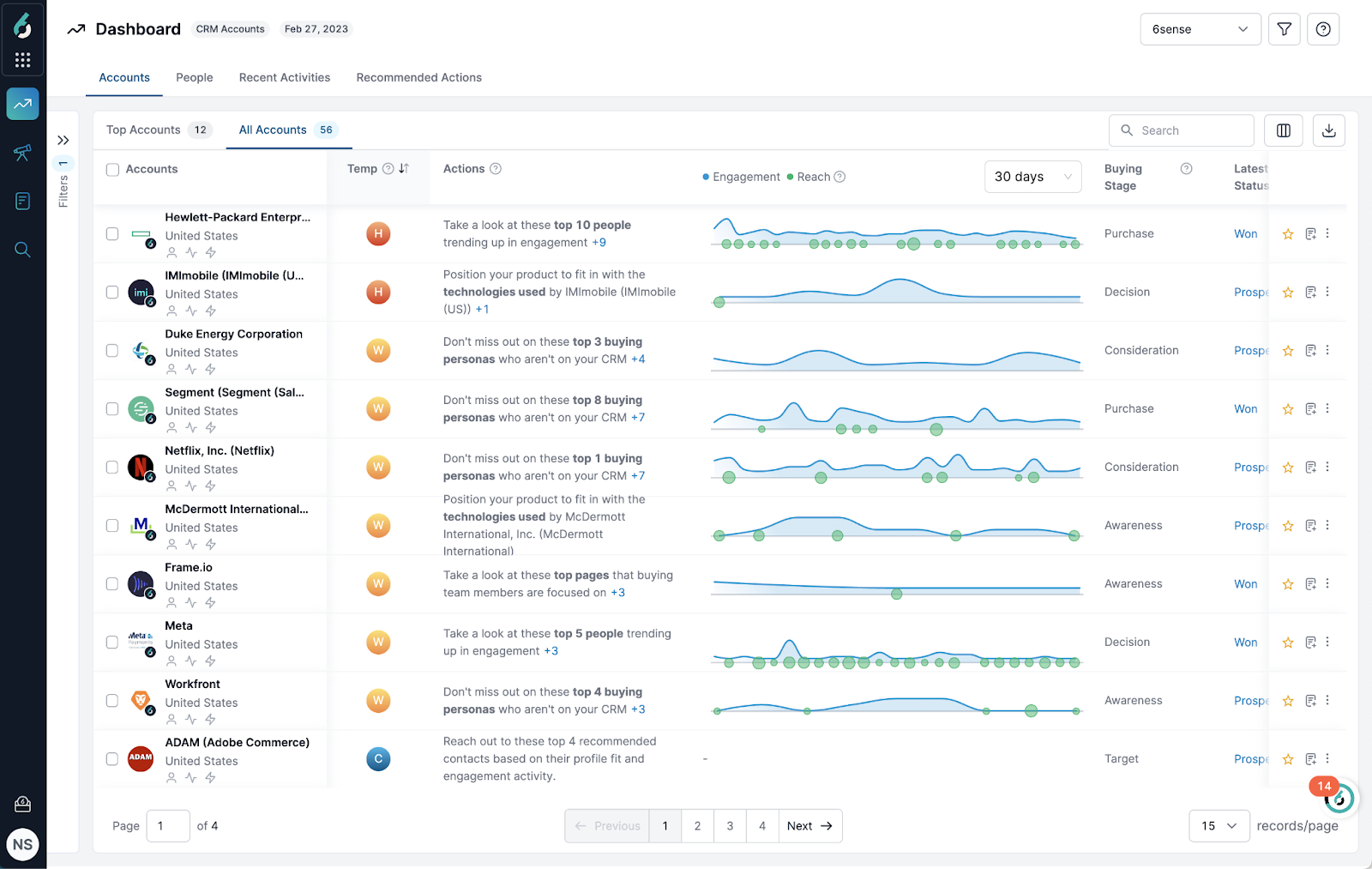
ZoomInfo is a contact database and fully automated cold calling system that lets you set-and-forget outbound cold calling campaigns. With it, you’ll have access to more than 321 million professional contacts and 104 million businesses around the world.
The best use case for ZoomInfo is sourcing contacts for your cold calling process. You’ll have access to plenty of features that can help verify quality, including AI. First, define your market and perform a search with ZoomInfo’s AI-powered copilot. Then, set up sales automations via calls and emails. You can tap into conversational intelligence tools to analyze calls later on. Then, use predictive modeling to find more contacts that fit your parameters.
But keep in mind ZoomInfo doesn’t offer public pricing. Plus, it relies on a credit-based system, which is relatively confusing and not well explained on the website (more on this later).
ZoomInfo does offer a built-in dialer, but it doesn’t let you integrate with third-party dialers. That means you can’t connect the phone system you’re already using for cold calling.
Plus, the dialer itself comes with many limitations. For example, the ZoomInfo dialer doesn’t let you:
- Set up manual dialing to phone numbers
- Bridge dial other phones
- Create or support phone numbers outside the US
If any of these are dealbreakers for your business, you should consider a standalone ZoomInfo alternative. Or, consider only using ZoomInfo to source contacts for your call center.
ZoomInfo Pricing
ZoomInfo doesn’t publicly list its pricing. Instead, you need to provide your business email for a custom quote.
Just looking for a ballpark estimate? We reached out ourselves and were quoted $7,000/year for one user, plus 36,000 recurring credits and ~10,000 annual bulk credits.
For context, one credit in ZoomInfo equals one record exported. This means you can export a total of 46,000 potential prospects per year.
But again, the credit system is confusing and fairly opaque. You’ll need to speak with a sales rep for more information on how they work.
Key Features of ZoomInfo
- 425 million contacts and businesses
- Intelligent dialing solutions
- Automatically record calls
- Automated outreach sales workflows
- AI-powered email workflows
- Digital marketing solutions, as a separate package
- Talent sourcing solutions, as a separate package
Demo of ZoomInfo
Apollo: Best for Cost-Effective Contact Sourcing
Pros
- Call tracking tools
- Dedicated list of contacts for sales staff
- Log calls and customer details in your CRM
Cons
- Credit-based system gets expensive fast
- Dialer may be deactivated without warning
- No support for caller ID registration
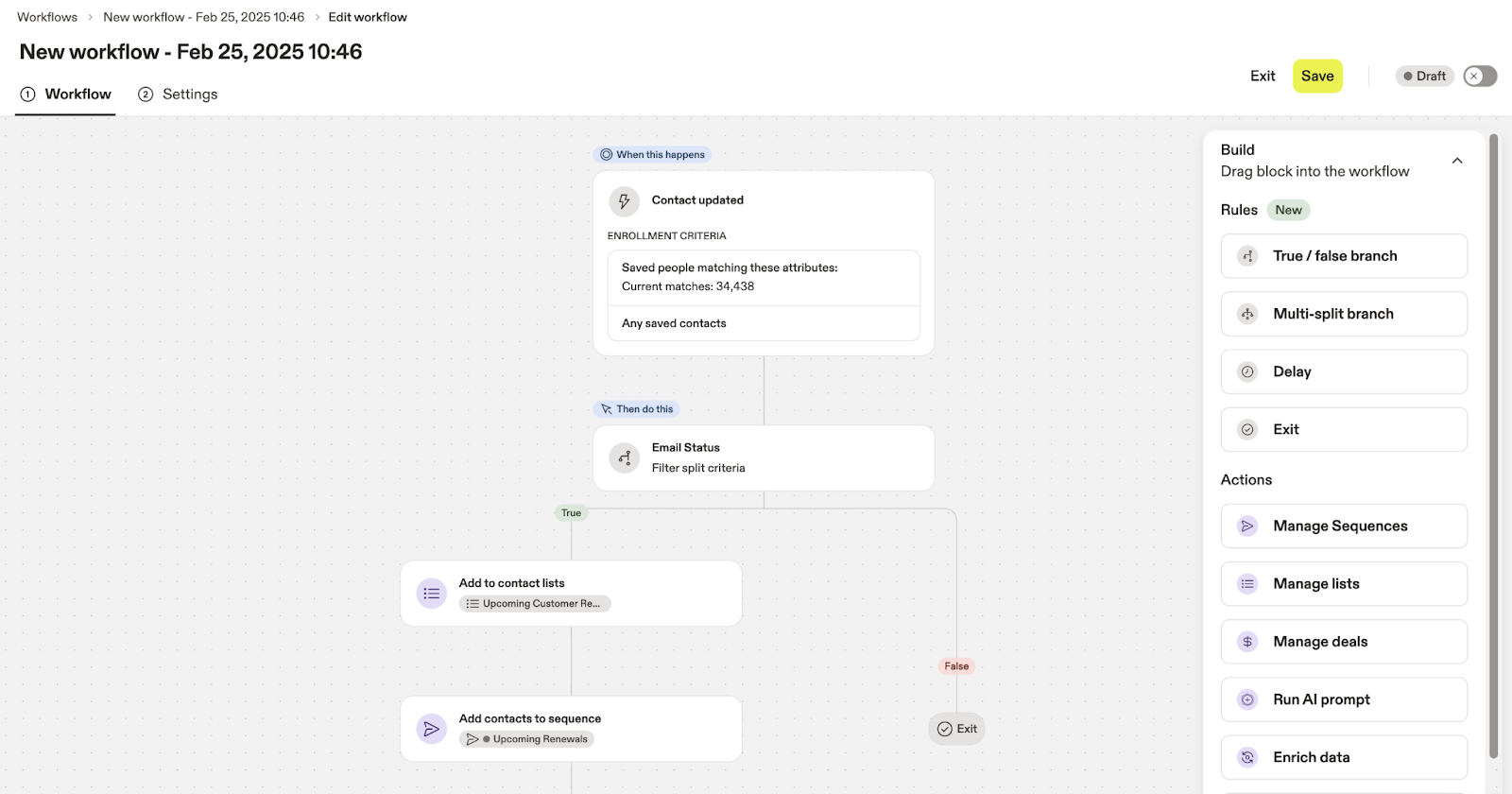
Apollo is a B2B sales prospecting platform for lead generation and sales automation. First, you source customer details by mining call data from lists in your industry. Then, you can automatically call prospects with a built-in dialer, leave pre-recorded messages on unanswered calls, and log call recordings in a CRM.
Just keep in mind that each of these actions requires credits, which are limited by your plan tier. It’s not particularly clear exactly how this works, so you’ll need to get in touch with sales for more details.
Plus, Apollo’s actual cold calling features may be somewhat limiting — especially the built-in dialer. It may be automatically deactivated if:
- You spent 70% of your monthly subscription on call charges
- You make at least five minutes' worth of calls in seven days
- The average cost of your phone calls is greater than $0.15 per minute
Apollo also doesn’t support controls for caller ID, which could make it more difficult to create a familiar name for possible prospects.
Allo, in contrast, lets you control settings for outbound caller ID. You can opt to show your personal (aka familiar) local number, which establishes professional consistency during return calls.
Apollo Pricing
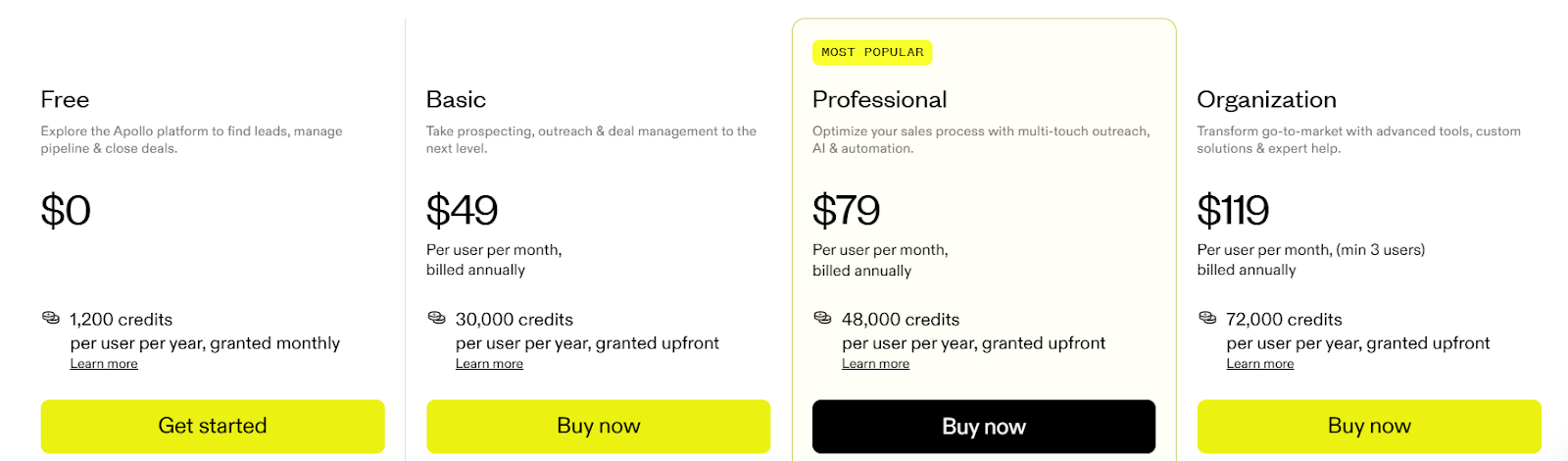
Apollo’s pricing comes in four separate “pillars.” There are four plans: inbound sales calls, outbound sales calls, data enrichment, and deal execution.
Each of these shares the same pricing plans and dollar amounts:
- Free: $0/user/month for 1,200 credits
- Basic: $49/user/month for 30,000 credits
- Professional: $79/user/month for 48,000 credits
- Organization: $119/user/month for 72,000 credits
The features you receive on each plan depend on your tier and selected use case.
We cover some of the most important in the section below.
Key Features of Apollo
- AI Assistant for lead management
- Power dialer / auto dialer
- Supports outbound and inbound calls
- Voicemail drops with pre-recorded messages
- Call analytics
Demo of Apollo
Best Recording and Analysis Platforms
Cold call recording and analysis platforms typically play two roles: recording phone and video calls on your behalf, and helping you synthesize that information with specialized software solutions. The goal is to help support your lead generation and lead management processes with less data entry.
Gong: Best for AI Analysis
Pros
- Considered industry standard
- Mix and match add-ons for a custom solution
- Intuitive sales tools are easy to use
Cons
- No transparent pricing
- Not for startups or SMBs
- Native dialer has limitations
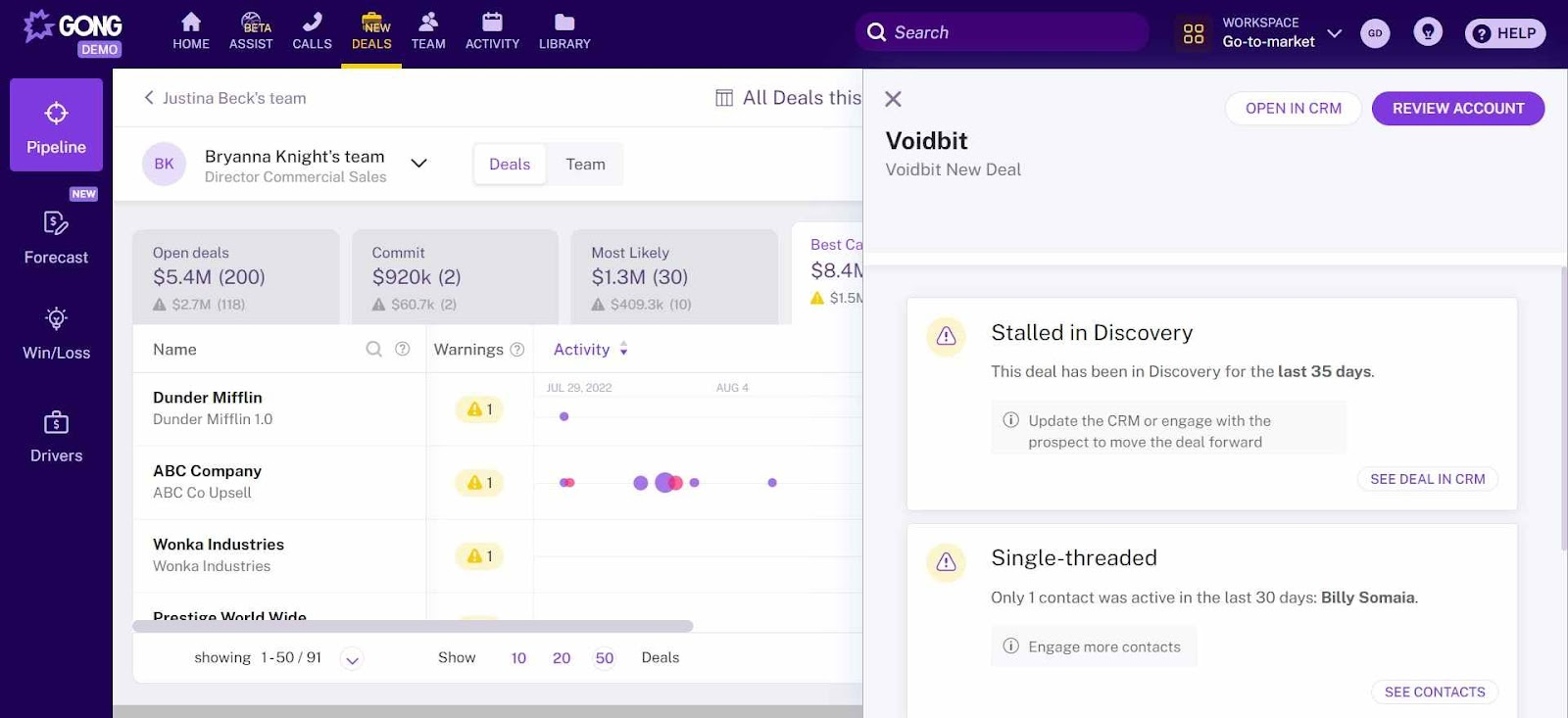
Gong is AI-powered sales call software that helps you record, transcribe, and analyze sales calls. It’s sometimes described as a “revenue intelligence platform,” which means it’s designed to help your sales team close deals faster.
Gong’s automatic note-taking, for example, can help reps catch tiny details that might’ve otherwise been missed. Reps can easily search transcripts, filter for keywords, and push contact histories to CRMs like Salesforce and HubSpot.
But Gong doesn’t offer any transparent pricing, so you’ll need to reach out to sales for a quote. This can be frustrating if you’re trying to source quotes from multiple places. And even if you do get a quote, sources say it could be expensive. This immediately places it lower on the list for growing SMBs with fewer resources to spare.
It’s true that Gong offers a native dialer option, but it’s extremely limited as a cold calling solution. With Gong, you can’t:
- Connect with dialing systems like Allo that are required for prospecting a large number of potential customers
- Record unscheduled calls
- Sync to another phone (such as your desk phone) for outbound calls
Is dialing a core piece of your outbound sales call strategy? Your best option is to integrate with dedicated sales call software like Allo.
Gong Pricing
Gong doesn’t publicly list its pricing. But we did a little digging and were quoted $117,000 per year for 50 sales reps. This included per-rep pricing, plus the pricing required to access the Gong platform.
Again, this was just a personalized quote. Be sure to reach out to Gong’s sales team for a custom quote of your own.
Key Features of Gong
- Real-time AI coaching
- AI call reviewer
- Team and supervisor insights
- Automated capture of calls, emails, and meetings
- Conversation content and sentiment analysis
- Real-time deal and pipeline health scoring
- Buyer intent and engagement tracking
- Cold calling CRM integrations
Demo of Gong
Avoma: Best for Budget Cold Calling Software
Pros
- Call tracking software, with upgrade
- Dialer integration with tools like Allo
- Revenue intelligence and lead router, with add-on
Cons
- 25 paid sales team members max on base plan
- No native dialer for cold calling campaigns
- Revenue Intelligence and Lead Routing (like with Gong) require add-ons
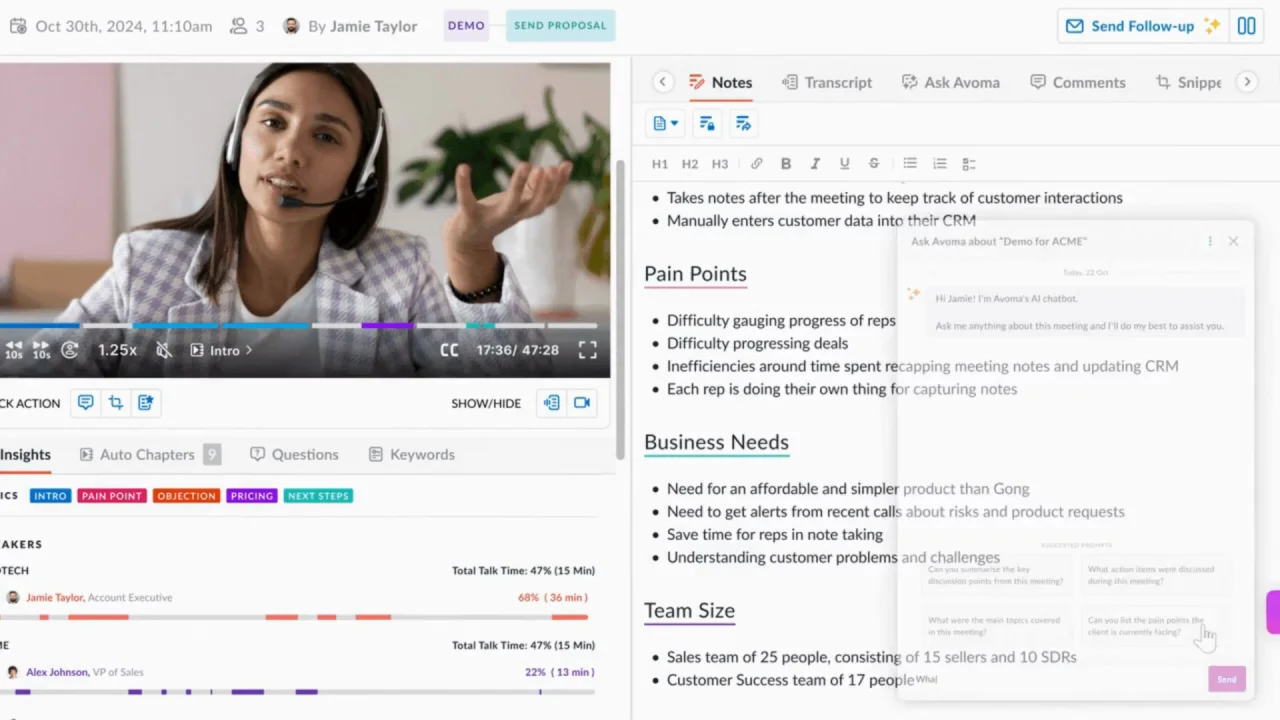
Avoma is a call recording, analytics, and call tracking platform that performs many of the same functions as Gong. It’s affectionately referred to as an “all-in-won” AI meeting assistant: you can automatically schedule and record meetings, sync notes and transcripts to your CRM, and score both reps and customers with AI-powered call notes.
Avoma can help you save money in comparison to Gong, but beware: you also get what you pay for. The software may suffer from reliability issues, according to past users. It also doesn’t come with a built-in dialer. This isn’t necessarily a bad thing if you already use modern cold calling software like Allo.
If you want cost-effective call recording alongside helpful scheduling features, Avoma can be a fit. But if you don’t already have a phone system, or if you’re more interested in built-in revenue intelligence and lead routing tools, you may want to consider an Avoma alternative.
Avoma Pricing
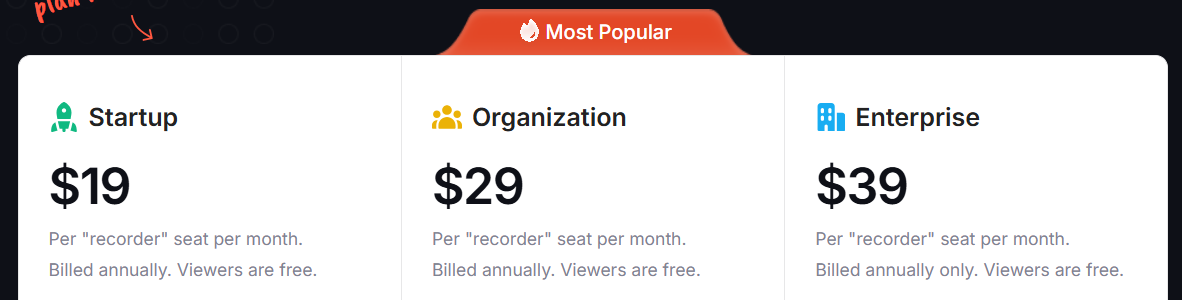
Unlike Gong, Avoma publicly lists its pricing.
There are three tiers:
- Startup: $19/user/month for up to 25 users, unlimited free seats, unlimited video recording, real-time transcriptions, AI summary notes, and access to dialer/CRM integrations
- Organization: $29/user/month for up to 100 users, AI topics and templates, round-robin scheduling, custom email templates, org-level policies, smart playlists, AI automations, and a customer success manager
- Enterprise: $39/user/month for team-specific access controls, quarterly business reviews, HIPAA compliance, and unlimited AI-powered usage intelligence
There are also two add-ons to consider:
- Revenue Intelligence: $24/user/month for AI deal risks, sales methodology tracker, AI win/loss analysis, and forecasting
- Lead Router: $19/user/month for advanced routing rules, inbound form qualification, and outbound lead hand-off
Key Features of Avoma
- Unlimited AI meeting assistant
- 1:1 scheduler
- Real-time transcriptions
- AI email follow-ups
- HIPAA-compliance and DPAs, with upgrade
- Custom AI notes, with upgrade
- Unlimited free view-only seats
Demo of Avoma
How to Pick the Best Cold Calling Software
We’ve listed quite a few cold calling systems to consider in this roundup. The question is, how do you pick the best options?
Here’s what to look for in your cold calling tools:
- Platforms aware of TCPA compliance: For a phone service, you’ll want something that’s TCPA Compliant, otherwise known as the Telephone Consumer Protection Act. This means they are familiar with compliance legislation and can help you make wise
- Industry-specific compliance laws: This could be SOC 2, HIPAA, or data encryption expectations for your industry.
- Intuitive and easy to use: The last thing you want is a clunky software solution that takes sales agents weeks or even months to learn. Software for cold calling should be easy to use and simple for sales representatives to learn in a few hours or less.
- Cost-effectiveness: Dollar amount isn’t the only consideration when buying a cold calling tool. In fact, the right cold calling software should offer high-quality features even on the base plan, which means you get the greatest bang for your buck.
- Third-party integrations: Does the cold calling tool connect with the tools your sales team already uses? For example, can you integrate with customer relationship management software? What about other sales tools like Slack, DocuSign, or email?
Frequently Asked Questions about Cold Calling Software
What is the best software for cold calling?
We may be biased, but we genuinely believe that Allo is the best software for cold calling. First, it helps teams work better together with unlimited calling, call routing, shared numbers, and analytics in one system. But it also helps growing teams move faster with automations, like automatic call recording, AI voice agents, and CRM integrations.
Are cold calls illegal?
No, cold calls aren’t illegal in most countries — but they are heavily regulated. You may need to follow legislation such as:
- TCPA in the US
- GDPR in the EU
- CASL in Canada
You may also need to observe calling hours, opt-out requirements, and do-not-call lists. Be sure to check the laws in your country and consult a legal professional if needed.
What is the best AI for cold calling?
The best AI for cold calling depends on how your business runs. Some automated cold calling systems focus on AI dialers and voicemail drops. Others specialize in team collaboration with shared numbers, call notes, and AI voice agents. But the biggest value for most sales teams comes from AI that helps reps prepare for calls, analyze conversations, and improve performance, not fully replacing human conversations.
FAQ
Are cold calls illegal?
No, cold calls aren’t illegal in most countries — but they are heavily regulated. You may need to follow legislation such as: TCPA in the US GDPR in the EU CASL in Canada You may also need to observe calling hours, opt-out requirements, and do-not-call lists. Be sure to check the laws in your country and consult a legal professional if needed.
What is the best AI for cold calling?
The best AI for cold calling depends on how your business runs. Some automated cold-calling systems focus on AI dialers and voicemail drops. Others specialize in team collaboration with shared numbers, call notes, and AI voice agents. But the biggest value for most sales teams comes from AI that helps reps prepare for calls, analyze conversations, and improve performance, not fully replacing human conversations.
What is the best software for cold calling?
We may be biased, but we genuinely believe that Allo is the best software for cold calling. First, it helps teams work better together with unlimited calling, call routing, shared numbers, and analytics in one system. But it also helps growing teams move faster with automations, like automatic call recording, AI voice agents, and CRM integrations.