Article Overview
- A multi-line phone system lets you take multiple inbound and outbound calls at the same time.
- There are two types of multi-line phone systems: traditional phone systems with multiple phone lines on one landline, and VoIP phone systems that manage calls in the cloud.
- The best multi-line phone systems for small businesses include Allo (affordable and transparent pricing), RingCentral (reliable + works with physical devices), and Nextiva (supports multiple communication channels).
- The multi-line phone system you choose should offer basic features like auto-attendants, audio conferencing, caller ID, call recording, call forwarding, compliance, and cost/scalability needs.
- To choose the right multi-line business phone system for your needs, be sure to choose a solution that meets your budgetary requirements, scalability needs, and feature expectations.
––––––––
Maybe more than one customer wants to call you for a quote. Or maybe there’s more than one sales rep who needs to make a call from your business phone number. Either way, if you still rely on a single phone line, you can only speak with one of them at a time.
We also know most customers won’t wait around for the first person in line to finish talking. A whopping 75% of them will hang up if they have to wait more than eight minutes.
Multi-line phone systems help solve this problem by letting you manage multiple calls at the same time. They also come with features like call routing and conference calling. That way, you can keep up with high call volumes as your business grows.
Below is a roundup of the six top multi-line phone systems, including a comparison of their pricing, features, and pros and cons.
What Is a Multi-line Phone System?
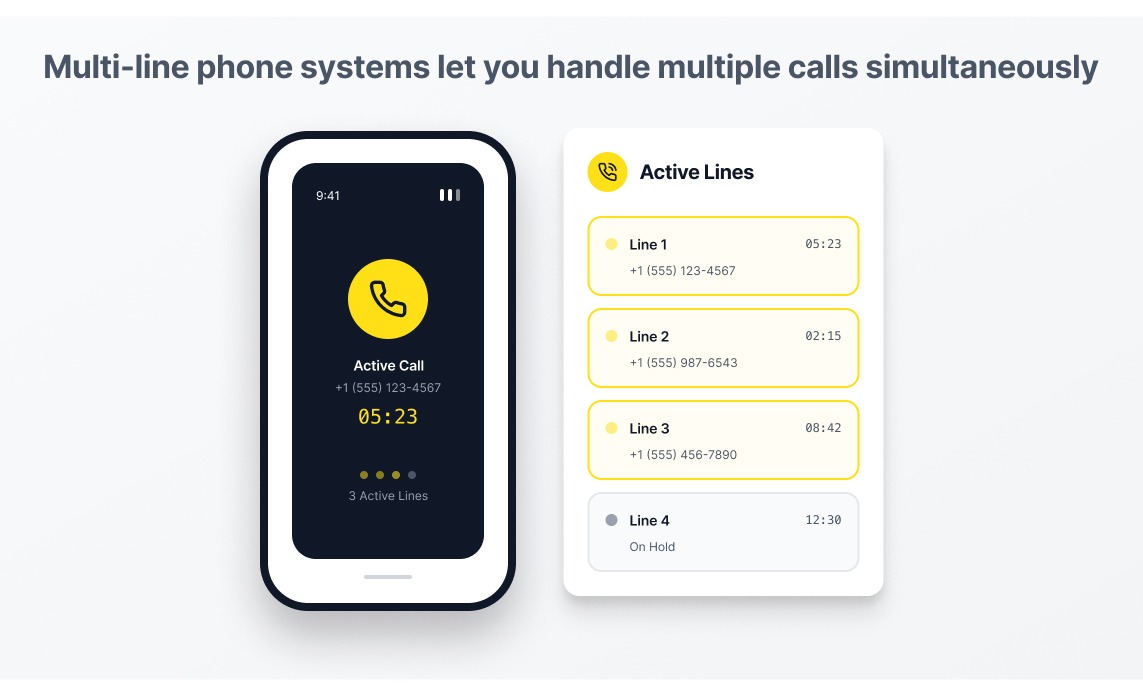
A multi-line phone system lets you handle multiple calls simultaneously, even if you’re using a single device. This allows you to make and receive phone calls as a team without sending callers to a busy signal. You may also hear multi-line systems referred to as ‘making calls concurrently,’ or managing ‘multiple calls at the same time.’
Compared to single-line phone systems, your receptionists, sales teams, and managers can use multi-line phone systems to:
- Handle multiple inbound or outbound calls at the same time on one device
- Avoid busy signals
- Transfer calls
- Put callers on hold
- Host audio conferencing
Keep in mind that the number of simultaneous calls you can make depends heavily on the system you choose. We’ll take a closer look at this in the section below.
How Multi-Line Phone Systems Work
There are two different types of multi-line phone systems: traditional multi-line phone systems, and cloud phone systems:
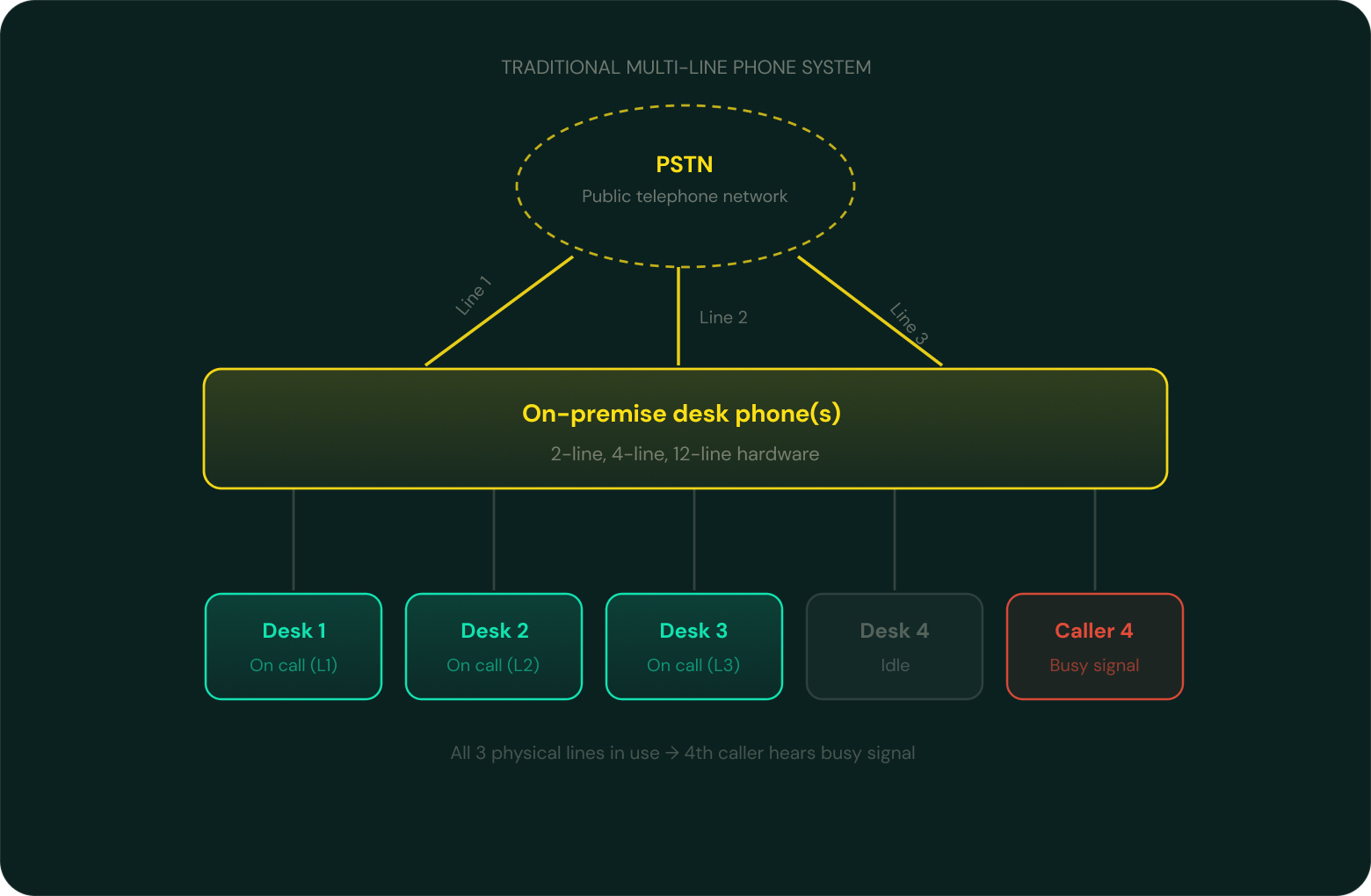
Traditional multi-line phone systems require you to purchase specialized desk phone hardware. First, you pick from different types of multi-line phones (think: two-line phones, four-line phones, or 12-line phones). Then, you set up physical phone lines that connect your desk phone to a telephone network. This usually required a private branch exchange, or PBX setup. This routes any incoming calls through the phone lines in your business. If outgoing and incoming calls exceed the number of calls your device can handle (i.e., if you have two phone lines and get three callers), inbound callers will hear a busy signal. Team members simply won’t be able to place any outbound calls.
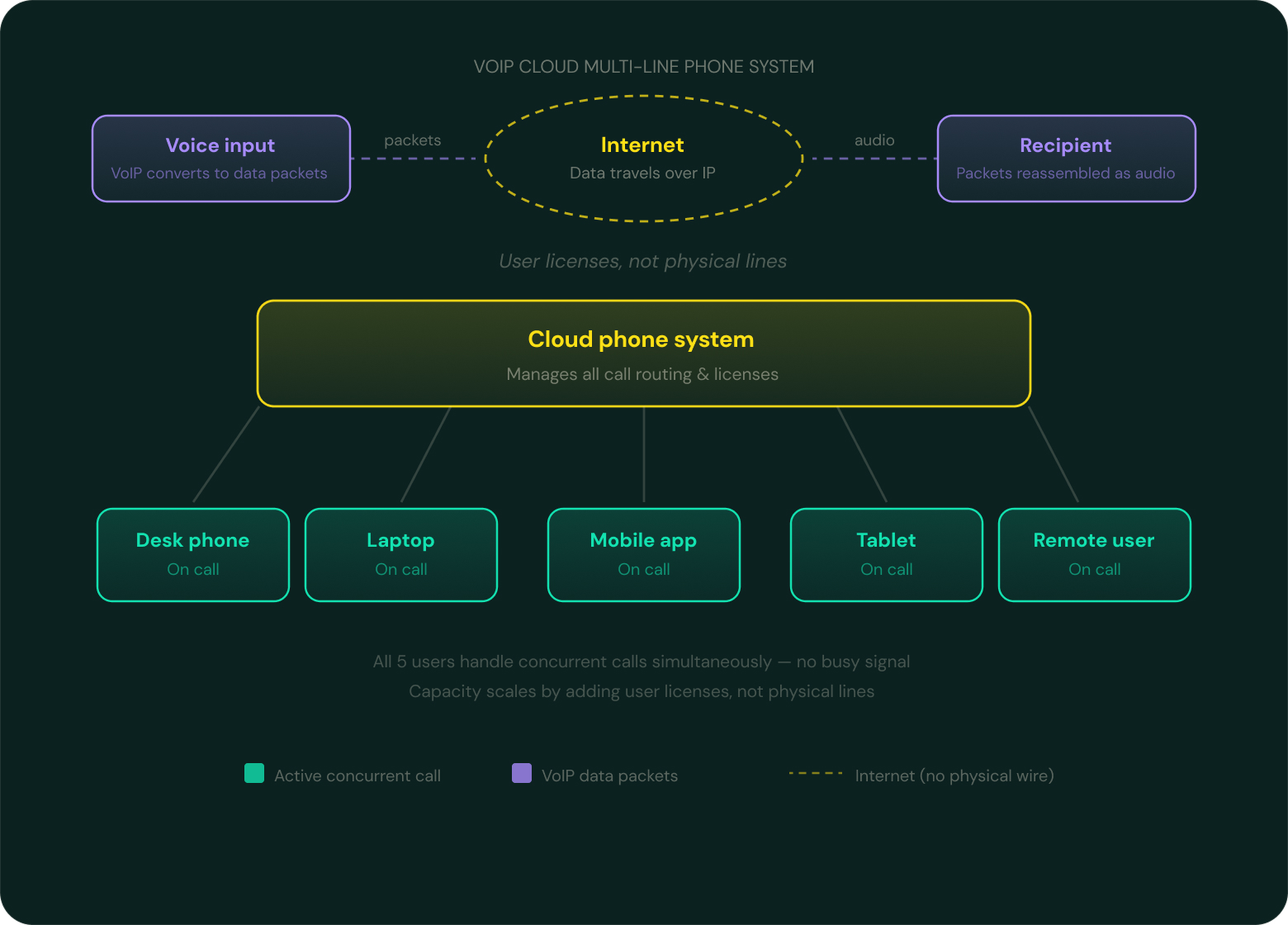
Cloud phone systems, on the other hand, use Voice Over Internet Protocol (VoIP) to help teams stay connected. This VoIP technology converts voices into data packets. Then, your call data travels over the internet and gets reconstructed into audio once it reaches your recipient.
Instead of assigning physical phone lines to each employee, cloud multi-line providers sell user licenses. You only need an app on your phone, computer, or tablet to run multi-line software. That way, you can use existing devices to make and receive calls concurrently.
Here’s a quick comparison of traditional vs cloud-based multi-line phone systems:
| Features | Traditional phone systems with multi-line support | Cloud-based phone systems with multi-line support |
|---|---|---|
| How it works | Hardware-based; required multi-line desk phones, copper phone lines | Software-based; can work from the office, home, in the field, anywhere with WiFi |
| Access | In-office, near installation, desk phones only, single location | Remotely, multiple locations, supports multiple device types (cell phones, computers, tablets) |
| Costs | Higher upfront hardware costs | Lower initial investment |
| Maintenance | Local IT maintenance required | Automatic updates and maintenance |
| Scaling up with new users | May require more desk phones, multiple lines (often limited physical lines) | Requires more user licenses (technically unlimited digital lines) |
💡Should you pick traditional vs. cloud-based multi-line phone systems? If you already have existing on-premise hardware, you can always upgrade with new cabling to add more users or phone lines. But it’s often much easier and cheaper to go for the cloud when mobility, lower costs, and advanced features matter more.
The Best Multi-Line Phone Systems, Compared
First, here’s a side-by-side breakdown of the best multi-line phone systems:
| Provider | Price | Simultaneous calls | Shared numbers | Unlimited calls in the US |
|---|---|---|---|---|
| Allo | $18/user/mo | Yes | Yes | Yes |
| RingCentral | $20/user/mo | Yes | Shared call appearance only | Not toll-free numbers |
| Nextiva | $15/user/mo | Yes | Shared call appearance only | Yes |
| Ooma | $19.95/user/mo | Yes | No | Yes |
| GoTo Connect | Contact sales | Contact sales | Contact sales | Contact sales |
| Grasshopper | $15/user/mo | Upgrade required | Upgrade required | Yes |
Next, let’s take a closer look at each multi-line provider in order:
1. Allo: Best for Growing Sales Teams
Pros
- Unlimited lines and users on a single account
- Unlimited calling and texting in the US and Canada
- Works on computers, phones, tablets (iOS and Android, desktop app, web app)
Cons
- Shared numbers require upgrade
Allo is a multi-line phone system that runs on devices you already own. You don’t need to purchase expensive hardware, desk phones, or IT training. Allo runs entirely in the cloud, so your team can get up and running in 15 minutes or less.
You can use Allo on any device that connects to the internet, from cell phones and tablets to desktop and laptop computers. Phone numbers belong to your business, not individual devices (although you can still use them there). Any team member can see incoming calls, pick up a shared line, or transfer a caller from anywhere. No need to worry about missing calls because someone is out of the office, or customers stuck waiting because only one person has “the number.”
Allo also offers shared phone numbers, which let you easily share the load of incoming calls. Everyone can work together on answering and making calls as a team, all while using the same number. No single person ever becomes the bottleneck. Incoming calls ring all devices and members until someone picks up the phone.
What if your human team members can’t pick up the phone? Allo's AI receptionist steps in. Our AI voice agent can greet callers, capture information, and route calls to human agents so nothing falls through the cracks. This allows you to take calls 24/7 without worrying about missing out on possible leads.
That doesn’t scratch the surface of our other VoIP features, including:
- AI call assistant
- Call reporting
- Call forwarding
- IVR software
- Voicemail to text
- AI call transcriptions
Key Features of Allo
- Shared phone numbers
- Call forwarding
- Caller ID
- IVR menu
- Automatic call recording
- Built-in AI features (AI assistant, AI voice agent, AI call tags, AI transcripts and summaries)
Allo Pricing
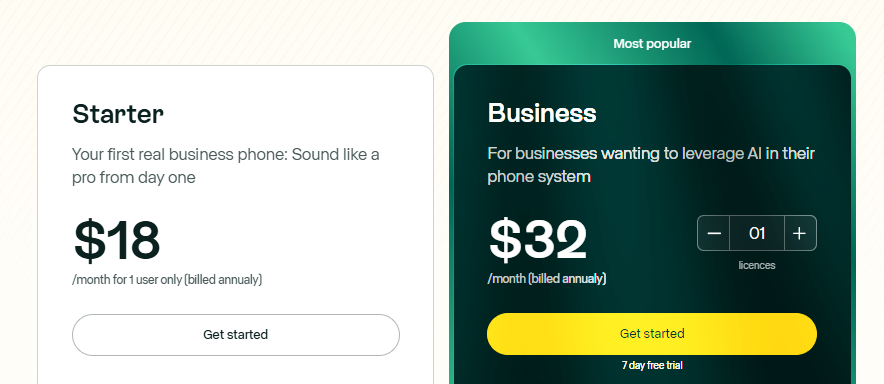
Allo’s pricing is per user, not per physical line. This means you’ll have predictable monthly billing that grows alongside your team — not the number of calls you take.
Allo offers two plans:
- Starter: $18/user/month for unlimited calls and texts in your domestic area, shared phone numbers, web, mobile, and desktop apps, call forwarding, caller ID, IVR,
- Business: $32/user/month for automatic call recordings, third-party integrations, shared phone numbers, ask AI with intelligent call search, more advanced call analytics, and AI call tags for easier organization
How to Set Up a Multi-Line Phone System with Allo
Setting up a multi-line phone system is easy with a small business-friendly VoIP platform like Allo. You don’t need additional hardware or specialty tools to add more lines. You just need 15 minutes to get started:
- Sign up for a seven-day free trial of Allo. We’ll send you a reminder before your free trial is up.
- Pick your number(s) of choice. Allo supports local and toll-free numbers so you can create a multi-line system without giving up your existing business number.
- Add other members of your team to your account. You can turn any number into a shared phone number, then set up simultaneous call ring for all members of the number. Or, you can purchase separate numbers for team members at $5/number/month.
- Use the admin portal to add users and manage permissions from anywhere. You can also activate the following features: business hours, IVR, call routing, voicemail, and AI receptionists.
- Download Allo onto your devices of choice. We offer a web app, mobile app, and desktop app, allowing users to do remote work from anywhere with a WiFi connection.
And that’s it! You’re now ready to make and receive calls from as many phone lines as you need. Add more to your account by simply adding more users, or purchasing additional numbers for $5 extra per number per month.
2. RingCentral: Best for Multi-Line Desk Phones
Pros
- Desk phone rentals
- Shared phone numbers
Cons
- More effective call queues require upgrade or add-on
- Shared SMS inbox requires add-on or upgrade
- Storage limits on every plan
RingCentral offers a multi-line phone system that works with cell phones, laptops, and existing desk phones. You can rent them for your team, or purchase them directly from RingCentral. You can also set up a push-to-talk feature that works like a walkie-talkie on your phone system. This works well for executive assistants who need to communicate short bursts of information without needing a dedicated line.
You can also trial RingCentral’s desk phones before committing to a plan. Just keep in mind you must return them within 21 days of your trial to avoid getting charged.
But apart from its desk phone rental features, RingCentral offers very limited bandwidth. There’s even storage units on every plan. Even its ‘unlimited storage’ options are subject to time-based deletion policies.
And while you can share incoming calls with your team, you cannot share texts without upgrading your plan or purchasing a costly add-on. The same goes for advanced call queues. There’s no way to call customers back from a queue, or set up a wait time announcement that lets callers know how long they’ll be on a line.
Key Features of RingCentral
- Buy or rent desk phones
- Shared phone numbers
- Host meetings via audio or video
- SMS messages, limited by tier
- Shared SMS inbox, with upgrade
RingCentral Pricing
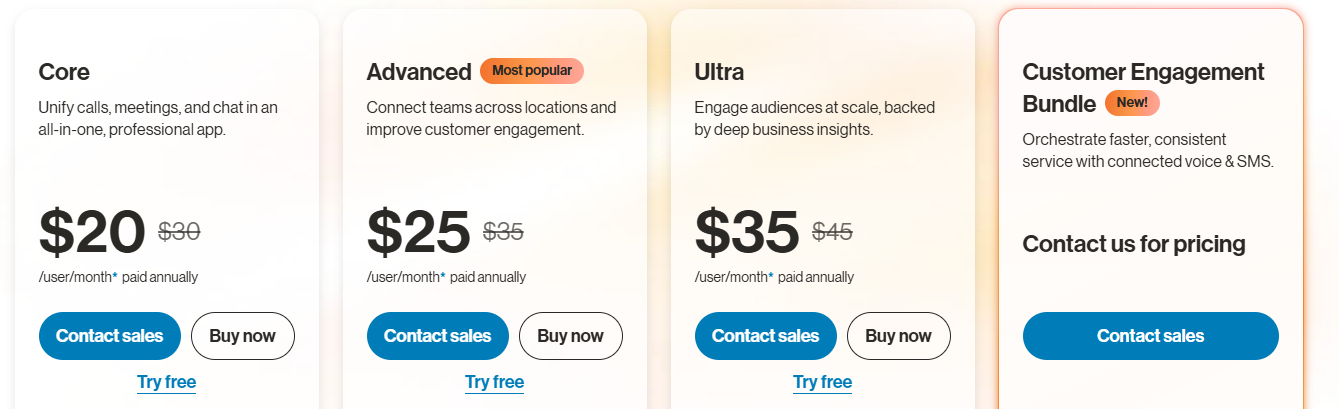
You can pick from one of four RingCentral pricing plans:
- Core: $20/user/month for unlimited domestic calling, 25 SMS messages, 100 toll-free minutes, 200-participant video meetings, basic call queues, and on-demand call recording
- Advanced: $25/user/month for advanced call queues and routing advanced analytics, and advanced integrations
- Ultra: $35/user/month for 10,000 toll-free minutes, 200 SMS user/month, and ‘unlimited’ storage for calls, texts, and files
- Customer Engagement Bundle: Custom pricing for a shared SMS inbox, plus the Call Queues Booster (call back from queue, wait time and place alerts, live reports)
3. Nextiva: Best for SIP Trunking
Pros
- SIP Trunking tools
- Unlimited video meetings on every plan
Cons
- Simultaneous ring only for 10 numbers
- Requires trunk lines for desk phones
- Huge jump in pricing for basic features AI transcripts and summaries
Nextiva is a customer experience platform that lets you set up a SIP trunk for existing hardware. That means you can keep any desk phones and on-premise PBX equipment you've already invested in, then replace your traditional phone lines with internet-based calling.
Beyond SIP trunking, Nextiva offers unified communications like voice, video, messaging, and customer management on a single platform. You’ll also get built-in multi-line management tools like call routing, auto-attendants, and analytics.
But keep in mind that Nextiva’s SIP trunk solution will require more configuration than a fully cloud-native solution. You also have to worry about limitations with simultaneous ring. According to Nextiva, you can only ring up to 10 devices at once. Compared to Allo or RingCentral, this isn’t very scalable.
You should also know there’s a huge jump in pricing to unlock basic features like AI transcripts and summaries. The Engage plan, for example, starts at $25/user/month. The Power Suite CX plan with AI transcripts is 3x more expensive at $75/user/month.
Key Features of Nextiva
- Dedicated SIP trunk features for existing PBX setups
- Video and audio conferencing
- Simultaneous ring, for up to 10 numbers
- Route calls to numbers and extensions
- Transcripts and summaries, with upgrade
Nextiva Pricing

There are currently three layers of Nextiva’s cloud multi-line phone system:
- Core: $15/user/month for inbound/outbound voice, IVR, call routing, 100 text messages, and access to mobile, web, and desktop apps
- Engage: $25/user/month for call queues, customer-to-team text messaging, call performance insights and reporting dashboards, 500 text messages per month, and 2,000 toll-free minutes
- Power Suite CX: $75/user/month for AI transcriptions and summaries, skills-based routing, and the ability to make and receive calls in one queue
Don’t want to give up your existing desk phone equipment? Nextiva also offers the following SIP trunking plans:
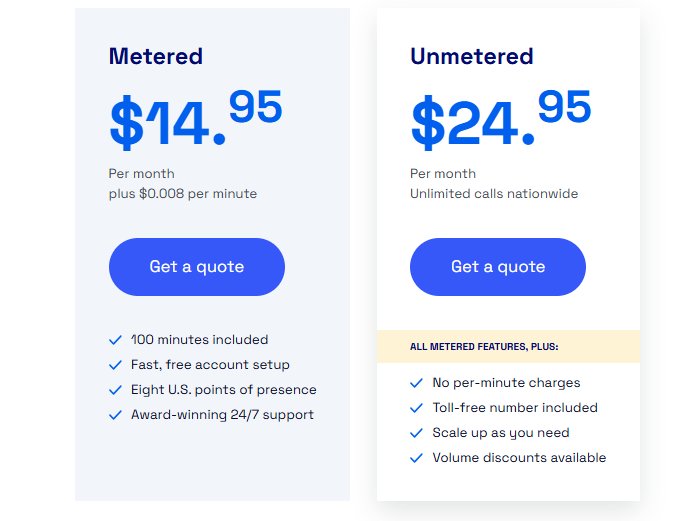
- Metered: $14.95/trunk/month plus $0.008 per minute, includes 100 ‘free’ minutes of call time per month
- Unmetered: $24.95/trunk/month plus $0.008 per minute, includes one toll-free number
Keep in mind that, with Nextiva, one trunk equals one concurrent call. So if you want the ability to make and receive 10 calls at once, you’ll pay a minimum of $149.50 per month, plus $0.008 per minute (not including hardware costs).
4. Ooma: Best for Overhead Paging and Intercom
Pros
- Intercom and overhead paging tools on every plan
- Direct dial numbers
Cons
- Extra fees for additional numbers, SMS overages, and hardware
- Poor call quality, according to user reviews
- Calling on the desktop app requires upgrade
Ooma is a multi-line phone system built for physical office environments. Its standout feature is built-in intercom and overhead paging support, which is something most competitors reserve for higher tiers (or don't offer at all). Keep in mind there’s also SIP trunking available, although not to the same extent as Nextiva.
Another standout feature of Ooma is offering direct-dial numbers. This allows clients to directly call your team members without needing to go through your single business number. Then, you can enable hot desking so that staff can share desk phones without losing their personal settings. Conference calling and call queues are also available, though both come with limitations depending on your plan (read: add-ons and upgrades).
But you should know that Ooma doesn’t offer any desktop calling unless you pay for an upgrade. This means out-of-the-box users are mostly trapped using physical hardware. This is a major drawback for remote or hybrid teams.
Even if you don’t mind sticking with desk phones, you should know past users say it’s unreliable at best. And with so much work required to reach a live agent, it may take multiple days to resolve issues with your phone system.
Key Features of Ooma
- One direct-dial number per user
- Hot desking
- Virtual extensions
- Conference calling, with limits
- Call queues, requires multiple upgrades
Ooma Pricing
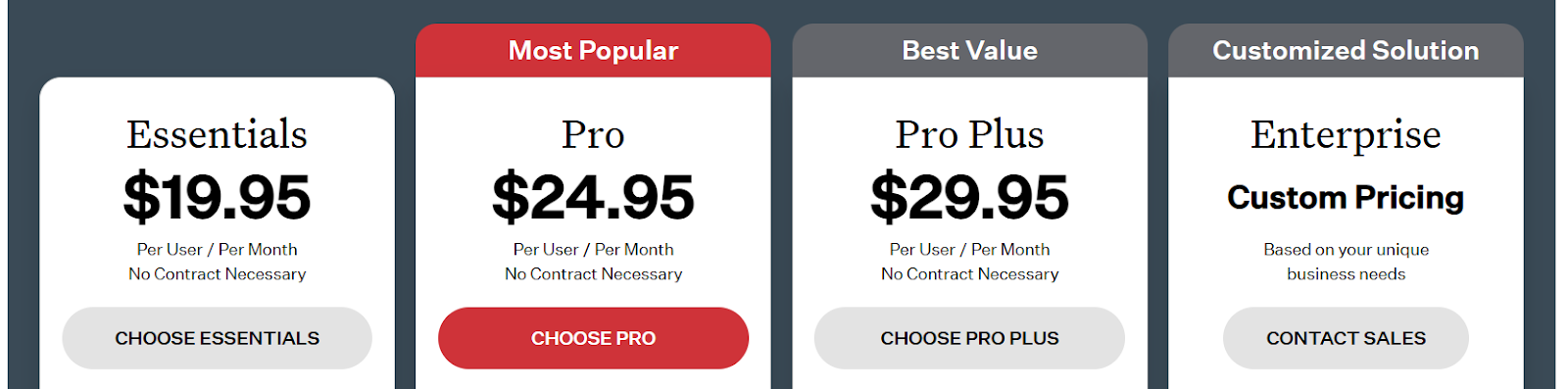
There are four Ooma pricing plans to choose from:
- Essentials: $19.95/user/month for unlimited calling, access to the mobile app, paging and intercom tools, and virtual receptionists
- Pro: $24.95/user/month for the desktop app, 250 SMS mesages per month, call recording, video meetings for up to 25 participants, and voicemail transcriptions
- Pro Plus: $29.95/user/month for 1,000 SMS messages per month, CRM integrations, hot desking, call queues, and 100 participants per video conference
- Enterprise: Call for a quote and get SIP trunking, integrations with Microsoft Teams, and advanced analytics
5. GoTo Connect: Best for Businesses with Multiple Physical Locations
Pros
- Multi-site compatible
Cons
- Shared contact limits
- No unlimited SMS
- No transparent pricing
GoTo Connect’s multi-line phone system lets you set up specialized ‘phone branches’ for businesses operating across several locations. Each site can have its own call routing, auto attendants, and queue settings. You also get an unlimited number of these three, so you won’t get nickel-and-dimed as your organization grows.
But note that GoTo Connect places staunch limits on many features, including its shared contacts. You can only share 2,000 contacts on the base plan. If you want to save contact details for a long time, or if you want to share more as your business grows, you’ll be forced to upgrade to the next tier. And since there’s no public pricing, there’s no way to gauge that jump in price.
Other limitations include SMS limits, which can quickly become a problem for teams that rely heavily on texting customers. Even toll-free numbers come with a set number of pooled minutes per month. Compare this with Allo, which offers unlimited SMS and toll-free minutes per user per month, all with transparent pricing.
Key Features of GoTo Connect
- Unlimited auto attendants and call queues
- Free calls to 50 countries
- Mobile and desktop applications
- Team inbox, with upgrade
- AI Receptionist, with add-on
GoTo Connect Pricing
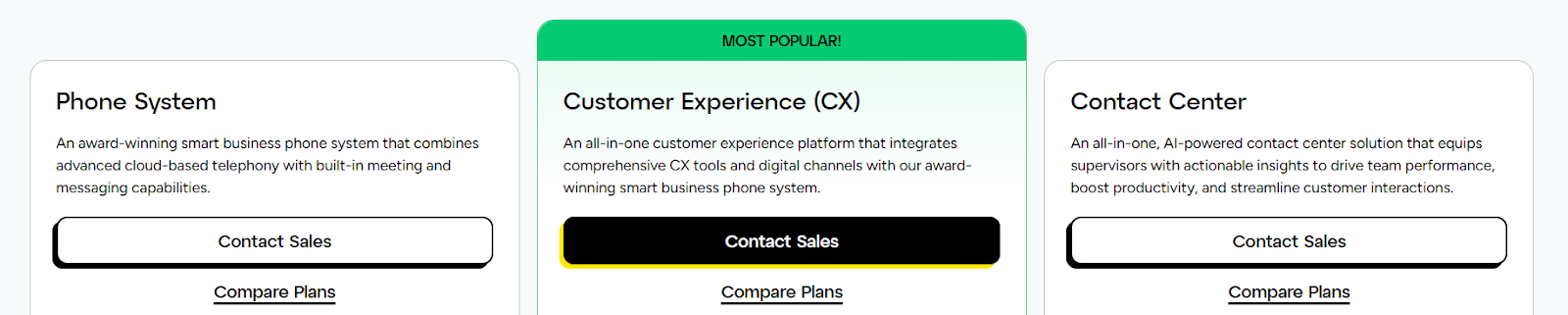
GoTo Connect doesn’t publish any pricing online. The only way to get a quote (and know what multi-line you get on each plan) is to contact sales.
6. Grasshopper: Best for Phone Number Extensions
Pros
- Unlimited users on a single account
- Unlimited extensions, with upgrade
Cons
- Simultaneous call handling requires upgrade
- No shared numbers
- Only one user on the base plan
Grasshopper is a legacy small business phone system that lets you set up extensions for numbers you already own. That way, you can give callers shortcuts to reach the right person or department. Instead of each team member needing their own unique phone number, callers can dial one central number, then use an extension to reach whoever they need.
You can set up unlimited call handling with Grasshopper, but only once you upgrade to the second most expensive plan. You can’t ring devices or users simultaneously, since you’re limited to one user on the base plan. And no matter how much you upgrade, you can’t access tools like shared phone numbers.
Keep in mind that extending your calling capabilities can also get expensive with Grasshopper. New numbers are nearly double the cost of what you’d spend with Allo ($9/number/month), and all extensions cost $3/month unless you upgrade to the most expensive plan.
Key Features of Grasshopper
- Unlimited calling and texting
- Mobile and desktop access on the base plan
- Call forwarding
- Call recording
- Virtual receptionist, with add-on
Grasshopper Pricing
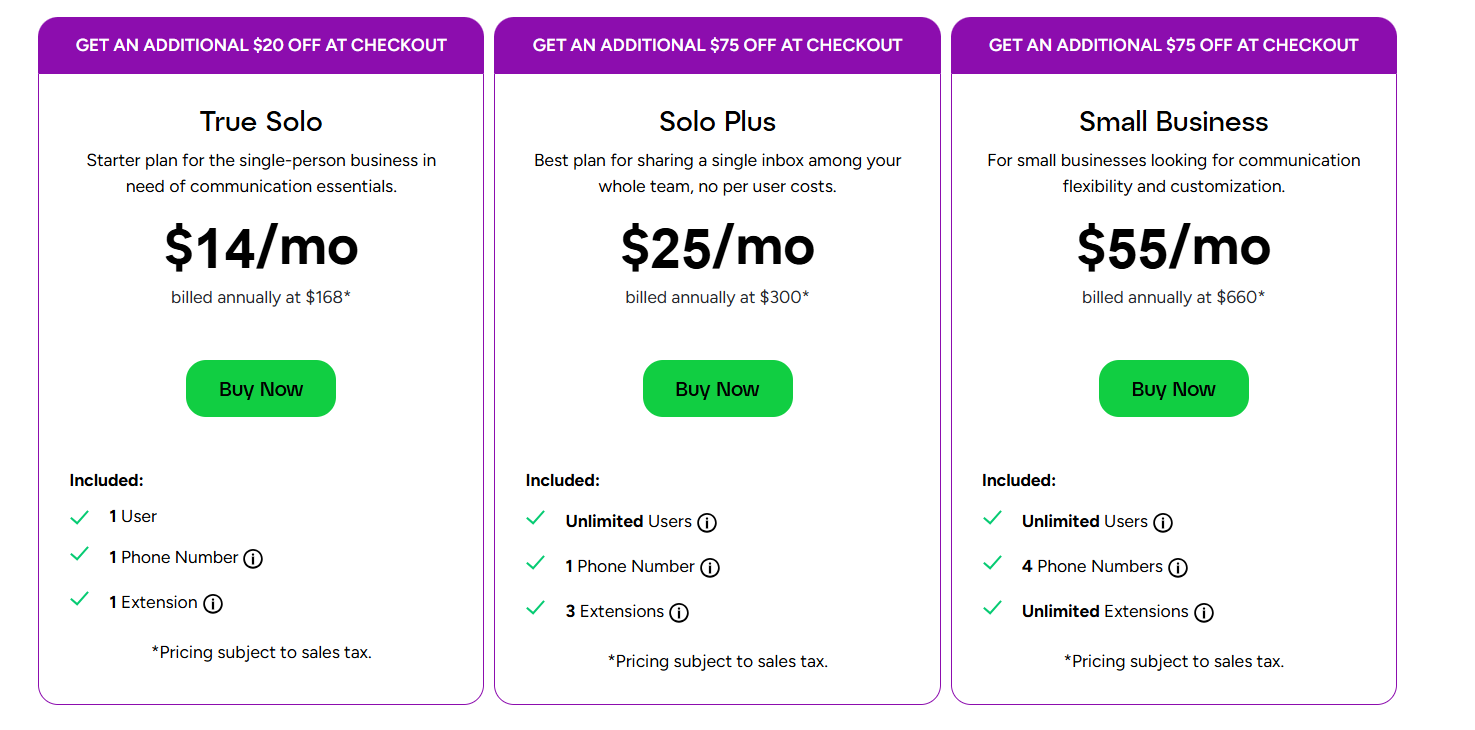
Grasshopper’s pricing depends on the number of users, numbers, and extensions you need.
This includes:
- Solo: $14/month for one user, one number, and one extension
- Solo Plus: $25/month for unlimited users per plan, one number, and three extensions, plus simultaneous call handling, call recording, and IVR
- Small Business: $55/month for four numbers and unlimited extensions
7 Features to Look For in a Multi-Line Phone System
There are plenty of multi-line phone system providers available. But not all platforms are built alike.
Before settling on just any software for your business, be sure it offers the following bare minimum features:
1. Auto-Attendants
Beyond simply making and receiving more calls, a great multi-line phone system also allows callers to direct themselves to the right person or department.
Modern phone menus typically offer IVR, or interactive voice response software, that directs incoming calls. This technology uses speech recognition to help direct callers based on what they say (like, “to get a custom quote, say ‘Sales’).
Not only does this typically lead to lower abandonment rates, but it also helps direct the flow of traffic so human reps don’t need to
2. Audio Conferencing
Business phone systems with built-in audio conferencing let you handle incoming calls with more than one employee. This makes it easier to coach sales reps, provide support to busy team members, and easily communicate with more than one customer.
3. Caller ID
Customers likely won’t pick up the phone for a number they don’t recognize. But with business caller ID, you can easily display your business name and number and share it with multiple employees. Now, when team members use personal devices to make calls from your business number, it correctly showcases your business name.
This can boost response rates and build customer trust when everyone’s using a different device in your multi-line system.
4. Call Recording and Call Analytics
Both on-demand and automatic call recording can help you capture what was said on calls — especially the ones you weren’t present for. This can help you quickly get context on recent interactions and see whether or not you need to step in.
You can easily pair this with real-time analytics, which show peak call times, missed-call rates, and average handle times for each staff member. That way, whether everyone on your team is using a shared or separate number, you can review individual metrics to get a better idea of performance.
5. Call Forwarding
You can use call forwarding to route incoming calls to other mobile devices or alternate numbers. That way, you can quickly send incoming calls to the right person or department, even if they’ve fallen through the cracks of your phone menu.
Keep in mind that some multi-line phone systems require you to upgrade before sending calls to ‘external sources’ (i.e., personal numbers). Be sure to check what your provider of choice expects before signing on the dotted line.
6. Security, Compliance, and Reliability
The best multi-line phone systems follow all best security practices to secure your business communications data.
Keep an eye out for:
- Multiple data centers for better uptime and more secure backups
- Encryption for data at rest and in transit to protect outbound and inbound calls
- Secure call recording storage and retention policies
7. Cost and Scalability
Money shouldn’t be your only factor when selecting a multi-line system — but keep in mind it will have a significant impact when adding more lines or users.
Per-line pricing means you’ll pay a fee each time you add a new extension or line to your account. You’ll likely also need to pay fees for maintenance, hardware, and new cables (not to mention purchasing new desk phones if needed).
Per-user pricing is typically more predictable, since it’s easier to know how much you’ll pay for all active phone users. You also won’t have to scale up every time you get a high volume of calls, especially if you’re a seasonal business. Just add a user to your account, pay for the month, and easily remove them when their time is up.
How to Choose the Right Multi-Line Phone System
Can’t decide between all these multi-line phone systems? Here are some questions to ask that will point you in the right direction:
- Does it offer the features you need? Or will you need to mix and match with other platforms (like AI answering services)?
- Can it scale with your call volume over time? Check for arbitrary limits around how many calls you can take at once, and whether or not those get deprioritized at certain plan levels or times of day.
- Does it work wherever your team does? This refers to whether or not it works on smartphones and computers, or just desk phones. Can you take multiple calls outside the office or in the field when getting work done?
- What integrations does it offer? Can you connect with the tools you already own? Or will you be taking a step backwards in acquiring this system?
- Does it offer value for the cost? Is what you’ll spend on the phone system going to offer an equivalent or greater business value?
- How good is the call quality? Is there a history of poor audio or dropped calls?
- How much customer support can you expect? Can you easily locate SLAs, support hours, and migration assistance on their pricing page?
- How long will it take to get started? The best multi-line phone systems can help you get up and running in minutes. More traditional platforms may require weeks or even months.
Frequently Asked Questions About Multi-Line Phone Systems
Can you have multiple phone lines?
Yes, you can put multiple phone lines on a traditional phone using SIM cards or eSIM technology. You could also use second phone number apps to make multiple calls from two numbers on one phone. But in a business context, you’ll need to purchase a dedicated multi-line phone systems. That way, you can make multiple calls through your internet connection. The best multi-line phone systems include Allo, RingCentral, and Nextiva.
How to manage multiple phone lines?
You can manage multiple phone lines in one of three ways: Assigning multiple numbers to members of your team Putting multiple team members on the same number Creating virtual extensions or direct dial numbers that branch from one number The easiest solution is setting up a multi-line phone solution like Allo, which lets you purchase all the phone numbers you need to manage from a single business account.
What year will landlines be phased out?
The US FCC wanted to switch off all copper landline phones by December 2025. This, however, has yet to occur. Landline phones are still available in the US, plus other locations around the world. But it’s far more economical to switch to a VoIP phone system. That way, you can more easily set up a multi-line system.