The Best AI Website Translation Tools for Expanding Internationally
Wondering how to translate your website easily? We tested the leading solutions and share our favorites.


Key Takeaways
- Weglot is the best overall choice if you want to go multilingual without a developer. It includes automatic content detection on any CMS, multilingual SEO capabilities, and a free tier to get started.
- Smartling is best for enterprise teams with dedicated localization staff. While it offers AI translation and human validation, there's no published pricing and no self-serve sign-up signal. This is a serious enterprise investment.
- Lokalise is best for product and engineering teams. It's an AI orchestration system that evaluates multiple engines per string and keeps your localized releases in sync with your English ones automatically.
- Crowdin is best for developer-led teams. There's an AI stack drawing on OpenAI, Anthropic, and Azure AI, a workflow built to run localization inside the same pipelines your developers already use, and over 700 integrations.
- Phrase is best for freelance translators and language service providers. It provides affordable entry-level plans for individual linguists, although the platform is built for professional translation workflows rather than 'set-and-forget' systems.
––––––––––
Your analytics can often show you traffic from non-English locations that don't convert at the same rate. If the product is right and the pricing is optimal, the problem is simply that your website is speaking to them in a language they haven't chosen.
AI has compressed what used to be a months-long translation project into something you can have live within a day. With the right tool, you can set up one-click website translation all the way up to enterprise localization platforms that need a full implementation team.
Let's take a look at some of the most widely used, so you can match the right solution to how your team works.
Comparison overview
| Solution | Starting Price | Best For | G2 Rating |
|---|---|---|---|
| Weglot | Free (2,000 words) Paid from ~$17/mo | Hands-free AI translation on any CMS, no developer required. Best overall | 4.7 / 5 |
| Smartling | Custom Contact sales | Enterprise teams needing AI and human translation with quality guarantees. Enterprise pick | 4.4 / 5 |
| Lokalise | From ~$144/mo | Product and engineering teams running continuous software and app localization. Continuous localization | 4.7 / 5 |
| Crowdin | Free Paid from ~$50/mo | Developer-led teams wanting collaborative, open-source-friendly localization workflows. Developer-friendly | 4.4 / 5 |
| Phrase | From ~$27/mo | Professional translators and language service providers managing workflow-driven projects. Workflow-driven | 4.5 / 5 |
Weglot, best for hands-free AI website translation
What is Weglot?
Weglot was built on a simple premise: going multilingual shouldn't require a developer or a localization team. It works with practically every web framework and publishing platform, such as Shopify, WordPress, Webflow, Squarespace, Wix, and even custom builds.
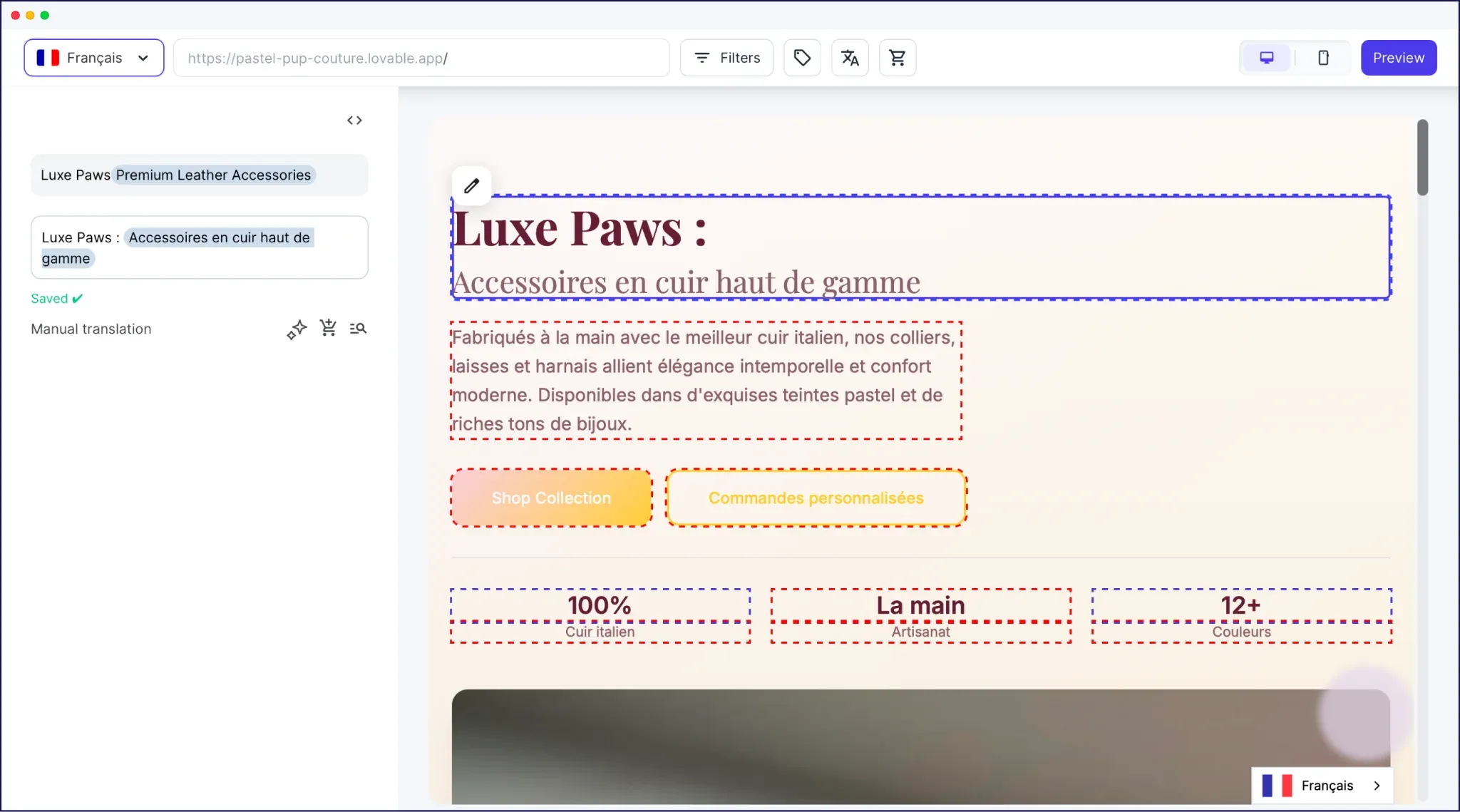
Once you install the plugin or paste a script tag into your site's <head> tag and choose your destination languages, Weglot detects and translates your entire site automatically. This includes pages, product listings, forms, popups, dynamic content, and metadata.
We've covered Weglot previously in our roundup of the best AI tools in advertising and the same theme comes up every time: it runs in the background and asks almost nothing of you once it's live.
Why Weglot is the best tool for expanding internationally
Weglot connects to DeepL, Google Translate, and Microsoft Translator, but selects the best model for each language pair. So, your German pages could use a different engine than your Japanese ones, based on which produces the most accurate output for that pair.
Also, the AI Translation Model (powered by OpenAI and Gemini) learns from your brand guidelines, glossary, and past edits. If you tell it to "keep product names in English" or "use a formal register in French", it carries those rules forward across every piece of content you publish.
However, the benefits of Weglot go well beyond translation quality:
- International SEO runs automatically from day one. Language-specific URLs and hreflang tags, along with translated page titles, meta descriptions, and image alt text are all active the moment you add a new language.
- New content translates the moment you publish it. Weglot's automatic content detection also picks up additions in real time.
- You can refine translations in context. The Visual Editor lets you browse your live site and make in-line edits directly from your dashboard.
Ultimately, you get a complete, full, and automatic site translation. Forms, checkout flows, popups, and third-party app content all translate on installation, so you don't end up with a translated product page and an English checkout.
Weglot pricing
Weglot's free plan covers 2,000 words for a single language. However, for more resources, you'll want to opt for a premium plan:
- Starter: At $17 per month you get 10,000 words for one language, 20,000 translation requests, and the core Weglot functionality.
- Business: For $32 per month you can translate into three languages using a 'budget' of 50,000 words and translation requests.
There are three higher tier plans that also include greater functionality for specific use cases:
- Pro: You can translate into five languages from an allocation of 200,000 words and translation requests for $87 per month. You can also access analytics within the Weglot dashboard.
- Advanced: $329 per month gets you 1,000,000 words and translation requests per month for up to ten languages. However, this also includes the AI Translation Model functionality and the ability to create custom languages.
- Extended. Weglot's top tier nets you practically the whole feature set, including translation memory. It costs $769 per month and you get 1,000,000 words and translation requests (to spread across 20 translated languages).
Best of all, there's a 14-day free trial available for any of these plans. After that period, you can choose the right tier for your needs.
Demo video
Smartling, best for enterprise translation operations
What is Smartling?
Most translation tools trust the AI output and ship it. However, Smartling builds its platform around the need to generate translations then validate them through human reviews and quality scoring. The idea is that nothing has to reach your audience before it meets your standards.
This works for large enterprises managing ongoing, high-volume translation across websites, campaigns, apps, and support documentation. It means Smartling's feature set is centered around those types of companies.
Why Smartling is good for expanding internationally
Smartling's core is based on a combination of AI speed and human-grade accuracy. A few specific capabilities drive this:
- The AI Human Translation workflow adds professional review to automated output. For regulated industries or high-stakes marketing copy where getting the tone wrong carries consequences, this is the differentiator.
- Quality scoring is built in, so you can measure translation quality against defined standards throughout a project, rather than discovering problems after content is live.
- The AI Hub routes content through over 15 machine translation engines and LLMs. It means different content types can go through the model best suited to each job.
So, if you have a dedicated localization team and established content pipelines, Smartling could be your option. However, the integration work involved and the required onboarding relationship means it isn't the right starting point if you need your website translated this week.
Smartling pricing
Smartling does not publish pricing, so the only path to a quote is a demo meeting with its sales team.
Make no mistake: this is an enterprise product with appropriate pricing.
Demo video
Lokalise, best for product and engineering teams
What is Lokalise?
Every time you ship new functionality, your localized versions fall a little further behind. Lokalise was built to solve this: it's an AI localization platform that keeps translated content in sync with your development cycle.
The solution's system evaluates multiple translation models for each string and selects the highest-scoring output.
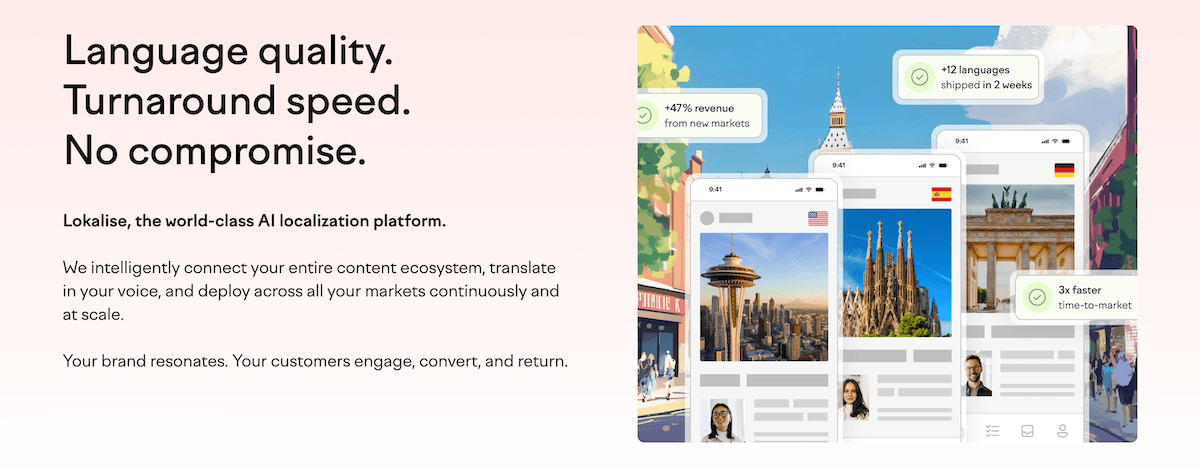
Furthermore, you can incorporate translation glossaries and memories to ensure the high-grade machine translations get the right setting and context.
Why Lokalise is good for expanding internationally
From a product and engineering scope, Lokalise's continuous localization pipeline is where you'll save time:
- Git integrations can trigger automatic translations. If you push new code to your repo, Lokalise handles the workflow up until human review.
- Over 60 integrations cover your full content stack. This means everyone in the chain can connect to the right third-party tools, such as Figma, HubSpot, WordPress, and more.
- AI orchestration selects the best engine per string. Rather than routing everything through one model, Lokalise evaluates multiple AI providers and serves the output with the highest accuracy score for that language pair.
Lokalise is localization infrastructure for technical teams, so setup will need developer input. It makes most sense if you plan to run ongoing localization, which means it might be too complex for small business needs.
Lokalise pricing
Lokalise's pricing is straightforward, much in the same way as Weglot:
- Explorer: For $144 per month, you get as many words as you need, document localization, and a limited number of workflow templates.
- Growth: This plan gives you access to AI translation, as many languages as you need to translate into, glossaries, and translation memory: all for $499 per month.
- Advanced: At $999 per month, you get the full feature set of Lokalise.
Each plan comes with a 14-day free trial and round-the-clock support. If you're an enterprise, you can also contact the team to discuss your needs.
Demo video
Crowdin, best for developer-led collaborative localization
What is Crowdin?
Crowdin treats localization the same way software teams treat code: version-controlled, collaborative, and integrated directly into your existing pipelines. It's a connected integration ecosystem, so there are more than 700 apps in the Crowdin store and a large open-source user base.
The AI stack draws on OpenAI, Anthropic, and Azure AI, with suggestions informed by in-product screenshots, glossaries, and style guides. Crowdin Copilot is the tool to create tasks and organize files using natural language commands rather than navigating menus.
Why Crowdin is good for expanding internationally
Developer teams will benefit the most from Crowdin:
- Git integrations detect new strings and trigger translation automatically. Content changes are picked up, translated, and synced back without the need for your input.
- There are translators and proofreaders on every paid plan. The pricing model scales on hosted words, not per-seat, which keeps costs predictable as your contributor count grows.
- Open-source and academic licenses are available at no cost. For non-profit and educational projects, Crowdin offers free access, which is unusual at this level!
Crowdin is a developer tool first and foremost. While website translation is a supported use case, you need the knowledge to configure the integration and manage string syncing as there's no proxy-based automatic content detection.
Crowdin pricing
Despite the complexity of the tool, Crowdin's pricing is arguably some of the most simple:
- Pro: For around $50 per month you have 60,000 words to play with and all the core functionality.
- Team: Around $150 per month gets you 100,000 words, access to dedicated user roles, reporting, and an in-context visual editor.
- Team+: This plan offers the full feature set but comes with about 500,000 words to use, all for around $450 per month.
Given the open-source foundation of Crowdin, there's also a free version based on that model. However, the premium plans all come with a 14-day free trial.
Demo video
Phrase, best for translators and language service providers
What is Phrase?
AI translation alone won't be the only task at an agency or when working with external translators. Instead, you need to assign jobs, enforce quality standards, keep terminology consistent, and get the finished content back on time. Phrase is the tool to handle this.
It's a language intelligence platform that brings together management functionality, editors, software localization tools, and a machine translation engine in one product. The AI Translation Agent combines in-context translation, AI post-editing, and terminology correction.
Why Phrase is good for expanding internationally
While Phrase's feature set is fantastic overall, its governance tools will draw you in:
- Quality Profiles define accuracy thresholds by content type. High-stakes content gets a human review and routine marketing copy can ship automatically.
- Phrase QPS provides AI-powered quality scoring based on the MQM 2.0 framework. You get an objective, industry-standard measure of whether a translation is ready to publish.
- The Phrase Portal gives non-specialists access to machine translation. Team members without a full license can request translations within brand-approved parameters, which reduces bottlenecks.
However, you're going to stretch Phrase if you don't have developer knowledge and want to use its website translation functionality. Even so, Phrase's governance functionality is something the simpler tools don't have.
Phrase pricing
Phrase offers plans across several categories, but we're focusing on its Freelancer and LSP tiers:
- Freelancer: You get access to a management system, analytics, a language AI, and more for around $27 per month.
- Professional: There's a big jump up to about $600 per month here, but you get all access to the entire Phrase feature set.
You can also access two Business and Enterprise tiers, but for details, you'll need to contact the Phrase team.
Demo video
Conclusion: Choosing the best AI website translation tool depends on your needs
The five tools on this list serve different types of teams and scopes, so none compete directly. The choice comes down to how your team works and what you're trying to translate.
However, choose Weglot if you want your website multilingual today, without a developer and without a localization strategy. The installation and setup process takes around ten minutes, tops. It's the most accessible entry point on this list with results that scale as you grow.
Here's a quick look at the other four options:
- If you run a large enterprise with dedicated localization staff and need AI translation backed by professional human review at volume, Smartling might be your choice.
- Lokalise could be for you if you have a product or engineering team shipping continuous software releases.
- If your team has developer resources available and you want version-controlled, collaborative localization that runs directly inside your existing development pipelines, Crowdin will likely interest you.
- Phrase could be your choice if you're a professional translator or agency with language service providers and need quality governance tools built in.
Once you settle on your needs, choose a couple of solutions that seem suitable, then investigate whether there's a free trial available.
Frequently asked questions about AI website translation tools
Which AI translation tool is easiest to set up?
While all of the best AI website translation tools will be intuitive, Weglot's install takes minutes. In contrast, a tool such as Crowdin requires developer setup, while Smartling involves an assisted onboarding process before you're live.
Is AI translation accurate enough to publish without human review?
This depends on the content type and context. For product descriptions, navigation, blog posts, or even marketing pages, modern AI translation could be accurate enough to publish without editing. For legal content, medical documentation, or brand-critical campaigns, human review is still necessary.
Do I need a developer to translate my website with AI?
In short, no. Most solutions on this list will have a user-friendly interface and usability. However, there are some that will need some developer input: Crowdin for instance. Other tools, such as Weglot, are purpose-built for non-developers.
Which AI translation tools handle multilingual SEO?
Multilingual SEO requires specific technical implementation, such as language-specific URLs and hreflang tags. This also includes translated metadata: page titles, meta descriptions, and image alt text. If you miss any of these, your translated pages may not rank in local search results or rank for the wrong language entirely. Weglot and Crowdin support multilingual SEO among other options.