Best phone system for real estate - Our selection
Six real estate phone systems compared on price, AI, and routing, so you never lose a deal to voicemail.


TL;DR
A real estate phone system has one job: make sure you never lose a deal to a missed call. Here is where each tool fits.
- Google Voice is best for solo agents on a shoestring budget because it starts at $10/user/month (and is free for personal Gmail use), though it offers almost no AI and no CRM links.
- Allo is best for small, AI-first real estate teams because its AI receptionist answers when you are mid-showing, and it syncs calls straight into your CRM from $25/month.
- Quo is best for small teams that text clients all day because its shared inbox, threads, and tagging keep every conversation in one place from $19/user/month.
- Zoom Phone is best for agents already using Zoom meetings because calls, meetings, and SMS sit in one familiar app from $18/user/month.
- Dialpad is best for growing brokerages that want built-in AI coaching because live transcription and call scoring come standard from $27/user/month.
- Nextiva is best for larger US real estate offices because it bundles voice, video, chat, and desk phones into one platform from $23/user/month.
How many deals have you lost to voicemail? In real estate, a buyer who reaches your voicemail simply dials the next agent on the listing. Speed-to-lead is not a nice-to-have; it is the whole game.
Yet most agents still run their business off a personal cell number. That means no call routing, no separate business identity, and no record of who said what. It works until your pipeline grows, and then it quietly costs you money.
The right phone system for real estate fixes this.
In this guide, we compare six real estate agent phone systems across price, AI, routing, integrations, and ease of exit. You will get a quick summary table, the criteria we used, and an honest breakdown of each tool, including where it falls short. By the end, you will know which is the best real estate phone system for your situation, whether you are a solo agent or running a busy real estate agency.
Summary table
| Solution | Starting Price | Best For | G2 Rating |
|---|---|---|---|
| Google Voice | $10/user/mo Call routing needs Standard ($20/user/mo) | Solo agents who need a cheap second line and can skip AI and CRM links. Best value | 4.1 / 5 |
| Allo | From $25/mo Routing & integrations on Business ($45/user/mo) | Small, mobile real estate teams that want calls answered and logged automatically. Mobile-first | 4.7 / 5 |
| Quo | From $19/user/mo AI summaries & CRM links on Business ($33/user/mo) | Small teams that text clients all day and share one inbox. Team inbox | 4.7 / 5 |
| Zoom Phone | From $18/user/mo US & Canada unlimited plan | Agents and brokerages that already run their day inside Zoom. For Zoom users | 4.6 / 5 |
| Dialpad | From $27/user/mo Standard plan, billed monthly | Growing brokerages that want built-in call AI and coaching as standard. Scaling teams | 4.4 / 5 |
| Nextiva | From $23/user/mo AI features on Power Suite CX ($75/user/mo) | Larger US offices that want voice, video, chat, and desk phones in one platform. All-in-one | 4.5 / 5 |
How to pick the right real estate phone system
Here are the five criteria we used to evaluate every option below.
- Mobile-first reliability. You work from your car, the sidewalk, and the open house, not a desk. The app has to be fast, stable, and built for a phone screen first, web second.
- Never-miss-a-call coverage. A missed call is a lost listing. We looked at call routing (cascading, simultaneous, round robin) and AI answering services that pick up when you cannot.
- A separate business identity. You should never hand out a personal cell. We checked for dedicated business numbers, local presence, and clean caller ID.
- CRM and follow-up integrations. A real estate-hosted phone system earns its keep when it logs calls and texts into your CRM automatically, so follow-up never slips.
- Texting and spam control. Clients text more than they call, and a number printed on listings attracts robocalls. SMS support and spam filtering both matter.
We ran each tool against these criteria, leaned on published pricing and third-party reviews, and added our own hands-on notes where we have them. Now to the breakdown.
Google Voice, best for solo agents on the tightest budget
Google Voice in a nutshell
Google Voice is Google's phone service, launched in 2009 and familiar to millions who use it free with a personal Gmail address. For business, it lives inside Google Workspace. It is clean, dead simple, and cheap. It is also extremely basic. If your business already runs on Gmail, Calendar, and Drive, Google Voice slots in without a second thought.
Why Google Voice works great for real estate
| Main pros | Main cons |
|---|---|
| Free for personal use, very affordable for business Unlimited inbound/outbound calls in the US, Canada, and most of Europe Large, active Google Support community for self-help Clean, no-frills interface | Almost no AI (spam blocking and voicemail transcription only) No CRM integrations, no auto-reply texts, no shared team inbox Business use requires a Google Workspace subscription No dedicated support on the free version |
For a solo agent watching every dollar, the price is hard to argue with. The catch is everything it leaves out.
The honest take: Google Voice is a starter line, not a real estate business phone system. It has no CRM links, which means no automatic call logging and no follow-up workflows. The moment you hire a second agent or want an AI to answer after hours, you will outgrow it.

Google Voice pricing
For personal use with a @gmail.com address, it is free.
For business, you need Google Workspace, and there are three plans:
- Starter: $10/user/month. Up to 10 users, works in 14 countries, includes unlimited domestic calling, unlimited US texting, and voicemail transcription.
- Standard: $20/user/month. Adds unlimited users, on-demand call recording, and call routing (ring groups: round robin, simultaneous, or fixed order).
- Premier: $30/user/month. Adds automatic call recording and advanced reporting via BigQuery.
Note the catch for teams: real call routing only appears on the Standard plan, so most agencies will pay $20, not $10. A local number is included per user.
Demo video of Google Voice
Allo, best for AI-first small real estate teams
Allo in a nutshell
Allo is an AI and mobile-first phone system built for small teams and salespeople. It launched in 2024, with a headquarters in Miami. The pitch is simple: a business line that lives on your phone, answers with AI when you cannot, and writes everything back into your CRM. For agents who run their day from a mobile screen, that focus matters.
Why Allo works great for real estate
| Main pros | Main cons |
|---|---|
| Native CRM integrations that sync call recordings, transcriptions, and contact updates AI receptionist answers callers and gathers details when you are unavailable Flexible routing: cascading or simultaneous ring, with AI backstop Transparent, affordable pricing with no add-ons | Newer product, so a shorter track record than incumbents Not built for large enterprises with very complex workflows |
Allo was designed for exactly the person reading this: someone who is mobile, runs a small team, and cannot afford to miss a call.
The honest take: the AI answering service is the standout for real estate. When you are mid-showing and a lead calls about a listing, the receptionist picks up, answers questions, and captures the details, so the lead never hits a dead end. Routing and integrations sit on the Business plan, so plan for $45/user/month if you want the full kit. As the team behind Allo, we will be upfront about that bias, and we have kept the pros and cons grounded in the same review data we used for everyone else.
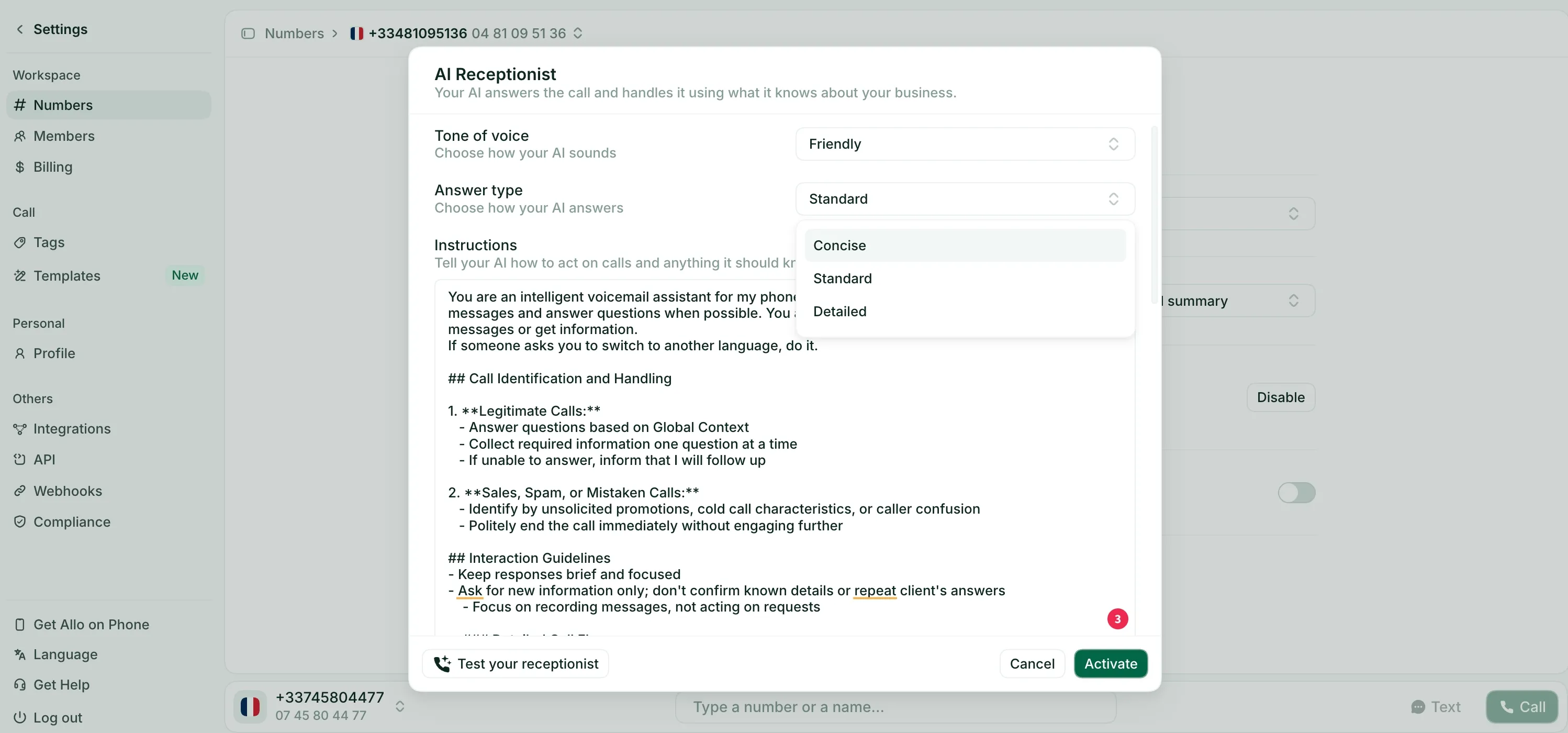
Allo pricing
- Starter: $25/month, one user max. Includes unlimited calls, a local phone number, AI call summaries, and IVR.
- Business: $45/user/month. Adds integrations, unlimited AI answering service, SMS, call routing, and international calls.
There is a 7-day free trial and no add-ons, which keeps the bill predictable.
AI is included in all plans rather than sold as an upsell, which is rare in this category.
Demo video of Allo
Quo, best for small teams that text clients constantly
Quo in a nutshell
Quo started in 2018 in Canada, built by Mahyar Raissi and Daryna Kulya to fix a problem they kept seeing: business owners running their companies off personal numbers. You may know them by their old name, OpenPhone; they rebranded to Quo in 2025.
The product is best known for a clean, collaborative shared inbox.
Why Quo works great for real estate
| Main pros | Main cons |
|---|---|
| Support team is very reactive Clean UI that is genuinely easy to use Shared inbox with threads, tagging, and internal chat Built-in lightweight CRM and caller ID | No cold calling allowed; they may block your account if they suspect it Mandatory SMS registration process that can be slow to clear Lacks a proper spam filter |
Real estate runs on texting, and Quo treats messaging as a first-class citizen rather than an afterthought.
The honest take: the shared inbox is excellent for a small real estate agency where several people touch the same client. Threads and tagging mean nothing falls through the cracks. Two warnings, though. First, Quo explicitly forbids cold calling, so if your prospecting includes unsolicited outreach, this is the wrong tool, and you risk a ban. Second, the lack of a strong spam filter stings when your number is plastered across listings.
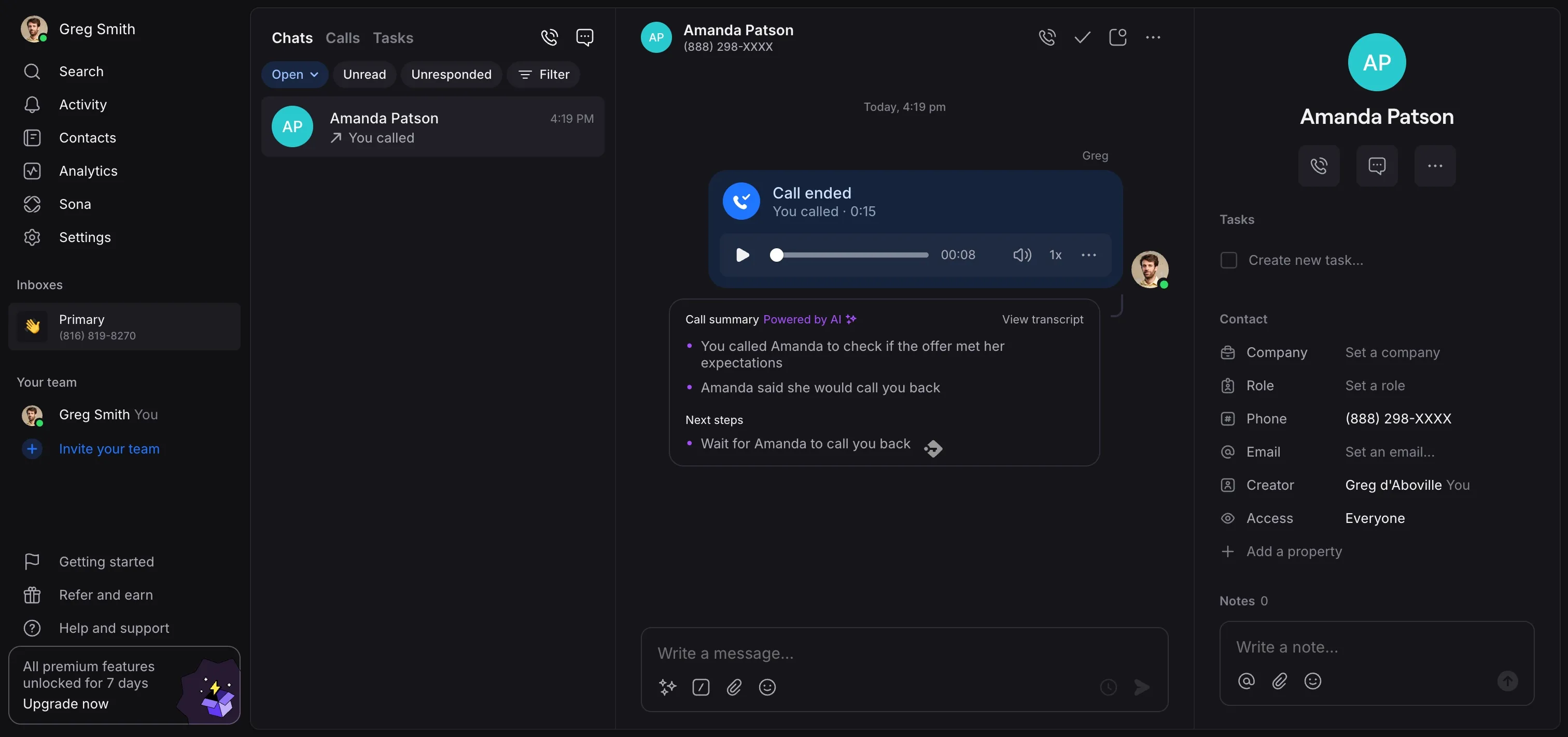
Quo pricing
- Starter: $19/user/month. Includes a local number, unlimited US/Canada calling and messaging, voicemail transcripts, and 10 AI calls via Sona, their AI agent.
- Business: $33/user/month. Adds AI call summaries and transcripts, group calling, call transfers, analytics, and HubSpot and Salesforce integrations.
- Scale: $47/user/month. Adds dedicated onboarding, priority support, and inbound phone support.
There is a 7-day free trial. One number is included per user, and extra numbers cost $5/user/month. Sona handles 10 calls free on any plan, then $0.75/call. Note that the CRM integrations agents care about live on the Business tier, so budget for $33, not $19.
Demo video of Quo
Zoom Phone, best for agents already using Zoom
Zoom Phone in a nutshell
Zoom Phone launched in 2019 to extend the video product everyone already knew into a full business phone system.
If your brokerage runs listing presentations and team huddles over Zoom, the phone layer feels instantly familiar. It is clean and straightforward, and it shares one login with the meetings tool you use daily.
Why Zoom Phone works great for real estate
| Main pros | Main cons |
|---|---|
| Good connectivity and call quality Deep integration with the rest of Zoom Smooth transitions between phone, meeting, and mobile | Lacks AI answering service and AI IVR No shared contacts on the mobile app Support can be hard to reach |
Zoom Phone's biggest strengths are continuity and its affordable pricing ($18/user/month for the cheaper plan). The weakness is that it was built as an add-on, and it shows in the AI and mobile gaps.
The honest take: when we tested Zoom Phone, the settings were the sticking point. There are a lot of options, and the labels are not obvious, so expect some hunting. The bigger limitation for real estate is the missing AI answering service. There is a capable "AI Companion" for summaries and voicemail, but nothing picks up a live call for you. For an agent who is constantly unavailable, that is a real gap.
Zoom Phone pricing
- US & CA Unlimited: $18/user/month. Unlimited US/Canada calls, free US/Canada SMS, a phone number, call recording, integrations, and AI features like call summaries and task extraction.
- Pro Plus: $24/user/month. Bundles Zoom Phone with the full Zoom Workspace (Meetings, Team Chat, Docs, Mail).
- Business Plus: $29/user/month. Adds more storage, larger meeting capacity, and SSO.
Demo video of Zoom Phone
Dialpad, best for growing brokerages that want built-in AI
Dialpad in a nutshell
Dialpad has an unusual pedigree. Founder Craig Walker previously built GrandCentral, the VoIP product that Google bought and turned into Google Voice.
The company has been building its own AI since 2018, well before it was fashionable, and that head start shows in the product. Dialpad keeps three editions: Connect for everyone, Support for service teams, and Sell for sales teams.
Why Dialpad works great for real estate
| Main pros | Main cons |
|---|---|
| Strong, mature AI built in-house since 2018 Easy to use once configured Robust call routing (fixed order, round robin, idle, simultaneous) AI features included free on every plan | A genuine learning curve at the start Long support wait times and unclear answers SMS approval process can be bumpy |
Dialpad is the AI-forward pick for a brokerage that is scaling and wants coaching baked in.
The honest take: Dialpad's AI is the real draw. Call summaries, live coaching, and call scoring come standard at no extra charge, which is genuinely rare. For a team lead training newer agents, the live coaching is a quiet superpower. The trade-offs are call quality grumbles and a setup that takes a beat to learn. Routing is comprehensive and kicks in from the Standard plan with up to three departments.
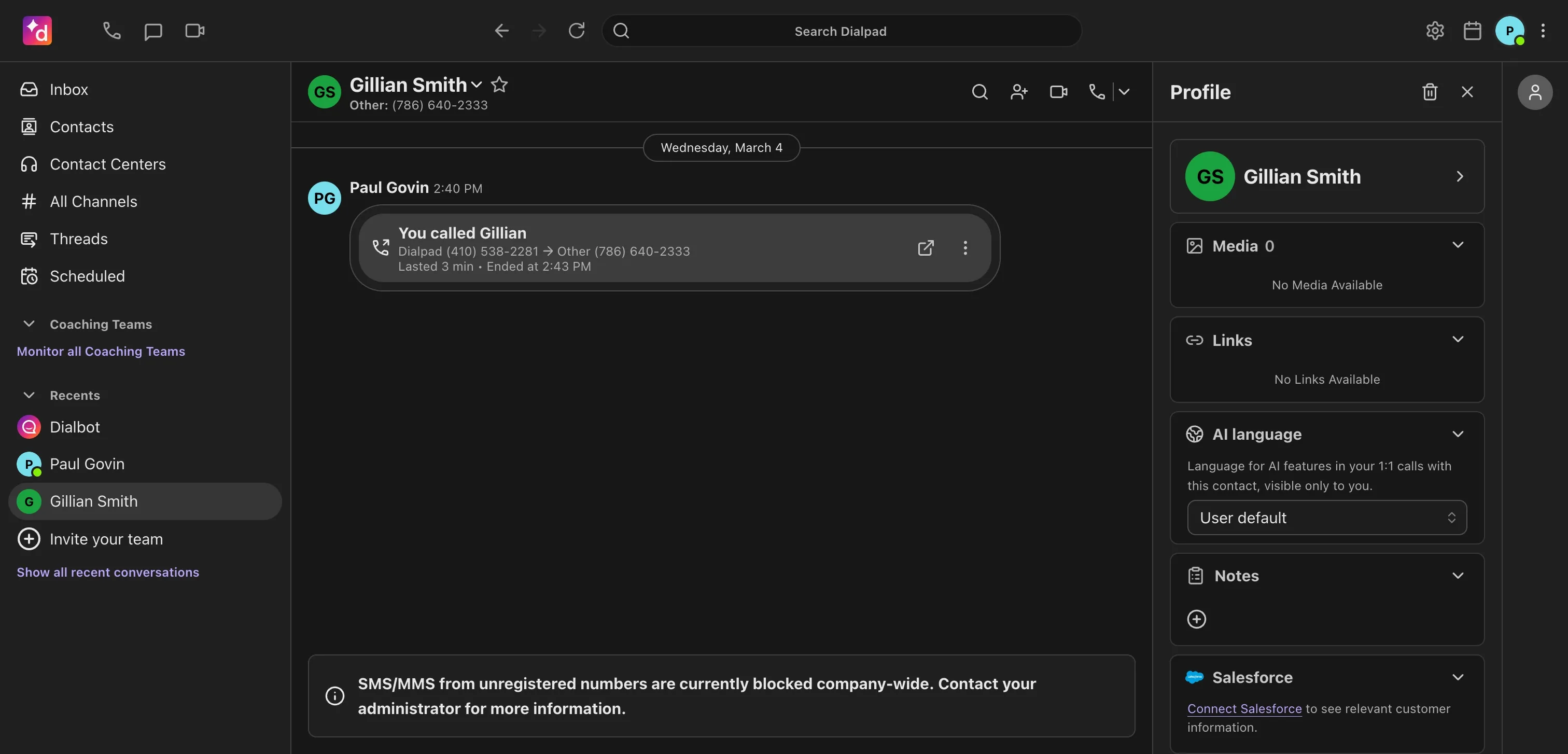
Dialpad pricing
- Standard: $27/user/month (billed monthly). Unlimited calling in your country plus the US and Canada, a local number, call forwarding, call recording, and up to 3 departments.
- Pro: $35/user/month. Adds SSO, phone support, and up to 25 departments.
AI features are included on every plan, which is the headline value here.
Demo video of Dialpad
Nextiva, best for larger US real estate offices
Nextiva in a nutshell
Nextiva was founded in 2008 in Scottsdale, Arizona by Tomas Gorny, with a mission to make any business "feel and operate like a Fortune 500 company." It has grown into a full communications platform: voice, video, team chat, SMS, and even light CRM and ticketing in one place. It is the most enterprise-leaning option on this list and a common choice for established US brokerages that want a single vendor.
Why Nextiva works great for real estate
| Main pros | Main cons |
|---|---|
| Voice, video, chat, SMS/MMS, and light CRM in one tool Strong call reliability and platform uptime Advanced configuration, including detailed call routing Support for physical desk phones | Works in the US only (and limited parts of Canada) Steep learning curve UI can be confusing Basic plan lacks call routing and recording AI features require the $75/user/month plan |
Nextiva suits a larger real estate office that values reliability and one unified platform over a low entry price.
The honest take: when we set it up, the admin felt clean, and the desktop app was easy to find and worked well. The reliability and desk-phone support are real strengths for an office with a front desk. But the cost of AI is the catch. The good AI features (transcription, summaries, intelligent routing) sit behind the Power Suite CX plan at $75/user/month, and the AI receptionist is billed separately at $99 per 100 interactions. For a small team, that is steep. Nextiva also runs US-only, so it is a poor fit if you serve international buyers.
Nextiva pricing
- Core: $23/user/month. A phone number, SMS, video meetings, call routing, and team chat.
- Engage: $50/user/month. Adds advanced reporting, web chat, and a toll-free number.
- Power Suite CX: $75/user/month (up to 100 agents). Adds AI transcription, summarization, and intelligent routing.
One local or toll-free number is included. Be aware that the entry Core plan omits features rivals include by default, and the AI most agents want lives on the $75 tier.
Demo video of Nextiva
Conclusion
There is no single best real estate phone system; there is the one that fits how you actually work. Here is the short version.
- Solo agent, tight budget: Google Voice gets you a business line for $10, as long as you can live without AI or CRM links.
- Small team that wants AI to answer for you: Allo is the mobile-first pick, with an AI receptionist and CRM sync from $25/month.
- Team that texts clients all day: Quo's shared inbox keeps everyone on the same thread, from $19/user/month.
- Already on Zoom: Zoom Phone adds calling to a tool you know, from $18/user/month.
- Growing brokerage that wants AI coaching: Dialpad bundles mature AI into every plan, from $27/user/month.
- Larger US office that wants one platform and desk phones: Nextiva covers it, from $23/user/month, with AI on the higher tier.
If you are a small or growing real estate team, the deciding factor is usually whether the system answers when you cannot.
That is the entire reason we built Allo around an AI receptionist and instant CRM sync. Start your 7-day free trial and see how many leads you stop losing to voicemail.
FAQ
What is the best VoIP service for real estate agents?
There is no single best VoIP for real estate agents; the right pick depends on your team size and how you work. Solo agents on a tight budget tend to start with Google Voice, small AI-first teams lean toward Allo for its AI receptionist and CRM sync, and larger US offices often choose Nextiva for its all-in-one platform. The deciding factor for most agents is simple: pick the system that answers when you cannot, so a missed call never becomes a lost listing.
How much does VoIP cost for a real estate office?
For a real estate office, expect roughly $18 to $35 per user per month for a capable plan, with entry options like Google Voice starting near $10. The exact figure depends on the features you need. Call routing, CRM integrations, and AI answering often sit on mid-tier plans, so a realistic per-user cost for a team is closer to $25 to $45 per month.
Is there an AI phone agent for realtors?
Yes. Several real estate phone systems now include an AI answering service that picks up live calls, answers common questions, and captures lead details when you are unavailable. Allo's AI receptionist and Quo's Sona are two examples built for small teams. Dialpad and Nextiva also offer AI, though Nextiva places its AI receptionist on a higher-priced plan with per-interaction billing.