











TL;DR
- Native integrations are best for most teams, especially those without a tech team who need calls, transcripts, and SMS logged automatically. They take a few clicks to turn on, and your provider maintains them for you.
- Middleware (Zapier, n8n) is best for teams with one specific workflow gap and no native option, because you can shape the flow exactly how you want it. Expect some maintenance and a recurring bill, and don't count on real-time sync.
- A custom API integration is best for teams with in-house developers and a genuinely unusual requirement that nothing off the shelf covers. You get total control, at the price of building and maintaining it forever.
My honest advice: start with native, drop to middleware only to patch a gap, and build on the API only when you truly have no other choice.
Introduction
Yes, with LLMs everyone has become some sort of a developer. So the question comes up a lot: does that justify building your own integration between your CRM and your phone system?
We don't think so.
Writing the first version of an integration has never been easier. Keeping it alive is where the real cost hides, and that part hasn't gotten any cheaper. Before you spin up a side project, it's worth knowing the three real options you have and what each one actually costs you, in money and in time.
In this article, I walk through those three ways to connect your CRM with your phone system: native integrations, middleware, and a custom API build. For each one I cover how it works, when it's the right call, the pros and cons, and roughly what you'll pay.
At a glance
3 ways to connect your CRM with your phone system
Native integrations
My personal take
This is the sensible option, and it works for most companies. If you're not sure where to start, start here.
How does it work?
It's simple: you pick a phone system that integrates natively with your CRM. Today most CRMs connect to at least one good phone system, even the niche ones.
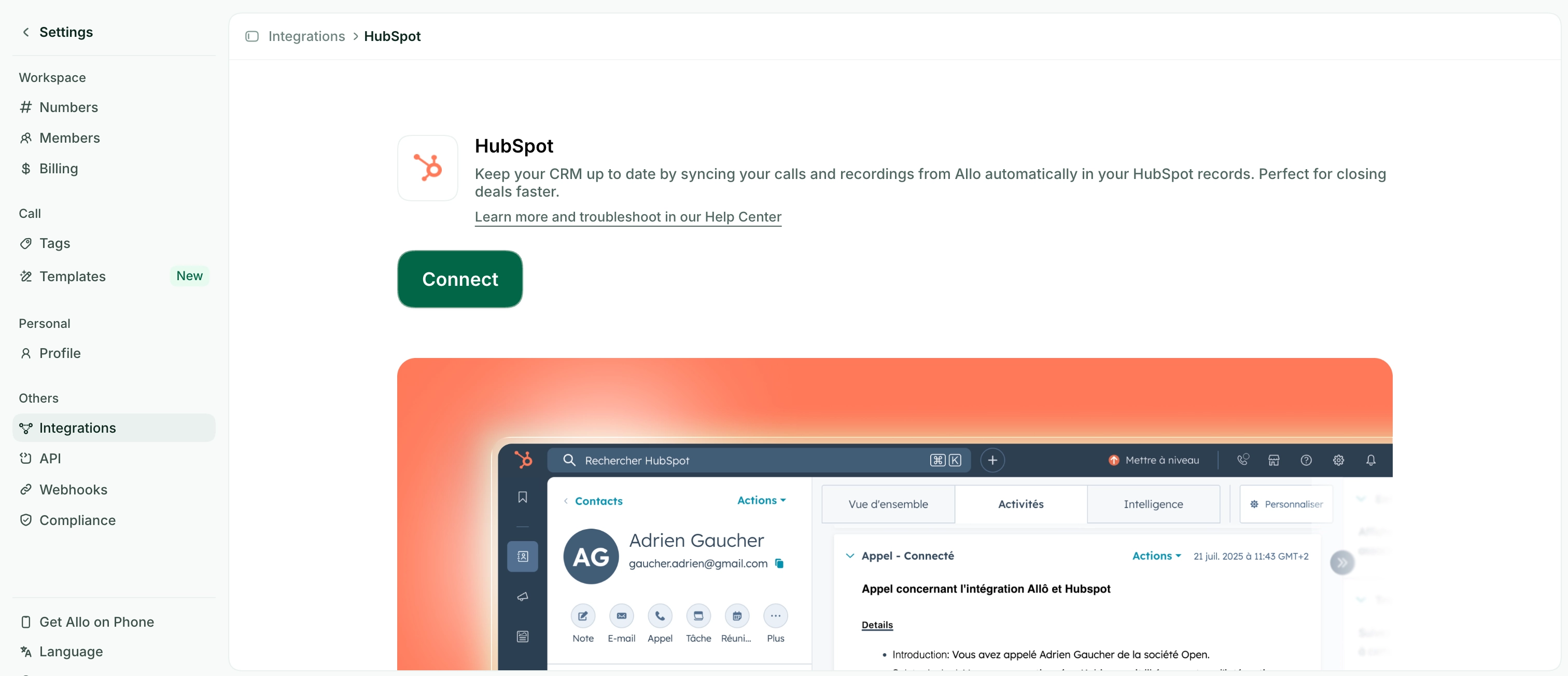
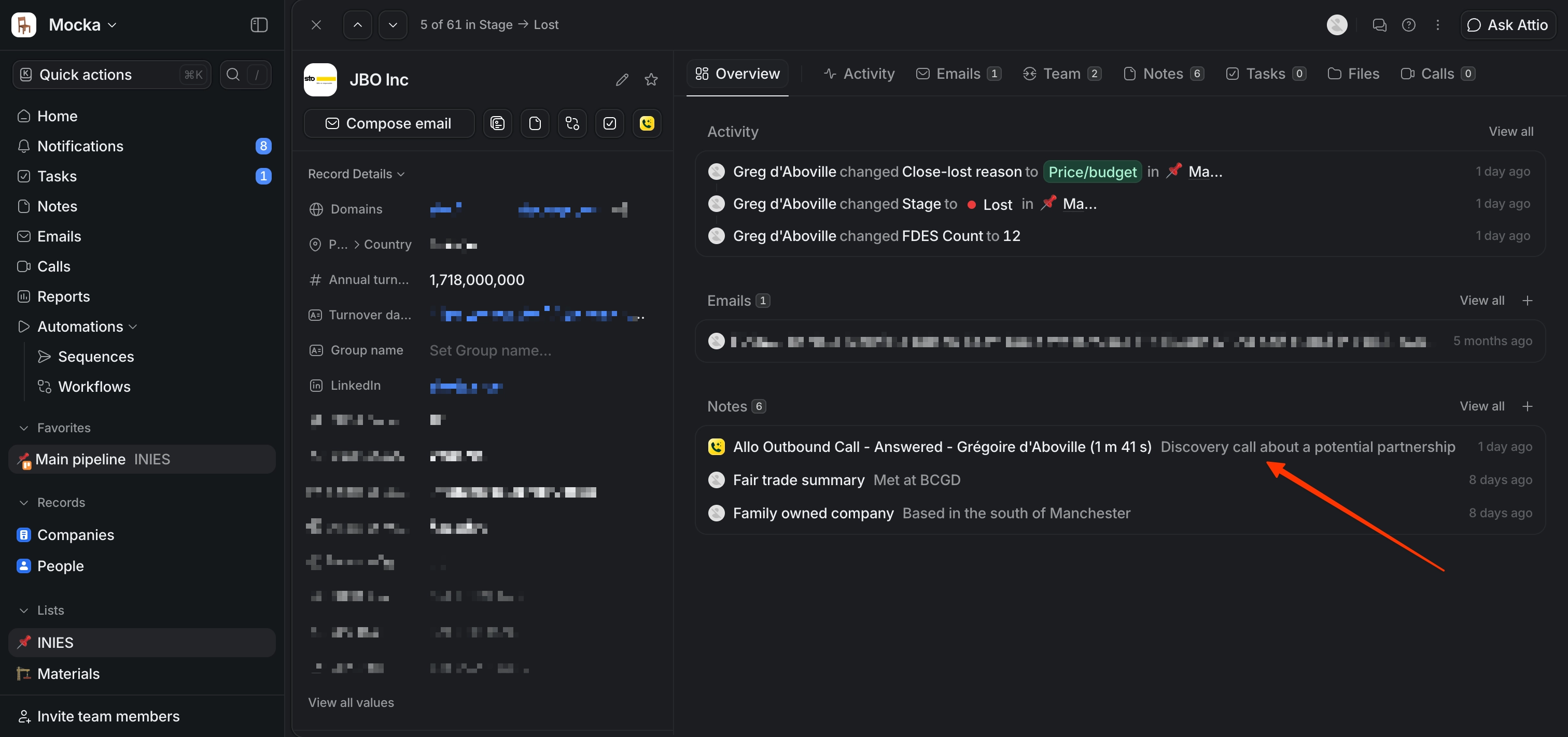
These integrations usually take only a few clicks to activate, and they're hassle-free. They log your calls in your CRM alongside transcripts, summaries, and SMS.
Better still, most of them enrich your caller ID: when someone calls, their details are pulled straight from your CRM, so you know who you're talking to before you pick up. That last part is something the other two methods rarely give you out of the box.

When to choose this option
- You don't have a tech team, or they're already buried in other work.
- You need both SMS and call data flowing into your CRM, not just one of them.
Pros
- Anyone can set it up. No technical knowledge required.
- No maintenance on your side. Your provider handles the updates.
- Enriched caller ID comes built in.
Cons
- Quality varies. Some integrations are deep and reliable; others are shallow and clearly an afterthought.
- They're often locked behind the most expensive plans.
How to make it a success
- Check the integrations listed on your provider's website. That's the best way to find the genuine native options, not the ones stitched together by a third party.
- Read the reviews when they exist. The HubSpot marketplace, for example, is refreshingly transparent and reliable for this.
- Make sure the integration covers everything you need (can it send SMS?) and that it runs deep, not just on the surface. A good test: does it sync call summaries, or only the fact that a call happened?
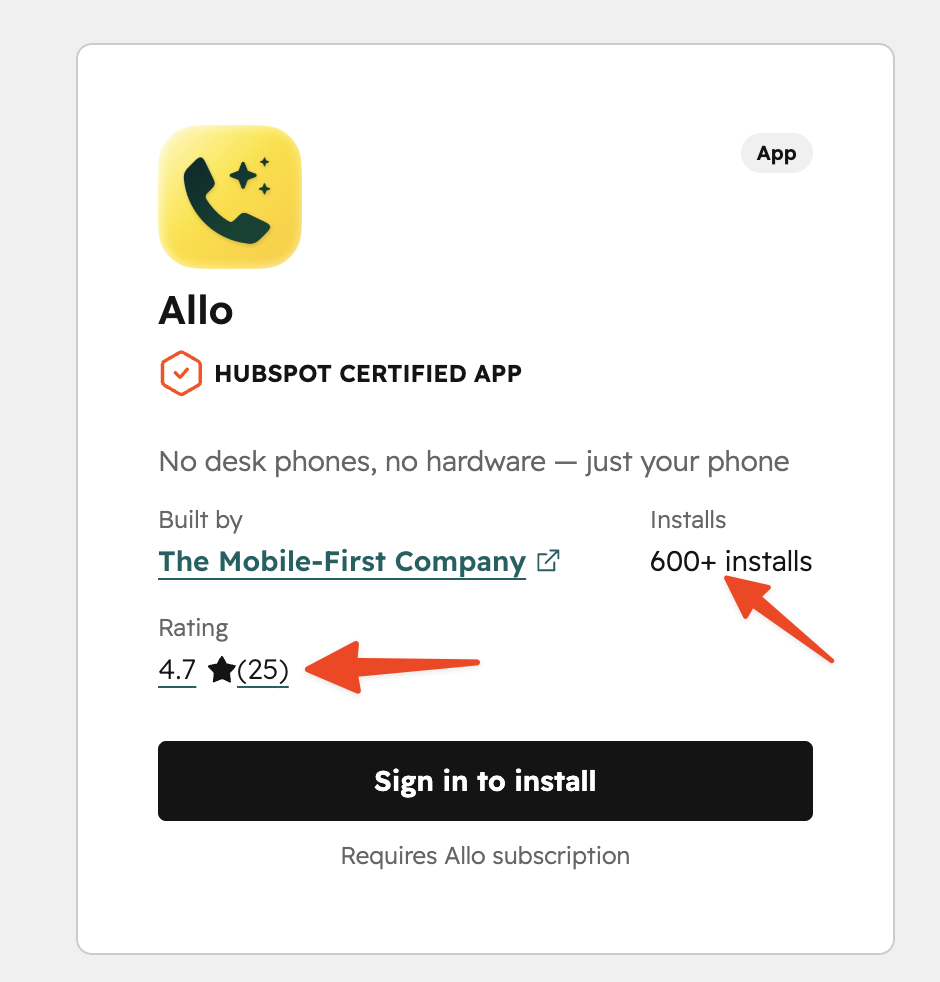
How much does it cost?
Pricing depends on the plan that unlocks the integration.
As a rough comparison:
- Allo: the CRM integrations are available on the Business plan ($32/month/user if paid yearly, $45 if paid monthly)
- Quo: integrations are available on the Business plan ($23/month/user if paid yearly, $33 if paid monthly)
- Dialpad: integrations are unlocked in the Pro plan ($25/user/month if paid yearly, $35 if paid monthly)
[[first-button]]
Using middleware (Zapier, n8n)
My personal take
Let's be straight: I wouldn't recommend this option unless you have no alternative. It can get expensive (middleware isn't free), and it's not always reliable. If you've ever had a Zap pause itself overnight because of a billing hiccup, you know exactly what I mean.
How does it work?
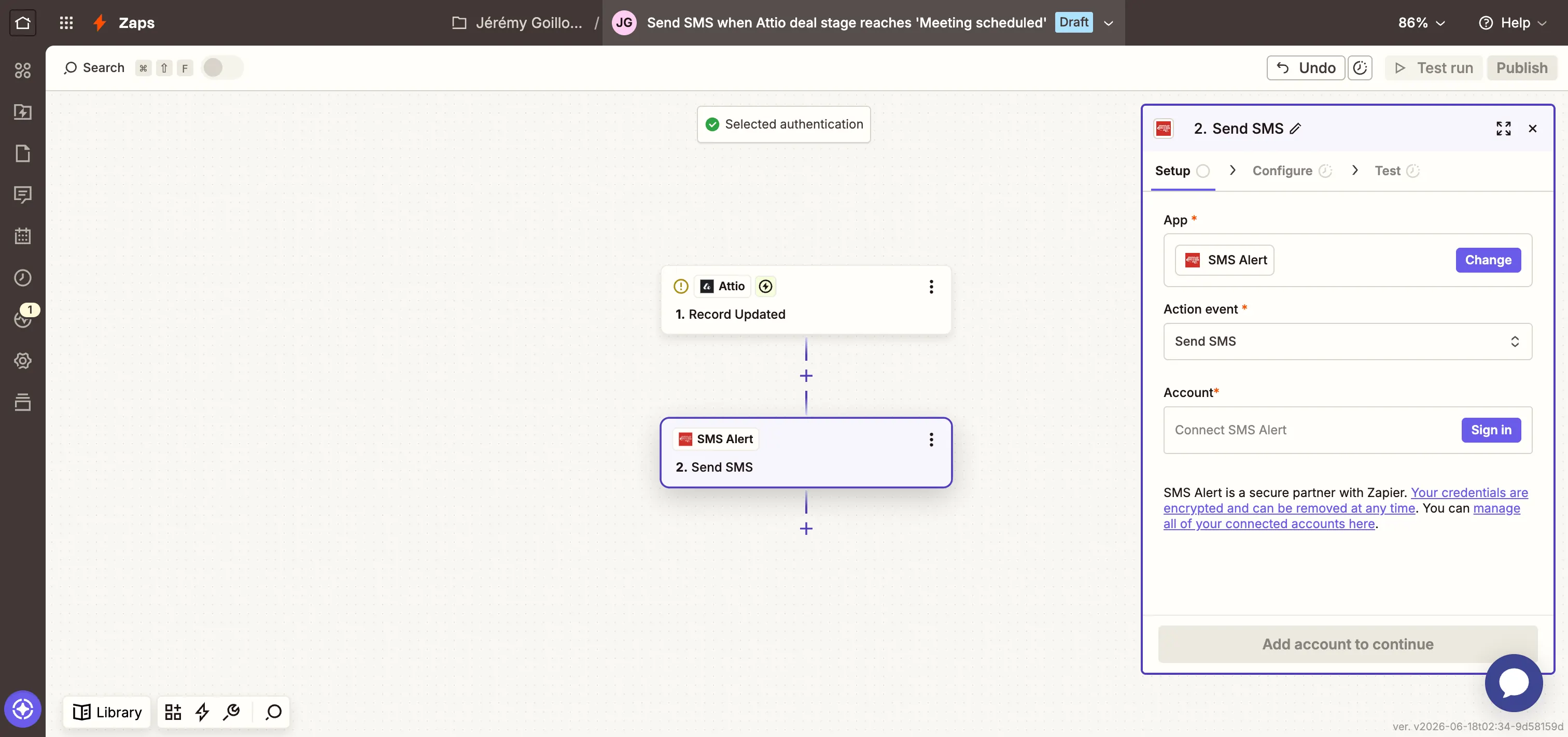
You connect your CRM to a phone system or SMS platform through a third-party tool like Zapier or n8n. The middleware sits in the middle, listening for an event on one side and pushing the result to the other.
When to choose this option
- Your CRM doesn't integrate natively, and you have no developers to build a custom connector.
- The native integration exists but misses a specific use case. A common one: triggering an SMS when a deal changes stage (for example, "Demo Booked" sends an automatic confirmation text).
Pros
- You can customize the flow exactly the way you want it.
- You can pick a tool that solves one specific job (just sending SMS, say) instead of paying for a full phone system.
Cons
- There's maintenance involved, and it lands on you.
- The sync is rarely real-time.
- It can get expensive in the long run, since most middleware charges per task or per run.
How to make it a success
Pick the right middleware for who's actually going to run it:
- Zapier is ideal for non-technical people: it's easy to use and connects to thousands of apps, but you pay for that convenience.
- If you have a bit of technical skill in-house, n8n is a solid, cheaper alternative, especially self-hosted.
How much does it cost?
Zapier starts at $19.99/month for 750 tasks (one synced call counts as a task, so the bill climbs fast at volume). n8n can be far cheaper if you self-host, but you trade that saving for setup and upkeep time.
Using an API
My personal take
This is the power-user option. It's the most flexible of the three and, in engineering time, the most expensive.
I'd only go this route if you already have developers in-house and a genuinely unusual need that neither a native integration nor middleware can cover. Remember the intro: writing it is the easy part now, but you'll be the one keeping it alive.
How does it work?
Both your CRM and your phone system expose an API, and increasingly, webhooks. You write code that listens for an event on one side (a call ends, an SMS arrives, a deal moves stage) and pushes the matching action to the other (create an activity, update a contact, send a text). You host that code, and you own it from day one.
The cleaner setups lean on webhooks, so the phone system notifies your code the instant something happens, instead of your code constantly asking "anything new yet?". A growing number of phone systems (including Allo) also expose their actions through an MCP server, which lets an AI assistant trigger them directly. Either way, the principle is the same: your integration is a small piece of software you run yourself.
When to choose this option
- No native integration exists, and middleware can't handle your logic.
- Your workflow is genuinely specific, with branching rules an off-the-shelf tool would choke on.
- You have engineering resources to build it and, just as important, to keep it running.
- Your volume is high enough that per-task middleware pricing has become absurd.
Pros
- Total control. You build exactly the data model and logic you want.
- No per-task fees. Once it's built, you own it.
- Real-time sync is achievable with webhooks.
- It scales cleanly at high volume, where middleware costs would spiral.
Cons
- You need developers, both to build it and to be on call when it breaks.
- All the maintenance is yours. When an API changes, your integration breaks, and nobody else is going to fix it.
- There's real upfront build time before you see any value.
- You're handling call recordings and personal contact data, so security and compliance are on you too.
How to make it a success
- Read both APIs before you commit. Confirm they actually expose what you need (transcripts? SMS? webhooks or only polling?) and check the rate limits.
- Prefer webhooks over polling. It's more reliable and far kinder to your rate limits.
- Budget for maintenance, not just the build. The build is a one-off; the upkeep is forever.
- Document it properly. A custom integration that only one developer understands becomes a liability the day that person leaves.
How much does it cost?
There's no sticker price; the cost is developer time. Budget for an initial build plus ongoing maintenance, and remember the second number never goes to zero.
Benefits of connecting your CRM with your phone system
Whichever option you pick, the payoff is the same, and it's bigger than it first looks.
The most obvious win is that every call and text gets logged automatically. Reps hate manual data entry, so when it's left to them, your CRM ends up half-empty and you can't trust a single report built on it. Automatic logging fixes that at the source.
It also gives your team full context before they even say hello. With enriched caller ID, the contact's name, company, and recent history surface the moment the phone rings. No more scrambling through tabs while someone waits on the line.
Follow-up gets sharper too. Once the two systems talk, you can fire an SMS off a CRM stage change, confirm a booked demo, or nudge a quiet deal, all without anyone lifting a finger.
Managers feel it as well. When calls, transcripts, and texts all land in one place, reporting finally reflects what's actually happening, and coaching stops being guesswork.
And there's a quieter benefit: a single source of truth. When the phone system and the CRM agree, onboarding a new rep or handing off an account stops being a treasure hunt through scattered notes.
Conclusion
There's no universally "best" way to connect your CRM and your phone system, only the one that fits your team. To recap:
- Native integration: the right call for most companies. Easiest to set up, maintained for you, and the only option that reliably gives you enriched caller ID. Start here.
- Middleware: reach for it to patch one specific gap a native integration leaves open, not as your foundation. Convenient, but watch the recurring cost and the lack of real-time sync.
- Custom API build: worth it only when you have in-house developers and a need nothing off the shelf can meet. Maximum control, maximum maintenance.
My take hasn't changed since the first line: just because LLMs make it easy to write an integration doesn't mean you should own one. For most teams, native wins. Build custom only when you've genuinely run out of better options.
FAQ
[[faq-blog]]
What's the best way to connect my CRM with a phone system?
For most teams, a native integration is the best way. It takes a few clicks, your provider keeps it running, and it usually includes enriched caller ID that the other methods don't. Reach for middleware or a custom API build only when a native option doesn't exist or can't handle your specific workflow.
How much does it cost to connect my phone system and my CRM?
It depends on the method. Native integrations are typically bundled into a higher plan of your phone system (expect $30-45/user/month). Middleware like Zapier starts around $19.99/month for 750 tasks and scales with volume. A custom API build has no fixed price; you pay in developer time, both to build it and to maintain it.
Is it possible to send SMS from a CRM?
Yes. Many native integrations let you send and log SMS straight from the CRM, and you can even trigger texts automatically from a stage change, like a confirmation when a demo is booked. If your CRM doesn't support it natively, a middleware tool such as Zapier or a custom API build can add it. Just confirm SMS is covered before you commit, since not every integration includes it.
.jpg)