Main takeaways
- Call routing software helps you make sure your prospects and clients are connected to the best possible agent in the minimum amount of time.
- The most advanced options let you choose between different type of routing (cascade, round robin, idle time or simultaneous).
- Allo is the best pick for small teams that want simple, effective call routing with an AI receptionist included at no extra cost. Google Voice works well if you just need basic call forwarding on a budget, though it lacks advanced routing options. Dialpad stands out for mid-sized teams that want flexible routing rules combined with strong AI features.
Introduction
Your best salesperson just missed a call from a prospect ready to sign.
Why? The call rang on the wrong desk.
Meanwhile, three other team members were free, scrolling through Slack.
That's not a people problem. That's a routing problem. And it's exactly the kind of thing call routing software is built to fix.
In this guide, we'll explain how call routing works, the different types available, and compare the best call routing solutions on the market so you can pick the right one for your team.
| Solution | Starting Price | Best For | G2 Rating |
|---|---|---|---|
| Allo | $25/mo AI receptionist included on Business | Small teams wanting straightforward routing with an AI receptionist built in. AI-first | 4.6 / 5 |
| Google Voice | $10/user/mo | Google Workspace teams needing basic call forwarding. Google Workspace | 4.1 / 5 |
| Dialpad | $27/user/mo | Mid-sized teams needing flexible routing rules and AI features. Flexible routing | 4.4 / 5 |
| CloudTalk | $27/user/mo | International teams needing local numbers across 160+ countries. Global coverage | 4.4 / 5 |
| Aircall | $40/user/mo 3-license minimum | Mature teams prioritizing deep CRM integrations. CRM integrations | 4.4 / 5 |
| Nextiva | $23/user/mo | Large US teams wanting a unified voice, video, chat and SMS platform. Unified comms | 4.5 / 5 |
What is call routing, and how does it work?
Call routing definition
Call routing software automatically directs incoming calls to the right person or team based on rules you define. Instead of every call hitting a single phone and hoping someone picks up, the system follows a logic you set: ring this person first, then that team, then send to voicemail.
Think of it as a traffic controller for your phone lines. It decides who gets the call, when, and what happens if nobody answers.
Most modern call routing runs through cloud-based VoIP phone systems. You configure your rules from a dashboard or app, and the system handles everything from there, no hardware required.
Call routing vs. call forwarding
These two terms get mixed up a lot, but they're not the same thing:
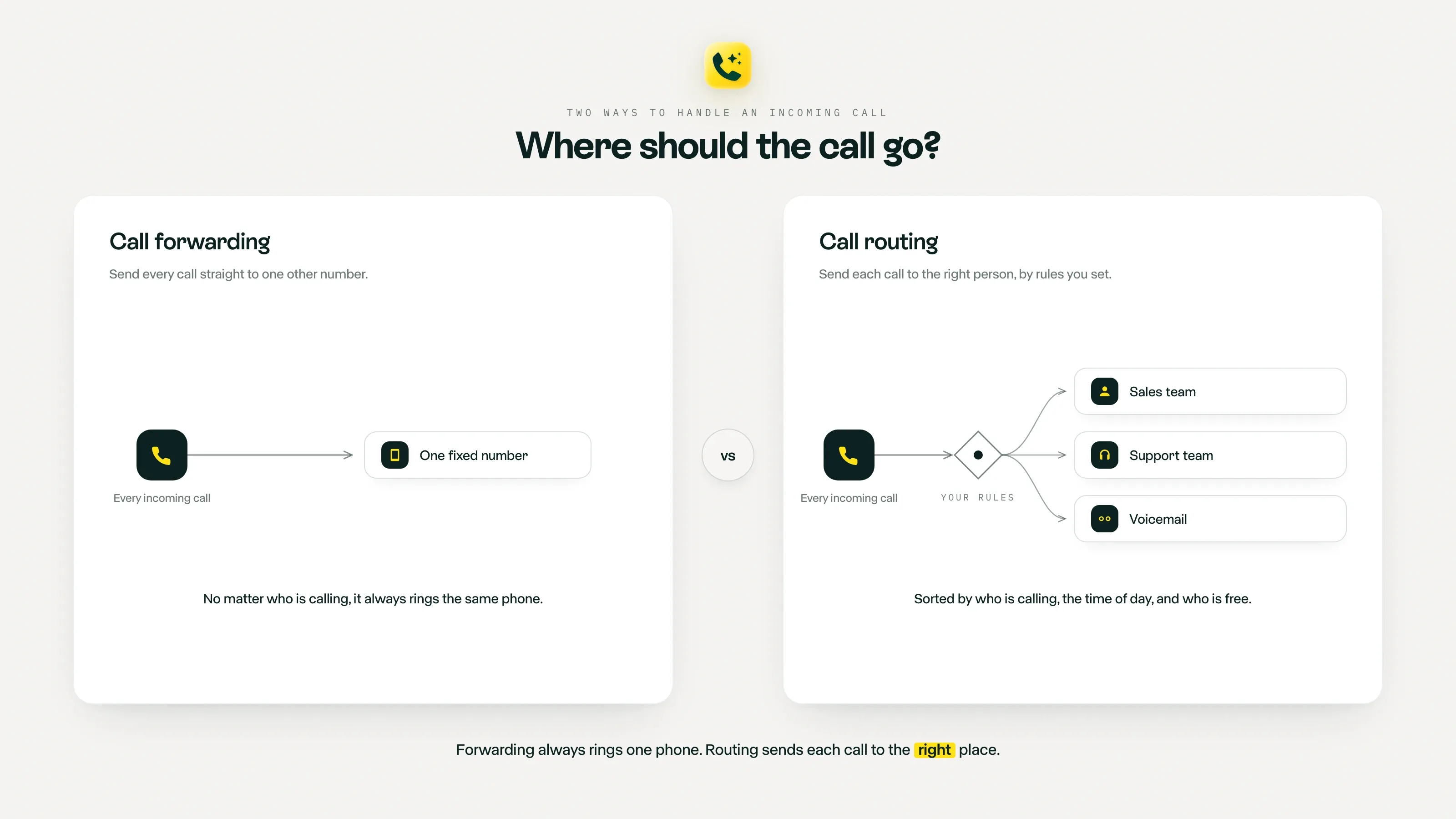
- Call forwarding is simple redirection. A call comes in on number A, and it gets sent to number B. One rule, one destination. It's useful if you want your office number to ring on your mobile when you're out, but that's about it.
- Call routing is a more sophisticated system. It can evaluate multiple conditions (time of day, caller's location, agent availability, skills) and distribute calls across a team based on the logic you define. It can also chain actions: ring three agents, then play a message, then send to an AI receptionist.
In short, call forwarding is one arrow pointing somewhere else. Call routing is an entire decision tree.
If you just need to redirect calls to your personal phone, check out our guide on call forwarding services.
For anything more complex, keep reading.
The different types of call routing
Not all routing strategies work the same way. Here are the main ones you'll encounter:
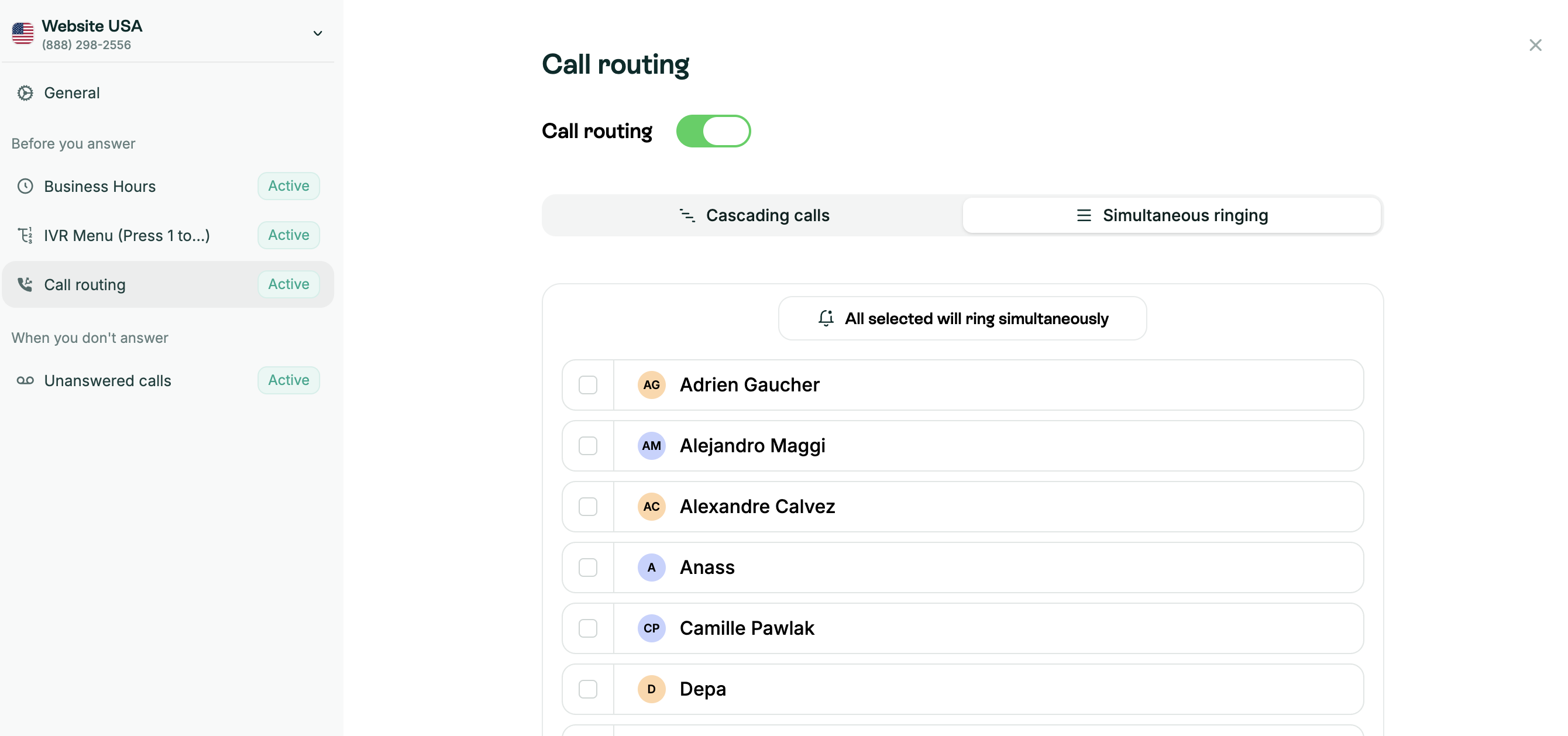
- Simultaneous ring. Every team member's phone rings at the same time. The first person to pick up gets the call. It maximizes your chances of answering quickly, which is perfect for small teams where speed matters more than even distribution.
- Fixed order routing (cascade routing). Calls go to agents in a set sequence. Agent 1 rings first; if they don't pick up after a delay, it moves to Agent 2, then Agent 3, and so on. This works well when you have a clear hierarchy, like a lead salesperson who should always get first crack at incoming calls.
- Round-robin routing. Calls are distributed evenly across the team. Agent 1 gets the first call, Agent 2 the second, and so on in a cycle. It keeps workloads balanced and prevents one person from handling everything while others sit idle. Great for sales teams where fairness in lead distribution matters.
- Idle time routing (longest idle). Each new call goes to the agent who has been free the longest. It's similar to round robin but smarter: instead of following a fixed cycle, it accounts for actual availability. This is the go-to for busy teams where call durations vary a lot.
- Skills-based routing. The system matches callers to the agent with the right expertise. A Spanish-speaking caller gets routed to a bilingual agent. A technical question goes to your support engineer. This requires tagging agents with skills in your system, but it reduces transfers and speeds up resolution. It's ideal for support teams handling varied requests.
Which one should you pick? It depends on your team and priorities.
| Routing type | Best for | Trade-off |
|---|---|---|
| Fixed order | Teams with a clear hierarchy (e.g., lead salesperson takes priority) | First agent can get overwhelmed |
| Skills-based | Support teams handling varied, specialized requests | Requires initial setup and agent tagging |
| Round robin | Sales teams that need fair lead distribution | Doesn't account for who's actually free |
| Idle time | Busy teams with uneven call durations | May route to less experienced agents |
| Simultaneous ring | Small teams where answering fast is the top priority | No control over who picks up |
AI call routing
Intelligent call routing is changing the game in two important ways:
- AI-powered IVR. Traditional IVR menus ("Press 1 for sales, press 2 for support") force callers into rigid paths. An AI IVR can understand what callers actually say and route them accordingly. Instead of pressing buttons, the caller says "I need help with my invoice" and the system sends them to the billing team. It's faster, less frustrating, and reduces misrouted calls.
- AI receptionist. When nobody on your team is available, an AI receptionist can step in. It can greet callers, answer common questions, take messages, and even book appointments. This means your business never truly goes silent, even after hours. For small teams that can't afford to staff a front desk around the clock, this is a significant upgrade over a basic voicemail box.
Now, let's look at the best options on the market.
Best call routing software
How to pick one
Before diving into specific tools, here are the key factors to evaluate:
- Flexibility of routing rules. Some tools only offer basic forwarding. Others let you build multi-step flows with cascading rules, time-based conditions, and fallback destinations. Make sure the system supports the routing type your team actually needs.
- AI features. An AI IVR or AI receptionist can make a real difference, especially for small teams. It's the difference between a missed call turning into a voicemail and that same call turning into a booked meeting. Check whether AI is included in your plan or billed as an add-on.
- Pricing. Look beyond the headline number. Some providers charge per user, others add fees for features like call recording, analytics, or AI. Watch out for minimum license requirements that inflate the cost for small teams.
- Integrations. If your team lives in HubSpot, Salesforce, or Pipedrive, your phone system should sync with your CRM. Otherwise you're stuck logging calls manually.
- What are your actual needs? Be honest about what you need. If all you want is basic call forwarding to your mobile, a full-blown cloud PBX might be overkill. If you're running a sales team, you'll want routing, recording, and CRM integration at a minimum.
Important note: the call routing options listed below depend on the plan you pick. For this comparison, we chose the "regular" plans, not the plans dedicated to call centers.
Allo, best for small teams
What is Allo?
Disclaimer: Allo is our own product.
Allo was created in 2024 as a mobile-first AI phone system for small teams and salespeople. It's built around the idea that your business phone should be as easy to use as your personal one, with AI doing the heavy lifting when you can't pick up.
Why Allo is a good choice for call routing
Allo keeps routing simple without sacrificing flexibility. You get two routing strategies (cascade and simultaneous ring), an AI receptionist that handles calls when nobody answers, and the ability to share one phone number across your whole team, so you don't need to buy a separate line for each person.
The AI receptionist is included in the Business plan at no extra charge. It speaks English, French, and Spanish, and can take messages, answer questions, book appointments and interact with callers on your behalf. No per-minute billing, no add-ons.
Pros
- AI receptionist included (no add-on fees)
- Strong CRM integrations (HubSpot rated 5/5 on the marketplace)
- Transparent pricing with no hidden costs
- Share one number across your team
- Cancel anytime from the app, no questions asked
Cons
- No power dialer
- May not suit large enterprises with complex workflows
- Call routing requires the Business plan ($45/user/month)
How call routing works in Allo
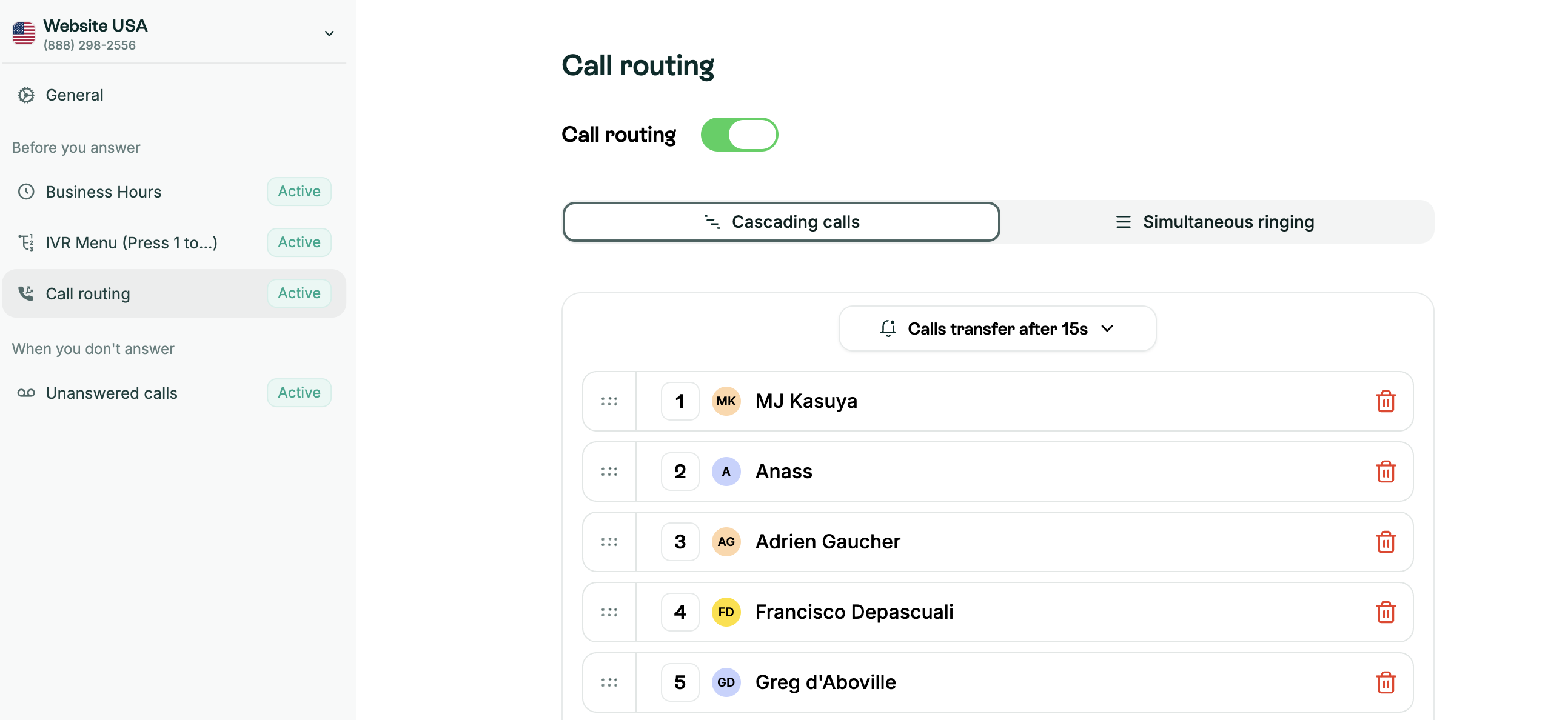
Allo offers two routing modes on the Business plan:
- Cascading calls. It rings team members in the order you set, with a custom delay between each. If nobody picks up, the call is sent to the AI receptionist.
- Simultaneous ring. Every team member's phone rings at the same time. Again, the AI receptionist is the fallback if no one answers.
You don't need a separate phone number for each team member. Allo lets you share one number across your team, which keeps things clean and reduces costs.
Allo pricing
Allo offers two plans:
- Starter: $25/month - 1 user max. Includes unlimited calls, a local phone number, AI summaries, IVR.
- Business: $45/month per user. Includes integrations, unlimited AI answering service, SMS and international calls.
Both plans include a 7-day free trial.
You'll need the Business plan to use call routing.
Allo demo video
Google Voice, best for basic call forwarding
What is Google Voice?
Google Voice is Google's phone system, launched in 2009. It's extremely popular among consumers because the personal version is free. For businesses, it integrates tightly with Google Workspace but stays deliberately simple: there are almost no third-party integrations and very few AI features.
Why Google Voice is a good choice for call routing
Honestly, Google Voice is not a great choice for call routing specifically. On the Starter plan, it only supports basic call forwarding, not true call routing. You can redirect calls to another device, send them to voicemail, or forward to another number, but you can't set up ring groups, cascade routing, or skills-based distribution.
That said, if your needs are genuinely simple (forward calls to your cell when you're away from your desk) and you're already paying for Google Workspace, it's hard to beat the price.
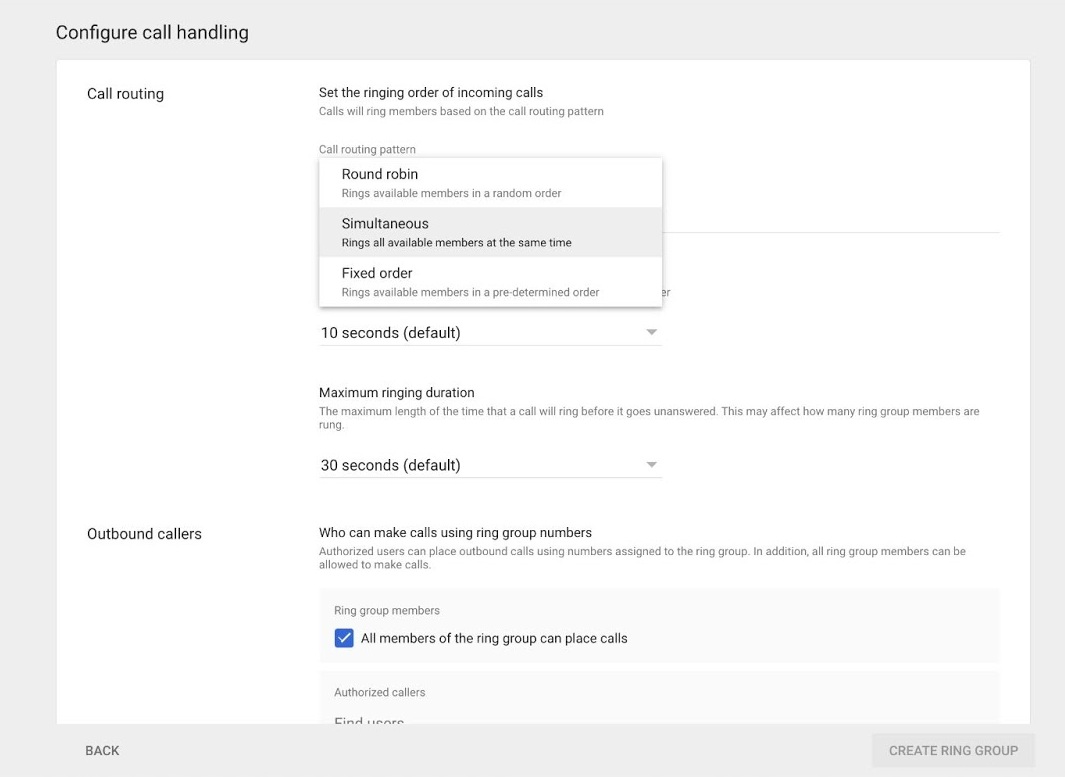
If you're ready to invest in the Standard or Premier plans, you will unlock ring groups and will access three call routing options: round robin, simultaneous, or fixed order.
Pros
- Free for personal use
- Very affordable for business ($10–$30/user/month)
- Unlimited domestic calls in the US and Canada
- Clean, simple interface
Cons
- No real call routing (forwarding only)
- Requires Google Workspace subscription for business
- No CRM integrations
- No customer support on the free plan
- Limited to the US and parts of Canada for local numbers
How call routing works in Google Voice
Google Voice supports call forwarding, not full call routing. You can customize rules per contact or for anonymous callers, choosing between ringing another device, redirecting to voicemail, or forwarding to a specific phone number.
True call routing (with ring groups and distribution rules) is only available on the Standard plan ($20/user/month), and even then, the options are limited compared to dedicated phone systems.
Google Voice pricing
If you're not paying for Google Workspace, you can only access the Starter plan ($10/user/month). It works for one user only, and includes unlimited domestic calling, unlimited US texting, and voicemail transcription.
If you're a Google Workspace subscriber, there are three plans available you can choose from:
- Starter ($10/user/month). Up to 10 users and works in 14 countries.
- Standard ($20/user/month). Same features plus an unlimited number of users, on-demand call recording, and call routing.
- Premier ($30/user/month). Includes automatic call recording and advanced reporting of voice activity with BigQuery.
Google Voice demo video
Dialpad, best for mid-size teams
What is Dialpad?
Dialpad was founded in 2011 by Craig Walker, who previously created GrandCentral (which Google acquired and turned into Google Voice). The company offers three products: Connect (general phone system), Support (for support teams), and Sell (for sales teams).
Why Dialpad is a good choice for call routing
Dialpad offers the widest variety of routing types among all the tools in this list.
AI is included in all plans for free, which is rare. Their call summaries, live coaching, and transcription work across 9 languages.
Pros
- Four routing types (fixed order, round robin, idle time, simultaneous)
- AI included in all plans (proprietary model)
- 9 languages supported for AI features
- 50+ countries for local numbers
Cons
- Call quality issues reported by some users
- Steep learning curve
- Support can be slow
- SMS approval process can be bumpy
How call routing works in Dialpad
Dialpad lets you set routing rules at the department level. Each department can use a different strategy:
- Fixed order: calls ring agents in a set sequence.
- Round robin: calls rotate evenly.
- Idle time: calls go to the longest-idle agent.
- Simultaneous: all agents ring at once.
If no one picks up, Dialpad can forward the call to voicemail, another department, another team member, or an automated menu. You can also create call forwarding rules on top of your routing setup.
The Standard plan ($27/user/month) includes up to 3 departments. The Pro plan ($35/user/month) expands that to 25.
Dialpad pricing
Dialpad Connect comes with two plans:
- Standard: $27/user/month. Includes unlimited calling (your country, the US, and Canada), a local number, call forwarding, call recording, and up to 3 departments.
- Pro: $35. Includes SSO, phone support, and up to 25 departments.
Dialpad demo video
CloudTalk, best for international teams
What is CloudTalk?
CloudTalk is a phone system founded in 2016. It targets sales and support teams, including call centers, and boasts 4,000 customers across 100 countries.
Why CloudTalk is a good choice for call routing
CloudTalk includes ring groups from its entry-level plan, which makes it accessible even on a budget. You get four routing strategies (ring all, round robin, random, and least recent) and local numbers in 160+ countries, the widest coverage in this list. If your team handles a lot of international calls, CloudTalk is worth a close look.
They've also launched an AI voice agent that supports both inbound and outbound calls, though it's billed separately.
Pros
- Ring groups included from the entry-level plan ($27/user/month)
- 160+ countries for local numbers
- Clean UI, easy to learn
- Automatic local number switching for international calls
Cons
- Call quality issues reported
- Customer support can be slow
- AI voice agent billed separately
- No integrations on the Lite plan
How call routing works in CloudTalk
Routing rules in CloudTalk are defined at the ring group level. Each ring group can use one of four strategies:
- Ring All: every agent in the group rings simultaneously.
- Round Robin: calls go to agents one at a time in sequence.
- Random: a random available agent gets the call.
- Least Recent: calls go to the agent who hasn't answered one in the longest time within that group.
Ring groups are included starting from the Lite plan ($27/user/month), but integrations require the Essential plan ($39/user/month).
CloudTalk pricing
- Lite: $27/user/month. Unlimited domestic calls, local numbers (160+ countries), ring groups.
- Essential: $39/user/month. Business hours, IVR, integrations.
- Expert: $69/user/month (min. 3 licenses). Power dialer, live monitoring, WhatsApp.
14-day free trial, no credit card required. AI voice agents are billed separately.
CloudTalk demo video
Aircall, best for mature teams
What is Aircall?
Aircall started in Paris in 2014 as a way to challenge traditional, hardware-heavy phone systems. They quickly pivoted to focus on CRM integrations, realizing that a well-connected phone system was what businesses actually needed.
Why Aircall is a good choice for call routing
Aircall has strong routing capabilities combined with excellent CRM integrations. They support random, simultaneous, and longest-idle routing, and their native integrations with Salesforce, HubSpot, and Zendesk are among the deepest in the market.
If you're a mid-sized team that relies heavily on CRM workflows, Aircall's integration depth is its main selling point.
Pros
- Deep CRM integrations (Salesforce, HubSpot, Zendesk)
- 38 countries for local numbers
- Recognized, trusted brand
- Call monitoring (listen, whisper, barge)
Cons
- 3-license minimum ($120/month floor)
- AI limited to English and French
- Many features are paid add-ons (AI, WhatsApp, analytics)
- Support quality can be inconsistent, especially for smaller teams
How call routing works in Aircall
Aircall supports three routing strategies:
- Random: selects a random available agent. Busy agents are added back to the pool if they become free before the queue time ends. Each agent rings for 25 seconds.
- Simultaneous: all available agents ring at the same time.
- Longest idle: rings the agent who has been idle the longest for 25 seconds, then moves to the next.
If nobody picks up, Aircall waits for busy agents to become available before the queuing time ends, which reduces missed calls.
Routing is available starting from the Essentials plan ($40/user/month).
Aircall pricing
Aircall offers two plans:
- Essentials: $40/user/month (min. 3 licenses). Local number, unlimited US/CA calls, IVR, call recording, SMS.
- Professional: $70/user/month (min. 3 licenses). Advanced analytics, power dialer, voicemail drop.
7-day free trial.
For a deeper dive, check our Aircall pricing breakdown.
Aircall demo video
Nextiva, best for large teams
What is Nextiva?
Nextiva was founded in 2008 in Scottsdale, Arizona. Their mission was to make every business, regardless of size, operate like a Fortune 500 company. They offer a unified communications platform that combines voice, video, team chat, SMS, and even light CRM tools in one place.
Why Nextiva is a good choice for call routing
Nextiva supports both simultaneous and sequential ring with priority ordering, plus overflow options when no one answers. It's a solid fit for larger, US-based teams that want voice, video, and messaging under one roof.
They also offer an AI receptionist (XBert) and an AI IVR, though both come at a steep premium. XBert costs $99/month for 100 interactions, then $0.99 per additional interaction. The AI IVR requires a custom quote.
Pros
- Unified platform (voice, video, chat, SMS)
- Affordable entry price ($23/user/month)
- Strong reviews (4.8/5 on Trustpilot)
- Webinar and online fax capabilities
Cons
- US-only coverage for local numbers
- AI features are expensive add-ons
- HubSpot integration requires a Windows computer
- Cancellation involves phone or email, with reported friction
How call routing works in Nextiva
Nextiva offers two main routing options:
- Ring everyone at once: all available agents ring simultaneously.
- Ring users one at a time: agents ring sequentially based on a priority order you define.
When no one answers within a specified time, you can forward the call to another number, a specific user, or voicemail. Overflow rules let you define a fallback destination for peak times.
Call routing is included from the Core plan ($23/user/month), but advanced features like AI transcription and intelligent routing require the Power Suite CX plan ($75/user/month).
Nextiva pricing
Nextiva offers three plans:
- Core: $23/user/month. Phone number, SMS, video, call routing, team chat.
- Engage: $50/user/month. Advanced reporting, web chat, toll-free number.
- Power Suite CX: $75/user/month (up to 100 agents). AI transcription, intelligent routing, call scoring.
AI Receptionist (XBert) is billed $99/month per 100 interactions.
We also wrote a guide on the top Nextiva alternatives.
Nextiva demo video
Nextiva gates their demos behind a sales process. You can request one on their website.
Frequently asked questions about call routing solutions
What is call routing software?
Call routing software is a system that automatically directs incoming phone calls to the right person, team, or department based on rules you configure. These rules can account for agent availability, caller needs, time of day, or skills. It runs through cloud-based VoIP platforms and replaces the need for a receptionist or manual call transfers.
What is an example of call routing?
A sales team uses simultaneous ring so that when a prospect calls, every available rep's phone rings at the same time. The first rep to answer takes the call. If nobody picks up within 20 seconds, the call is forwarded to an AI receptionist that takes a message and books a callback.
What is another name for call routing?
Call routing is also known as automatic call distribution (ACD), call flow management, or intelligent call routing. In simpler setups, people sometimes call it call forwarding, though technically forwarding is just one type of routing.
Which technology is commonly used for call routing?
Most call routing today runs on VoIP (Voice over Internet Protocol) technology through cloud-based phone systems. These systems use SIP (Session Initiation Protocol) to manage calls over the internet. Many providers also layer AI on top for features like natural-language IVR menus and automated call distribution.
Are call routing and call forwarding the same?
No, they are not the same. While both manage incoming phone calls, they serve different purposes: Call Forwarding: Redirects all incoming calls from one specific phone number straight to another designated number or voicemail. It is a simple, linear redirect (e.g., forwarding your office phone to your cell phone while traveling). Call Routing: A more complex, automated system that distributes incoming calls to different destinations based on pre-set rules (e.g., time of day, language preference, caller ID, or department selected on a menu).